5 best Android apps you must try in November 2025

Aadil Raval
7 Min Read
Highlights
  • Google Play Store currently has more than 3 million apps and counting.
  • It makes it dreadful and strenuous to find apps that can really do wonders apart from the usual apps listed on the front page of the play store.
  • We have here is a curated pack of 5 best Android apps that you should consider trying this month.

Your Google Play Store has 3Mn+ apps and counting, making it impossible to try the goldmines and best Android apps out there. Yes, you could be using the top 10 best apps out there, but trust me, the Play Store has apps for everything imaginable and beyond. 

At True-Tech, we compile our picks for the 5 best Android apps available, offering our users the best options to try. From boosting productivity to utility apps, from customizing your phone to saving cost on cabs and Uber, we have our picks for some of the best apps on Android that you should try.

5 best Android apps you must try in November 2025

Well, let’s take a deeper dive into our listicle.

NoVolume

Category: Utility

NoVolume
Image Credits: NoVolume, via Google Play Store

Volume buttons and settings look almost the same, no matter what make and model of phone you choose. NoVolume is an app that brings about certain changes to the look and feel of the volume rockers that feel more welcoming than ever. 

Unlike the regular volume UI, NoVolume adds a circular scroll for volume settings with granular controls. It means if you want to place the rocker at 27%, it will stay at 27%, no more, no less. You can customize the size of the scroll, color, and font as well, making it much more intuitive. It even has a transparency mode included. Moreover, it’s free to use, but there’s a premium version, just in case you love it so much.

Download: NoVolume

Senior Home Launcher

Category: Utility
Senior home Launcher
Image Credits: Senior home Launcher, via Google Play Store

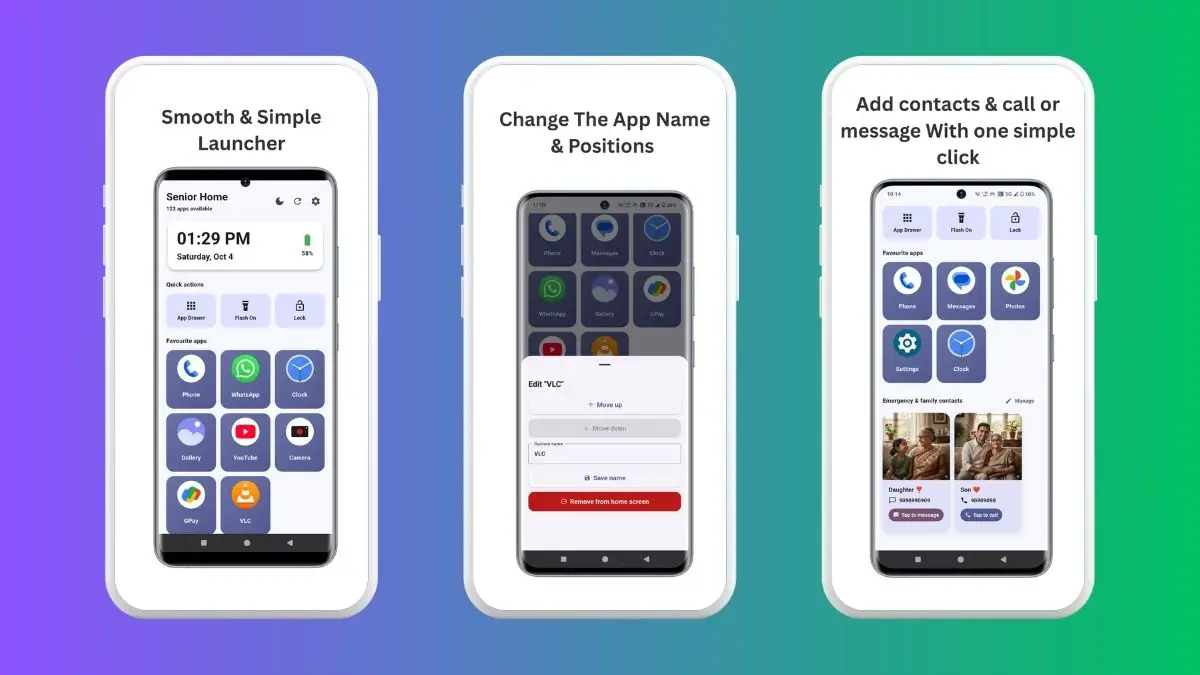
There are literally ‘n’ number of launchers on the Play Store that people love. But when you want something as minimalistic as possible, choose Senior Home Launcher. I would use this on my mother’s device as it makes way for all important stuff right in front of the user. It means no more squinting as the icons are large enough, there’s a big clock and date widget, one-tap call or message (you name it). 

There’s also a dedicated flashlight button, a utility that I often use when it’s pitch dark in my room at night. Although I would say this app is great for seniors and new users, I wouldn’t deny that it is great for all user types. I mean, my phone is usually cluttered with apps and countless options to choose from, but the Senior Home Launcher reorganizes everything in a simple manner, benefiting those who love simplicity.

Download: Senior Home Launcher

ComposePDF Pro

Category: PDF Maker
ComposePDF Pro
Image Credits: ComposePDF Pro, via Google Play Store

Trust me or not, but our daily lives revolve around PDFs. Whether it’s your CV or documents, corporate decks, and other documents, to name a few. This also means you need PDF applications or websites to carry out tasks such as converting other formats to PDF, combining multiple PDF documents into one, and even converting a PDF to an image. 

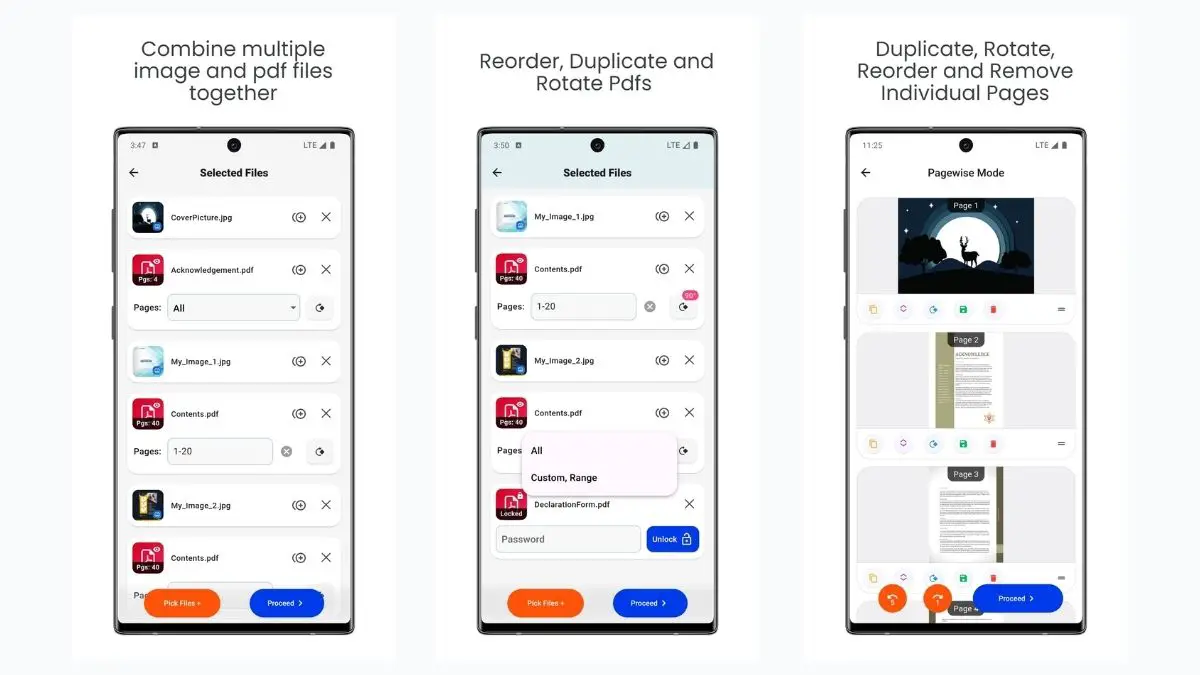
Of course, there are plenty of websites that can do the job; however, ComposePDF Pro is an app that sits on your phone without taking up much space and requires no internet. It lets you work with PDFs, anytime, anywhere, and with no watermarks whatsoever. It is like an app that seems too good to be true — and it is. The app has features including reorganizing PDF pages, rotating pages, compressing PDFs, password protecting, and the list goes on. Well, if your work involves more PDFs, you should try ComposePDF Pro right away.

Download: ComposePDF Pro

Hackney

Download: Sky Scanner for Ride Sharing
Hackney
Image Credits: Hackney, via Google Play Store

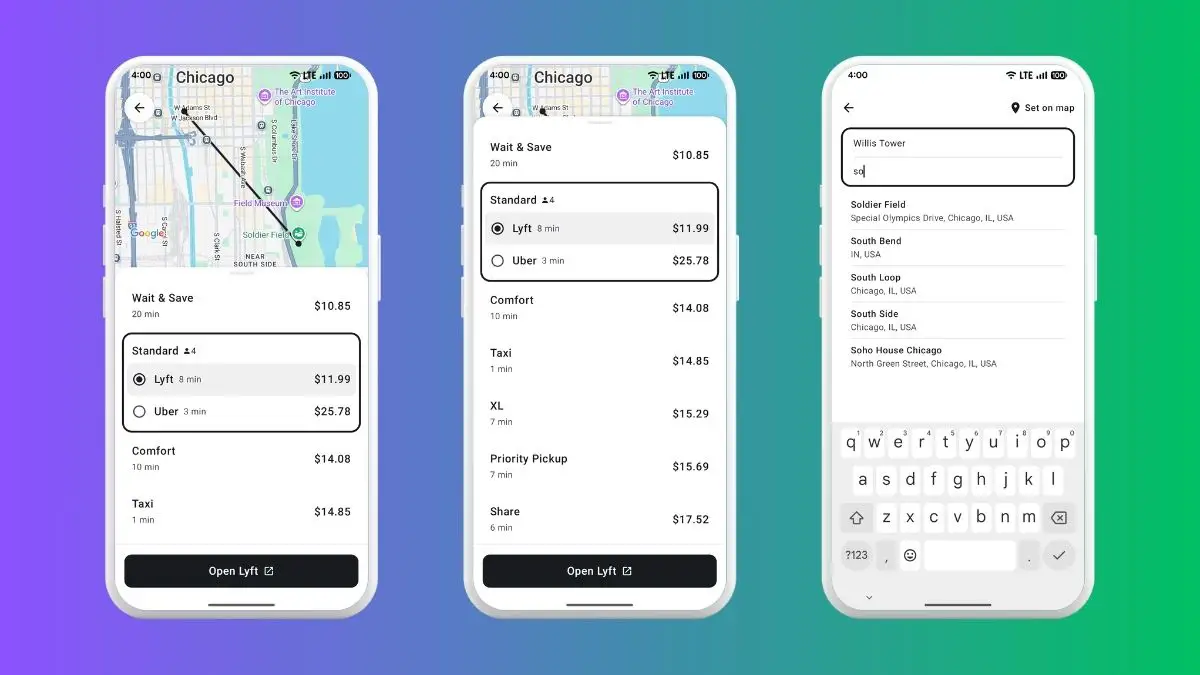
Do you use multiple ride-sharing apps to compare prices? I mean, it’s always true that there’s surge pricing, and one app will charge you more for the same journey compared to the other. Well, if that’s your case, Hackney is an app for you. No more opening and switching between multiple ride-sharing apps like Uber and Lyft, because Hackney does that for you. It allows you to check out the cost of travel, avoid surge pricing, and save up to 20% on these cab services. 

The only downside I see here is that the app is still new and thus may show some errors. Moreover, it is limited to Uber and Lyft and available in just a few countries. Since we are on the lookout for the best Android apps to try this month, and our readers can be from all corners of the world, if you live in the US and other supporting countries, try Hackney.

Download: Hackney

Super Status Bar

Category: Customized Status Bar
Super Status Bar
Image Credits: Super Status Bar, via Google Play Store

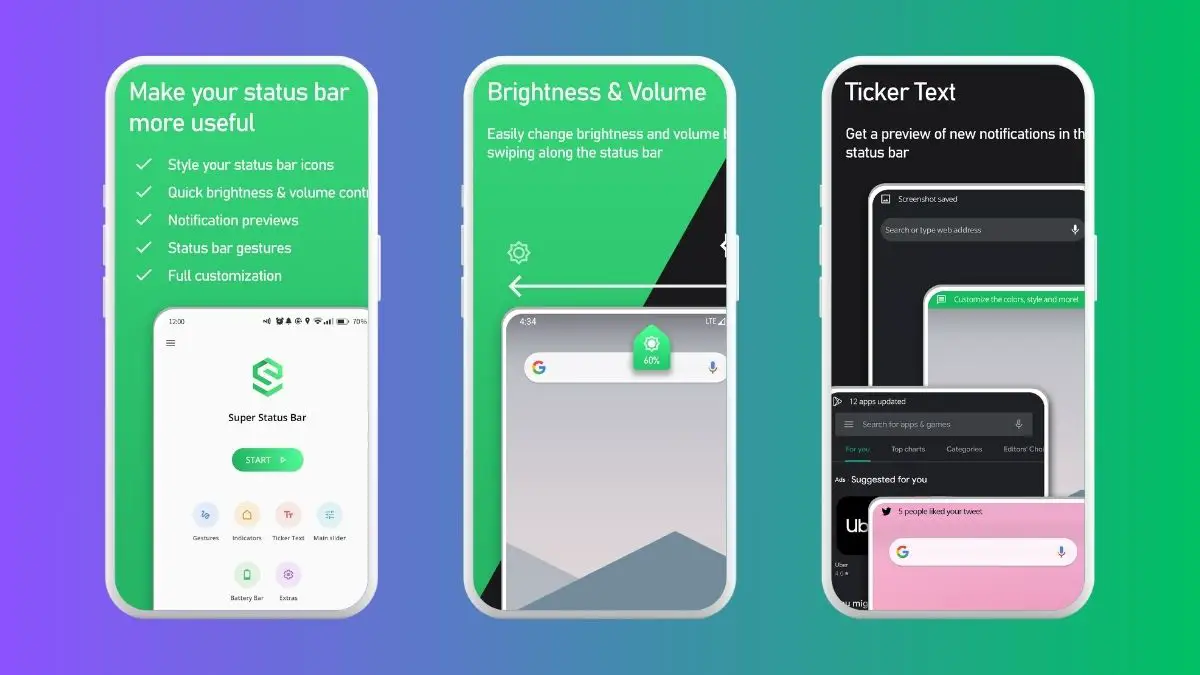
Your status bar lets you find out the time, battery percentage, and all the features enabled or accessed. But it can be supercharged to do much more than that. Presenting Super Status Bar, an all-powerful app that lets you tweak the status bar with gestures.

The app lets you change the brightness of your screen with just a swipe. Similarly, you can adjust the volume on your device by swiping on the status bar. Available gestures include torch, rotation, tap to sleep, quick settings, power off menu, screenshot, open apps, etc. If you are into customizations, you’ll love Super Status Bar for sure.

Download: Super Status Bar

Wrapping Up!

Now that we’ve given you the list of five best Android apps you must try in November 2025, it’s time for us to relax and for you to continue trying these apps out. Of course, we are always here to help, just in case. Moreover, we continue to bring such amazing apps every month, and thus, we will set our foot forward for the next iteration that you might like. So stay curious, stay techy, stay with True-Tech.

Share This Article
Follow:
A wordsmith, a kin tech observer, a sci-fi fanatic and a scientific documentary buff.
Highlights
  • Google Play Store currently has more than 3 million apps and counting.
  • It makes it dreadful and strenuous to find apps that can really do wonders apart from the usual apps listed on the front page of the play store.
  • We have here is a curated pack of 5 best Android apps that you should consider trying this month.

Your Google Play Store has 3Mn+ apps and counting, making it impossible to try the goldmines and best Android apps out there. Yes, you could be using the top 10 best apps out there, but trust me, the Play Store has apps for everything imaginable and beyond. 

At True-Tech, we compile our picks for the 5 best Android apps available, offering our users the best options to try. From boosting productivity to utility apps, from customizing your phone to saving cost on cabs and Uber, we have our picks for some of the best apps on Android that you should try.

5 best Android apps you must try in November 2025

Well, let’s take a deeper dive into our listicle.

NoVolume

Category: Utility

NoVolume
Image Credits: NoVolume, via Google Play Store

Volume buttons and settings look almost the same, no matter what make and model of phone you choose. NoVolume is an app that brings about certain changes to the look and feel of the volume rockers that feel more welcoming than ever. 

Unlike the regular volume UI, NoVolume adds a circular scroll for volume settings with granular controls. It means if you want to place the rocker at 27%, it will stay at 27%, no more, no less. You can customize the size of the scroll, color, and font as well, making it much more intuitive. It even has a transparency mode included. Moreover, it’s free to use, but there’s a premium version, just in case you love it so much.

Download: NoVolume

Senior Home Launcher

Category: Utility

Senior home Launcher
Image Credits: Senior home Launcher, via Google Play Store

There are literally ‘n’ number of launchers on the Play Store that people love. But when you want something as minimalistic as possible, choose Senior Home Launcher. I would use this on my mother’s device as it makes way for all important stuff right in front of the user. It means no more squinting as the icons are large enough, there’s a big clock and date widget, one-tap call or message (you name it). 

There’s also a dedicated flashlight button, a utility that I often use when it’s pitch dark in my room at night. Although I would say this app is great for seniors and new users, I wouldn’t deny that it is great for all user types. I mean, my phone is usually cluttered with apps and countless options to choose from, but the Senior Home Launcher reorganizes everything in a simple manner, benefiting those who love simplicity.

Download: Senior Home Launcher

ComposePDF Pro

Category: PDF Maker

ComposePDF Pro
Image Credits: ComposePDF Pro, via Google Play Store

Trust me or not, but our daily lives revolve around PDFs. Whether it’s your CV or documents, corporate decks, and other documents, to name a few. This also means you need PDF applications or websites to carry out tasks such as converting other formats to PDF, combining multiple PDF documents into one, and even converting a PDF to an image. 

Of course, there are plenty of websites that can do the job; however, ComposePDF Pro is an app that sits on your phone without taking up much space and requires no internet. It lets you work with PDFs, anytime, anywhere, and with no watermarks whatsoever. It is like an app that seems too good to be true — and it is. The app has features including reorganizing PDF pages, rotating pages, compressing PDFs, password protecting, and the list goes on. Well, if your work involves more PDFs, you should try ComposePDF Pro right away.

Download: ComposePDF Pro

Hackney

Download: Sky Scanner for Ride Sharing

Hackney
Image Credits: Hackney, via Google Play Store

Do you use multiple ride-sharing apps to compare prices? I mean, it’s always true that there’s surge pricing, and one app will charge you more for the same journey compared to the other. Well, if that’s your case, Hackney is an app for you. No more opening and switching between multiple ride-sharing apps like Uber and Lyft, because Hackney does that for you. It allows you to check out the cost of travel, avoid surge pricing, and save up to 20% on these cab services. 

The only downside I see here is that the app is still new and thus may show some errors. Moreover, it is limited to Uber and Lyft and available in just a few countries. Since we are on the lookout for the best Android apps to try this month, and our readers can be from all corners of the world, if you live in the US and other supporting countries, try Hackney.

Download: Hackney

Super Status Bar

Category: Customized Status Bar

Super Status Bar
Image Credits: Super Status Bar, via Google Play Store

Your status bar lets you find out the time, battery percentage, and all the features enabled or accessed. But it can be supercharged to do much more than that. Presenting Super Status Bar, an all-powerful app that lets you tweak the status bar with gestures.

The app lets you change the brightness of your screen with just a swipe. Similarly, you can adjust the volume on your device by swiping on the status bar. Available gestures include torch, rotation, tap to sleep, quick settings, power off menu, screenshot, open apps, etc. If you are into customizations, you’ll love Super Status Bar for sure.

Download: Super Status Bar

Wrapping Up!

Now that we’ve given you the list of five best Android apps you must try in November 2025, it’s time for us to relax and for you to continue trying these apps out. Of course, we are always here to help, just in case. Moreover, we continue to bring such amazing apps every month, and thus, we will set our foot forward for the next iteration that you might like. So stay curious, stay techy, stay with True-Tech.
Share This Article
Follow:
A wordsmith, a kin tech observer, a sci-fi fanatic and a scientific documentary buff.