- Accidentally deleted some files? Your older drives just got corrupted? Can't file photos on your SD card? Broken hard drive? Well, Stellar Photo Recovery is there for you.
- We got Stellar Photo Recovery up to the test to find what it is made up of.
- In this review, we found out Stellar has an impeccable performance when it comes to recovery and restoration of files.


Disclosure
This coverage was brought to you by Stellar Data Recovery Inc., who sponsored the review of the product. However, thoughts and opinions presented in the following review remain unbiased and based on actual thorough evaluation of the product.
Looking for photo recovery software? You haven’t landed in the right place. We live in the age of photos and videos where people document what they are doing and whatnot all on their devices. While there are more ways to store these memories or memoirs, sometimes, unexpected things happen wherein you either accidentally delete a photo(s) or say, it gets corrupted, consumed, or damaged due to XYZ reasons.
Whatever the reason might be, it becomes difficult to retrieve once deleted photos and videos without specialized software. If you are familiar with the fact that your files are never deleted, they are just hashed out when you intentionally or accidentally delete them, only to be overwritten with new files.
There are certain data recovery tools out there that carry out this recovery and restoration of photos and beyond, ensuring your memories remain at your disposal. We are reviewing one such photo recovery software, a legend in its own segment, that has helped us bring the dead (photos) to life. Well, we don’t want Stellar to pass through with flying colors without actually reviewing it in an unbiased manner, and thus, here’s what the Stellar Photo Recovery software brings to the table.
What do the pros and cons look like?
Well, we are directly jumping on the pros and cons that the Stellar Photo Recovery brings to the table. Once you are familiar with that, we shall jump into the review part.
Pros
- More than 300+ file types/ formats supported
- Strong device, storage systems, and setups support
- Basic and intuitive UI that makes it easier for even newbies to perform recovery
- Powerful recovery tools
- Reads SMART data
- Configuration scan settings and custom file systems
Cons
- A bit on the pricier side, especially for Mac
- May have performance issues when deep scanning, generally slow
- Limited free trial up to 1GB
- Inconsistent recovery results
Stellar Photo Recovery: User Interface
When it comes to the user interface, I would say Stellar looks a bit aged, not to lie. The layout is simple, there’s nothing flashy happening, and especially not in the old ’90s way. However, that also paints the second side of the coin.
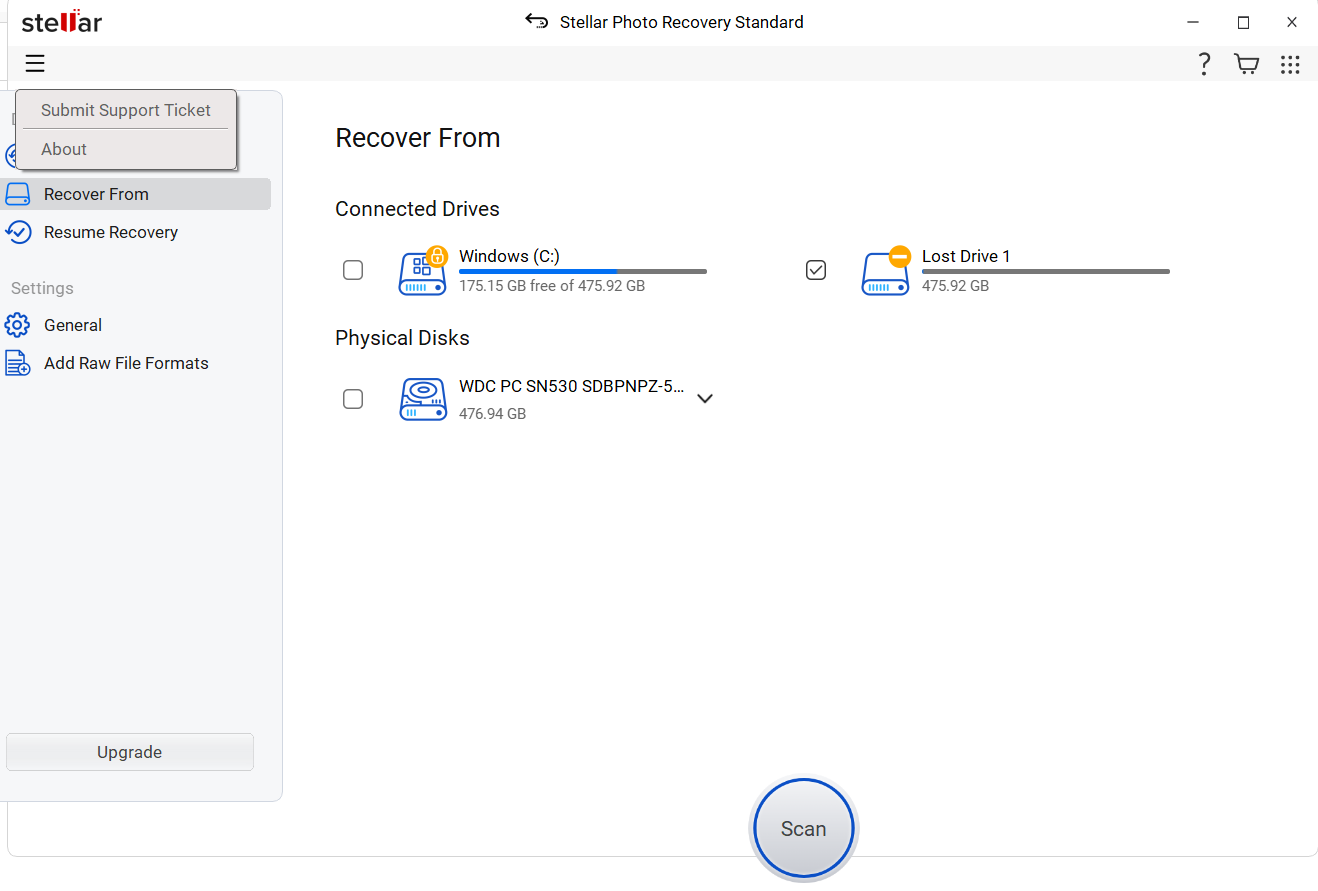
A simple layout means you can easily understand all the features and options it brings without needing to refer to the knowledge base on how-to videos. Of course, Stellar offers an extensive knowledge hub as well, but I highly doubt you’d need it if you have used data recovery software before.
If you have a Mac and a Windows PC, you’ll see a stark difference between the two in terms of the GUI. However, the overall layout and functionalities remain unchanged, i.e., a sidebar-style menu on the left, a hierarchical structure of files, multiple icon tiles for files, and simple dialog-driven steps to guide you from A to B in your recovery journey.
Stellar Photo Recovery: File Support
Stellar Data Recovery as a whole, which covers Photo Recovery as well, features file system support for NTFS, ReFS, FAT & exFAT for Windows, and Fat32, exFAT, NTFS, APFS, HFS+ for Mac.
Some of the commonly used file formats are JPEG, PNG, RAW (Photos); MP4, AVI, MOV (Videos); PST, EDB (Emails); WAV, MP3 (Audio); PDF, DOCX, XLSX (Documents); RAR, ZIP (Archives), etc. In fact, Stellar has a feature to add new file formats, which is basically teaching the software to recognize certain file formats. Overall, Stellar supports more than 300+ file types across the board, which makes it much more efficient than others.
Stellar Photo Recovery can handle multiple data loss scenarios, such as formatted drives, accidental deletions, corrupted or RAW partitions, non-booting systems, BitLocker-encrypted devices, etc., and covers USBs, external drives, SSDs, memory cards, and local drives, to name a few.
Stellar Photo Recovery: Platforms Supported
Stellar Photo Recovery is available across both macOS and Windows OS, which allows for full-fledged usage. There are also apps for Android and iOS devices called Stellar Data Recovery. Pricing for both Windows and macOS is different, although the underlying functionalities remain unchanged.
Stellar Photo Recovery: Features and Functionalities
Stellar brings a lot for all your photo and video recovery needs. First up, it supports a plethora of memory cards, whether it is corrupted, damaged, or inaccessible, and includes SD cards from various makers such as SanDisk, Samsung, Panasonic, Kingston, etc. It also covers photo recovery from all kinds of storage media, CR2, CR3, MOS, NEF, ORF, SRF, SR2, Adobe EPS, DNG, etc. It’s commendable how Stellar can recognize 300+ file types and beyond, and can intercept BitLocker-encrypted drives as well.
Other functionalities that the tool offers include scan and resume recovery, custom file types, image creation, comprehensive scanning, support for Unicode file recovery, advanced recovery and restoration tools, and SMART data. The tool is available to recover media upwards of 18TB or 18,000 GB, in capacity and beyond.
Stellar Photo Recovery: How To Use?
Well, there’s no rocket science involved here. All you have to do is take a few steps, and you are good on your road to recovering lost, deleted, or corrupted files. Here’s how.
Step #1: Download the software on your PC/Mac.
Step #2: Launch Stellar Photo Recovery if installed properly.
Step #3: Next, choose the drive/section where you want to run the scan. For external drives or storage devices, connect them to your PC and select the same.

Step #4: Hit the “Scan” button to run the analysis. A “Deep Scan” will scour through sectors that help dig deeper, although it is time-consuming.
Step #5: Preview found files segregated in tree-view and separated into photos, videos, audio, etc. You can use the filters and search bar to further locate specific lost items.
Step #6: Once you find the location, hit the “Recover” button, choose a drive other than the one scanning, and restore.
Stellar Photo Recovery: The Testing Ground
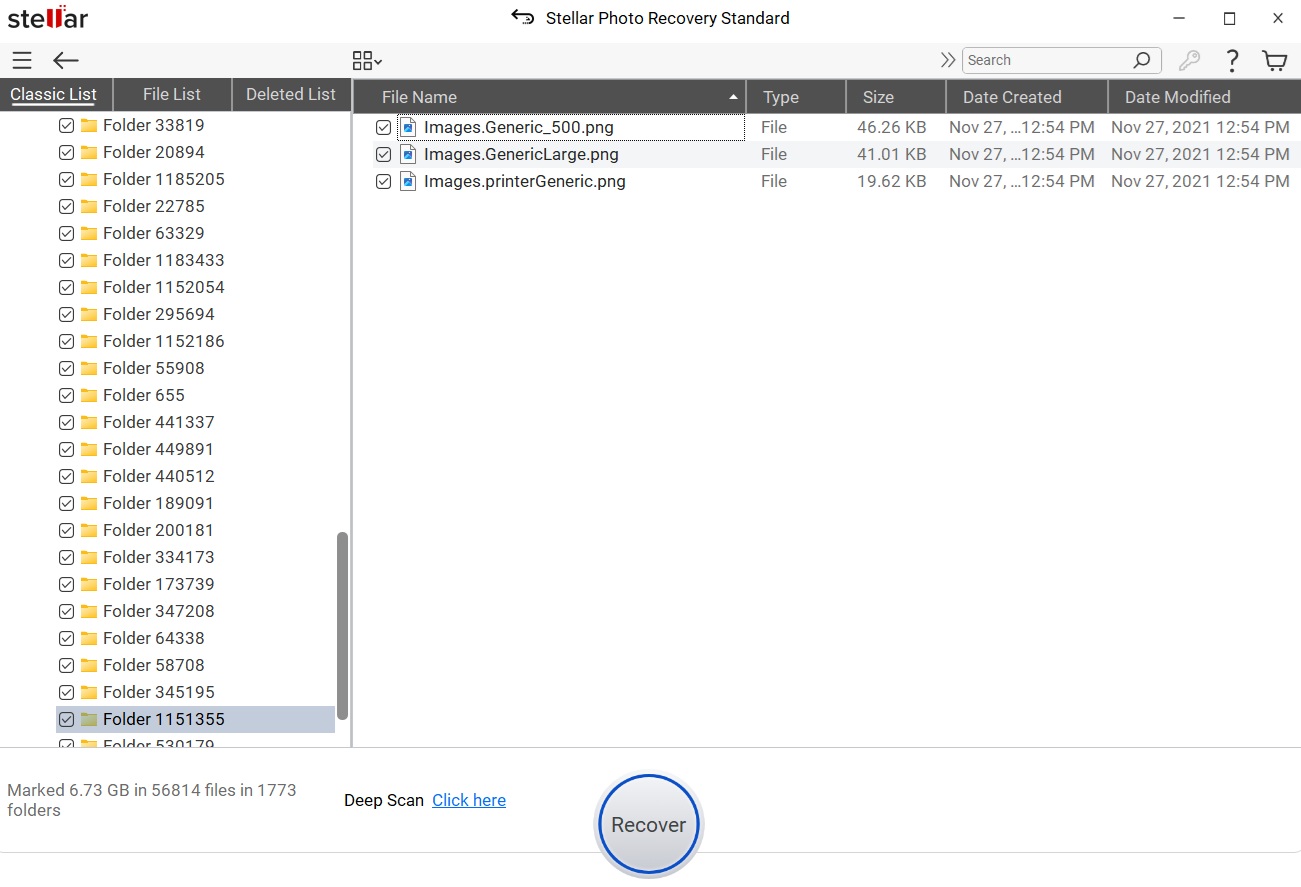
Of course, it’s never just about the UI or the file format supported. All that matters is how the tool actually performs at the ground level.
Generally, scanning is fast; however, when you engage Deep Scan on Stellar, the speed of the scan becomes noticeably slower. I tested the software across multiple scenarios for performance. During the first round, a case of deleted cases, the software was able to complete a quick scan in a minute, while a deep scan took ~16 minutes, giving us 0.5GB and 1GB of recovered data, respectively. Another scenario was with formatted drives, and the time it took to complete was 16 minutes; it was able to recover 0.8GB of data.
We asked some of our folks to test Stellar across multiple storage devices, such as the DJI Osmo Pocket 3. It had 128GB of data in its SD card that was deleted purposefully. It took 25 minutes to run the can, and voila, Stellar was able to find across 128GB of data, fully intact, without any issues.
In fact, I was able to find files as old as 2022 (we are in 2025 now) that were once deleted, and somehow, Stellar was still able to find them. Of course, such conditions can happen only if you don’t regularly overuse your PC. I have 500GB of SSD simply lying around for years with nothing much happening, which meant the older deleted files never got fully overwritten, and thus, Stellar was able to dig and find them. Still, this is commendable given these were three or more years older files.
Stellar Photo Recovery: Pricing
Stellar Photo Recovery is indeed a stellar platform for those who love their photos and videos. Apart from the review, let’s have a look at the pricing for both Mac and Windows and what it brings to the table.
The first is a Standard package starting $49.99 for one year with complete recovery capabilities. However, it can’t repair corrupted files. Then, we have the Professional package at $59.99/year, a slightly more expensive version with the ability to repair corrupted photos. The highest is the Premium package that unlocks the ability to repair both corrupted photos and videos and will leave you with a damage of $69.99 per year.
The Mac version is a bit pricier, starting at $59.99/year for the standard, and the premium tier will cost you $69.99/year.
For comparison, Disk Drill is a full-fledged data recovery system and a fierce competitor to Stellar. It brings a basic version free of cost with 500MB of storage. You can subscribe to its Pro version at $89 lifetime plan for unlimited recovery while an Enterprise version at $499 adds 10 users, unlimited activations, and more on top of Pro. Again, Stellar is cheap in terms of pricing, which gives it an edge over the competitors.
Stellar Photo Recovery: Customer Support
It’s not always the case that you would need customer support; however, Stellar Photo Recovery does have one when you need it. You can refer to their extensive FAQs, knowledge base, and how-to videos, which give you a peek into what to do when something stops you from recovery.
There’s a dedicated technical support contact number on-board, allowing users to get their problems and queries resolved. If not, you can opt to raise a ticket and wait for some time to get a written response, which will guide you with TeamViewer sessions if needed. What else do you want with a recovery tool?
Stellar Photo Recovery: Verdict
Drum rolls, please! Now it’s time for the verdict.
Stellar Photo Recovery is an exceptional tool, especially when you play around with photos and videos a lot, such as a content creator, photographer, or simply someone who has a lot of multimedia. Stellar turns out to have impeccable performance, although it is slightly expensive, i.e., at least $50/year, unless you are going to use it a lot of times, in which case it will pay for itself.
Again, I wouldn’t say you should avoid Stellar Photo Recovery because hey, it is still impressive to dig through years-old files and completely deleted data in drives without breaking a sweat. Overall, I would say Stellar does appear to have an impressive presence, extensive knowledge base, and trusted developers, all of which are brownie points in its favor. On a scale of 5 stars, I would give Stellar Photo Recovery review a 4/5-stars. So, what do you think about Stellar? Give it a try!