ChatGPT Atlas is shutting down—use these 5 AI browsers instead

Akarsh Rasik
6 Min Read
Highlights
  • OpenAI has announced the shutdown of ChatGPT Atlas; affected users should export data and migrate workflows immediately.
  • Privacy and export timelines are the biggest immediate risks—check settings, export bookmarks, and change privacy toggles now.
  • Switch checklist: bookmarks & profiles, extensions, agent settings, and a quick trial of summarization/side-panel features.

OpenAI has already made up its mind and is shutting down its experimental AI browser, ChatGPT Atlas, within a few months of release. With the announcement, people have been looking up here and there for its alternative, and to make your search easier, we have brought the top 5 AI browsers that you can use instead of ChatGPT Atlas.

If Atlas were already a part of your daily workflow, including research, summarizing content, or handling multiple tabs with AI, it’d be time to move away already. OpenAI has given its users a deadline to back up their data or stuff stored in Atlas because the browser will stop working on August 9, 2026.

Fortunately, the browser industry has evolved over time. As a result, we have several alternatives that offer similar features and, in some cases, a more powerful AI-powered browsing experience. So without any further ado, let’s explore the AI browsers.

Top 5 AI browsers to consider

Perplexity Comet

If you primarily work around researching, Perplexity Comet stands as one of the strongest alternatives on the market.

The biggest advantage it gives is answers with proper citation, which strengthens the result’s authoritativeness and trustworthiness. In other words, the browser points users to sources, rather than just generating responses.

Perplexity Comet | Top 5 AI browsers to consider
Representational image generated using AI by Akarsh Rasik for TrueTech

In addition, Comet also generates summaries of webpages faster, and it makes the information easier to compare with multiple sources on the browser.

Dia by The Browser Company

Dia is built by the team behind Arc, and the company says that it takes an AI-first approach to browsing.

Dia by The Browser Company
Representational image generated using AI by Akarsh Rasik for TrueTech

According to the firm, Dia integrates AI experience throughout the browser, rather than treating it as an optional feature. Users can ask questions about the visited webpages, summarize articles, rewrite text, and interact with content without switching tabs.

Dia is among the closest browsers to offering an Atlas-like experience with its built-in AI in the browser.

Brave Browser with Leo AI

As a personal user, I am adding Brave Browser to the list. The browser is well-known for focusing on privacy features, and Leo AI makes the browser even more capable without compromising that philosophy.

Moreover, the browser offers built-in tracker blocking, writing assistance, AI-powered page summaries, and options that eliminate dependence on cloud-based AI services.

Brave Browser with Leo AI
Representational image generated using AI by Akarsh Rasik for TrueTech

If you’re concerned about your privacy, along with not being okay with compromising AI features, Brave stands among one of the strongest options.

Microsoft Edge with Copiilot

You heard that right; Microsoft has evolved over time, and so have the users as they shifted to utilize its AI-powered browser, Microsoft Edge, which is particularly popular among Windows users.
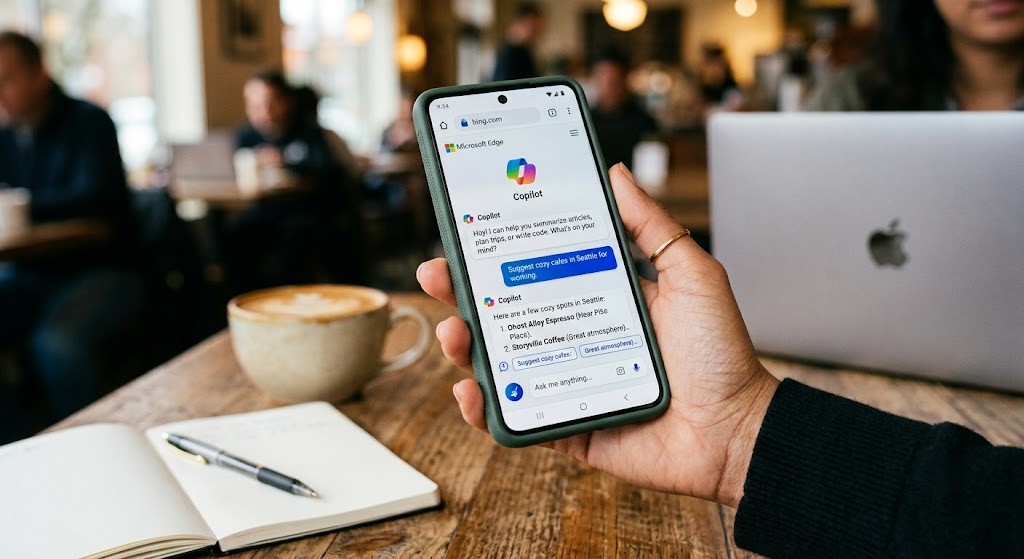
Microsoft Edge with Copiilot
Representational image generated using AI by Akarsh Rasik for TrueTech

Microsoft calls its AI “Copilot,” which is deeply integrated into the browser. Copilot brings several capabilities, including webpage summaries, search support, writing assistance, and productivity features that work with Microsoft 365 apps as well.

If you’re a Windows user, switching to Edge won’t require much adjustment.

Opera Browser with Aria AI

Last on our unranked list comes the Opera Browser, which has rapidly expanded its AI features in the app. Opera calls it “Aria AI,” and it gives users a smart assistant without having a need for additional extensions.

Opera Browser with Aria AI
Representational image generated using AI by Akarsh Rasik for TrueTech

Aria AI can summarize articles, answer questions, assist while browsing, assist in writing, help in coding, and more. The AI adds practical features and adjusts the browser’s experience, keeping the experience less complicated.

Keep up with the tech that actually matters.

From breaking news to deep dives, TrueTech brings you the tech stories worth knowing.
Add us as a preferred source on Google Search for quicker access to our coverage.

Add TrueTech as a preferred source on Google

A quick migration checklist

Switching from Atlas to a different browser doesn’t have to be complicated. That’s why here’s a breakdown of exact steps you need to follow:

Start by exporting your bookmarks and saving up webpages. Then install any AI browser you like, import your bookmarks here, and test the features you use in the new browser, such as asking questions, summarizing webpages, etc.

Finally, review each browser’s privacy settings, if you’re aiming to make it your default browser. The reason why I am saying this is that AI features often rely on cloud services, and you should be aware of the information being shared or not and whether those settings can be changed.

That’s all for now; remember, the biggest challenge isn’t finding a new AI browser or its replacement; it’s about finding a browser that fits the way they already work.


Share This Article
Follow:
Writing about emerging gadgets and technology news, as well as keeping you updated on movie and music news, with a focus on all things K-pop.
Highlights
  • OpenAI has announced the shutdown of ChatGPT Atlas; affected users should export data and migrate workflows immediately.
  • Privacy and export timelines are the biggest immediate risks—check settings, export bookmarks, and change privacy toggles now.
  • Switch checklist: bookmarks & profiles, extensions, agent settings, and a quick trial of summarization/side-panel features.

OpenAI has already made up its mind and is shutting down its experimental AI browser, ChatGPT Atlas, within a few months of release. With the announcement, people have been looking up here and there for its alternative, and to make your search easier, we have brought the top 5 AI browsers that you can use instead of ChatGPT Atlas.

If Atlas were already a part of your daily workflow, including research, summarizing content, or handling multiple tabs with AI, it’d be time to move away already. OpenAI has given its users a deadline to back up their data or stuff stored in Atlas because the browser will stop working on August 9, 2026.

Fortunately, the browser industry has evolved over time. As a result, we have several alternatives that offer similar features and, in some cases, a more powerful AI-powered browsing experience. So without any further ado, let’s explore the AI browsers.

Top 5 AI browsers to consider

Perplexity Comet

If you primarily work around researching, Perplexity Comet stands as one of the strongest alternatives on the market.

The biggest advantage it gives is answers with proper citation, which strengthens the result’s authoritativeness and trustworthiness. In other words, the browser points users to sources, rather than just generating responses.

Perplexity Comet | Top 5 AI browsers to consider
Representational image generated using AI by Akarsh Rasik for TrueTech

In addition, Comet also generates summaries of webpages faster, and it makes the information easier to compare with multiple sources on the browser.

Dia by The Browser Company

Dia is built by the team behind Arc, and the company says that it takes an AI-first approach to browsing.

Dia by The Browser Company
Representational image generated using AI by Akarsh Rasik for TrueTech

According to the firm, Dia integrates AI experience throughout the browser, rather than treating it as an optional feature. Users can ask questions about the visited webpages, summarize articles, rewrite text, and interact with content without switching tabs.

Dia is among the closest browsers to offering an Atlas-like experience with its built-in AI in the browser.

Brave Browser with Leo AI

As a personal user, I am adding Brave Browser to the list. The browser is well-known for focusing on privacy features, and Leo AI makes the browser even more capable without compromising that philosophy.

Moreover, the browser offers built-in tracker blocking, writing assistance, AI-powered page summaries, and options that eliminate dependence on cloud-based AI services.

Brave Browser with Leo AI
Representational image generated using AI by Akarsh Rasik for TrueTech

If you’re concerned about your privacy, along with not being okay with compromising AI features, Brave stands among one of the strongest options.

Microsoft Edge with Copiilot

You heard that right; Microsoft has evolved over time, and so have the users as they shifted to utilize its AI-powered browser, Microsoft Edge, which is particularly popular among Windows users.

Microsoft Edge with Copiilot
Representational image generated using AI by Akarsh Rasik for TrueTech

Microsoft calls its AI “Copilot,” which is deeply integrated into the browser. Copilot brings several capabilities, including webpage summaries, search support, writing assistance, and productivity features that work with Microsoft 365 apps as well.

If you’re a Windows user, switching to Edge won’t require much adjustment.

Opera Browser with Aria AI

Last on our unranked list comes the Opera Browser, which has rapidly expanded its AI features in the app. Opera calls it “Aria AI,” and it gives users a smart assistant without having a need for additional extensions.

Opera Browser with Aria AI
Representational image generated using AI by Akarsh Rasik for TrueTech

Aria AI can summarize articles, answer questions, assist while browsing, assist in writing, help in coding, and more. The AI adds practical features and adjusts the browser’s experience, keeping the experience less complicated.

Keep up with the tech that actually matters.

From breaking news to deep dives, TrueTech brings you the tech stories worth knowing.
Add us as a preferred source on Google Search for quicker access to our coverage.

Add TrueTech as a preferred source on Google

A quick migration checklist

Switching from Atlas to a different browser doesn’t have to be complicated. That’s why here’s a breakdown of exact steps you need to follow:

Start by exporting your bookmarks and saving up webpages. Then install any AI browser you like, import your bookmarks here, and test the features you use in the new browser, such as asking questions, summarizing webpages, etc.

Finally, review each browser’s privacy settings, if you’re aiming to make it your default browser. The reason why I am saying this is that AI features often rely on cloud services, and you should be aware of the information being shared or not and whether those settings can be changed.

That’s all for now; remember, the biggest challenge isn’t finding a new AI browser or its replacement; it’s about finding a browser that fits the way they already work.

Share This Article
Follow:
Writing about emerging gadgets and technology news, as well as keeping you updated on movie and music news, with a focus on all things K-pop.