
How to reset the Instagram algorithm and regain control over your feed

Aadil Raval
3 Min Read
Highlights
  • Instagram algorithm may trick you in consuming similar content for infinity unless you take a stand.
  • In this easy-to-follow guide, we take you through the process on how to hack and reset your Instagram algorithm.
  • Follow the other hacks to give your Instagram algorithm a much-needed cleanse.

There’s nothing more frustrating than the Instagram algorithm hitting you with waves of similar content that you either watched, skimmed, or maybe someone shared. It’s like if you end up watching just a few clips of Family Guy or Bigg Boss on Instagram, or if someone shared it a few times, your Instagram account will be flooded with similar content. 

When I say Instagram algorithm, I am talking about content that can be misleading, clickbait, outright false, or something you are not interested in. It could be simply something you like, but there’s way too much content around it that has shrouded other types of content from being visible. In any case, you need an Instagram cleanse, and that’s where the resetting of your Instagram algorithm comes into play.

How to reset your Instagram algorithm?

Now, call it resetting your Instagram algorithm or resetting your suggested recommendations, here’s how you can do it in an easy-to-understand step-by-step manner.
Step #1: Launch Instagram on your phone. 
Note: This method doesn’t work on desktops.
Step #2: Head over to your profile. The icon is located on the extreme bottom-right of the screen.
Step #3: Head over to the three-bar icon in the top-right corner to enter “More Options”.
Step #4: Now, find “Content Preferences” and tap on “Reset Suggested Content”.
Step #5: You will be greeted by terms and conditions that you need to accept and tap the “Reset Suggested Content” again to formalize it.
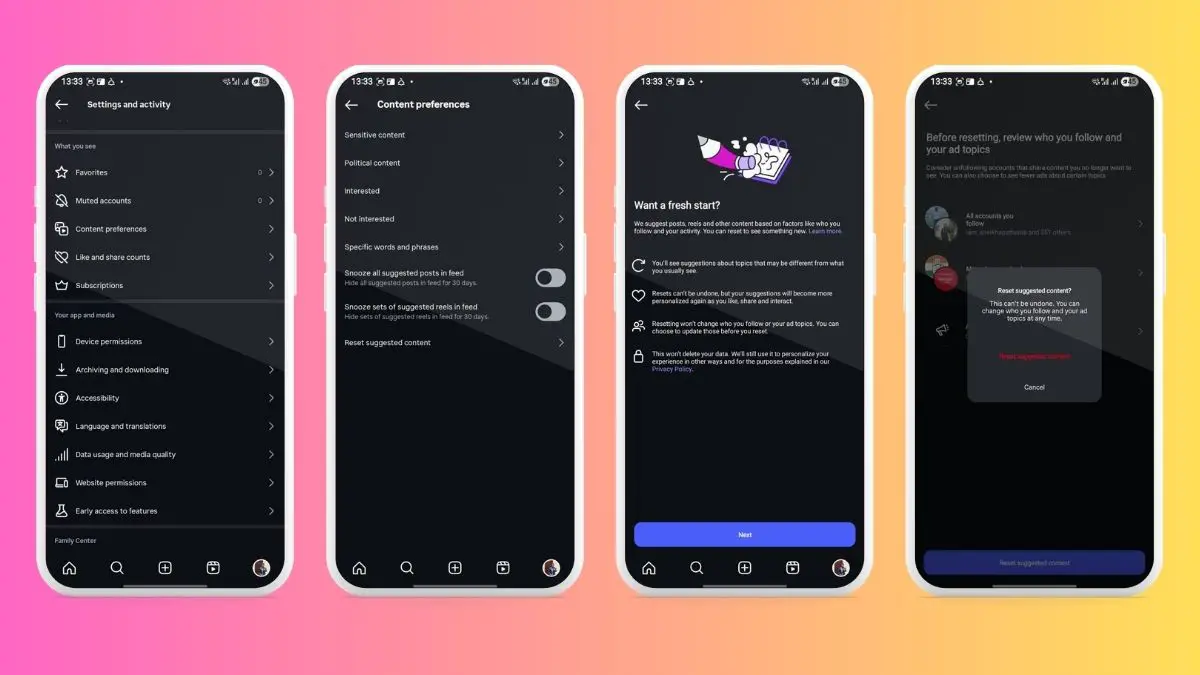
How to reset your Instagram algorithm
Image Credits: True-Tech

Once you are done, Instagram will start learning from your searches and intent to send personalized content again. This is basically the accounts and content you interact with; it is what reflects on your Instagram app. Note that the content preferences for the app and desktop can be different. 

Tips to hack your Instagram algorithm

The aforementioned method is great as it helps you reduce the heavy flux of similar content that you might find less interesting and outright annoying. But Instagram offers a lot of other features as well. For instance, whenever you spot a ‘Sponsored Posts’ (and you’ll find a tonne of them), head over to ‘More Options’ against such post and select “Not Interested”.
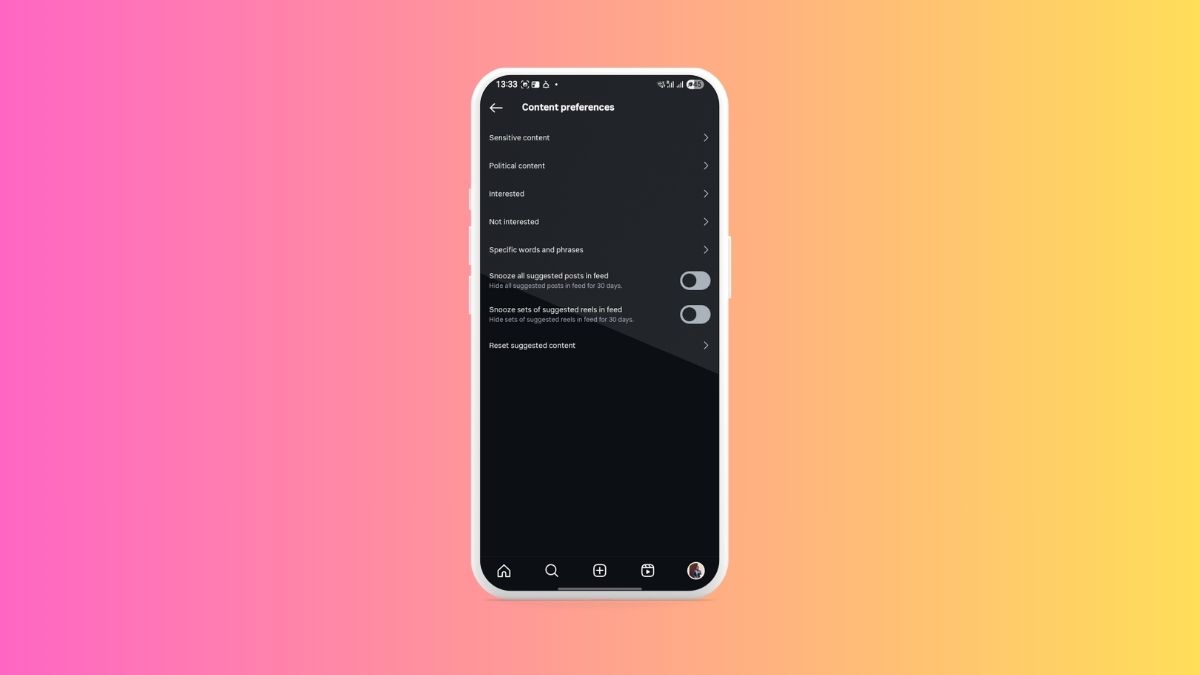
How to reset your Instagram algorithm
Image Credits: True-Tech

Next up, you can head over to Content Preferences just as before, and select both “Snooze all suggested posts in feed” and “Snooze sets of suggested reels in feed”. Tehre’s one more option — you can block content with specific words and phrases as well. Simply add the words or phrase and you are good to go.

Wrapping up

The aim is to give your Instagram a much-needed cleanse if there’s just too much saturation of similar content that you might not like, or simply get frustrated because there’s too much of it.

TAGGED:
Share This Article
Follow:
A wordsmith, a kin tech observer, a sci-fi fanatic and a scientific documentary buff.
Highlights
  • Instagram algorithm may trick you in consuming similar content for infinity unless you take a stand.
  • In this easy-to-follow guide, we take you through the process on how to hack and reset your Instagram algorithm.
  • Follow the other hacks to give your Instagram algorithm a much-needed cleanse.

There’s nothing more frustrating than the Instagram algorithm hitting you with waves of similar content that you either watched, skimmed, or maybe someone shared. It’s like if you end up watching just a few clips of Family Guy or Bigg Boss on Instagram, or if someone shared it a few times, your Instagram account will be flooded with similar content. 

When I say Instagram algorithm, I am talking about content that can be misleading, clickbait, outright false, or something you are not interested in. It could be simply something you like, but there’s way too much content around it that has shrouded other types of content from being visible. In any case, you need an Instagram cleanse, and that’s where the resetting of your Instagram algorithm comes into play.

How to reset your Instagram algorithm?

Now, call it resetting your Instagram algorithm or resetting your suggested recommendations, here’s how you can do it in an easy-to-understand step-by-step manner.
Step #1: Launch Instagram on your phone. 
Note: This method doesn’t work on desktops.
Step #2: Head over to your profile. The icon is located on the extreme bottom-right of the screen.
Step #3: Head over to the three-bar icon in the top-right corner to enter “More Options”.
Step #4: Now, find “Content Preferences” and tap on “Reset Suggested Content”.
Step #5: You will be greeted by terms and conditions that you need to accept and tap the “Reset Suggested Content” again to formalize it.

How to reset your Instagram algorithm
Image Credits: True-Tech

Once you are done, Instagram will start learning from your searches and intent to send personalized content again. This is basically the accounts and content you interact with; it is what reflects on your Instagram app. Note that the content preferences for the app and desktop can be different. 

Tips to hack your Instagram algorithm

The aforementioned method is great as it helps you reduce the heavy flux of similar content that you might find less interesting and outright annoying. But Instagram offers a lot of other features as well. For instance, whenever you spot a ‘Sponsored Posts’ (and you’ll find a tonne of them), head over to ‘More Options’ against such post and select “Not Interested”.

How to reset your Instagram algorithm
Image Credits: True-Tech

Next up, you can head over to Content Preferences just as before, and select both “Snooze all suggested posts in feed” and “Snooze sets of suggested reels in feed”. Tehre’s one more option — you can block content with specific words and phrases as well. Simply add the words or phrase and you are good to go.

Wrapping up

The aim is to give your Instagram a much-needed cleanse if there’s just too much saturation of similar content that you might not like, or simply get frustrated because there’s too much of it.
TAGGED:
Share This Article
Follow:
A wordsmith, a kin tech observer, a sci-fi fanatic and a scientific documentary buff.