How to use dual capture mode on iPhone 17 series?

Aadil Raval
3 Min Read
Highlights
  • iPhone 17 series just made a splash with an incredible demand.
  • The series brings dual capture mode that lets you shoot videos from both front and rear cameras simultaneously.
  • This is your handy guide to iPhone 17's dual capture mode, how to use it and what you can do with the latest feature at your disposal.

A much-awaited feature, the dual capture mode has officially arrived on-board the iPhone 17 series. The feature lets you record video feeds coming from both front and rear cameras simultaneously. I know, the feature has been available on Android phones for ages, but it’s now available on iOS as well. Here’s how you can enable dual capture mode on the iPhone 17 series and what you can do with it.

How to enable dual capture mode?

  1. Launch the ‘Camera’ app on your iPhone 17 series.
  2. Switch to the ‘Video’ mode.
  3. Head over to the ‘More Options’ denoted by six stacked dots in the top-left corner that should launch a carousel of video modes.
  4. Select the new-aged “Dual Capture” and see the magic happening in the viewfinder.
  5. Tap the shutter button to start recording via both front and rear cameras at the same time and in the same video.
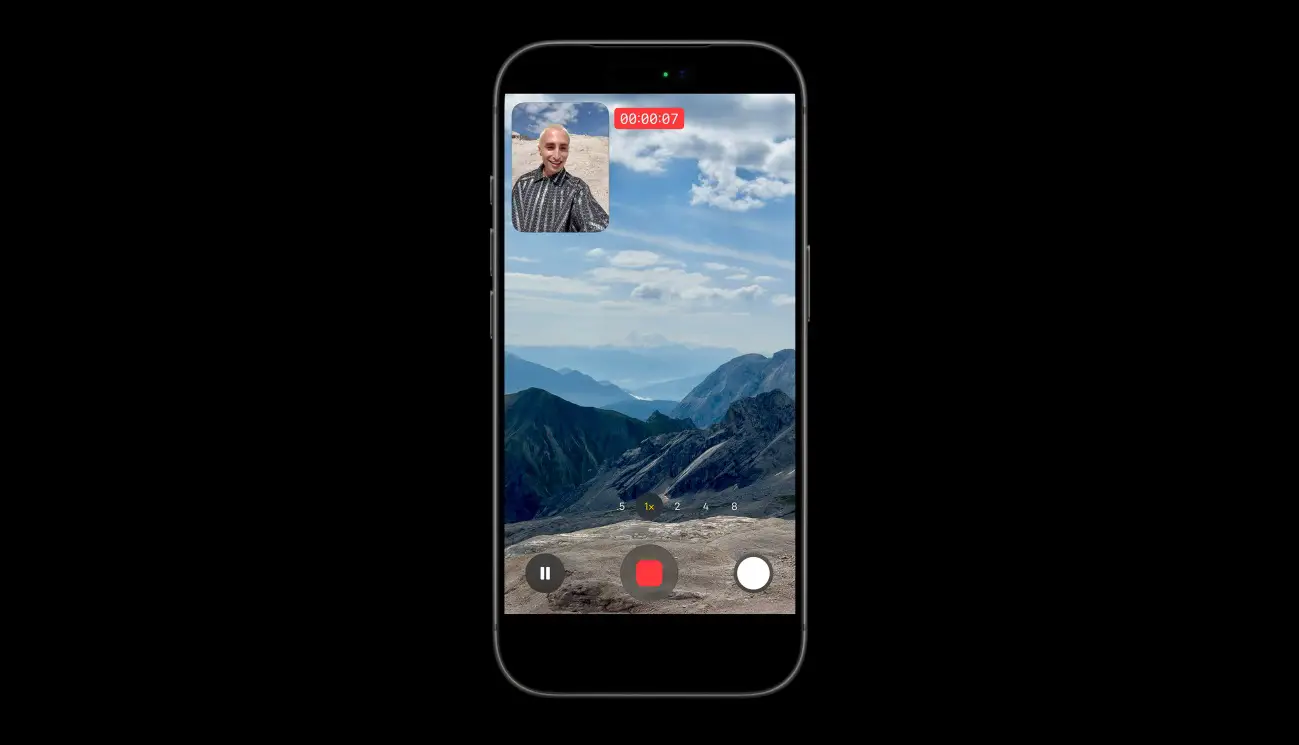
iPhone 17 dual capture mode
Image Credits: Apple

What can you do with dual capture mode?

With the latest dual capture mode in place, you can do much more with your iPhone. For starters, you can record video feeds from front and rear cameras at the same time. This is great for reaction videos and vlogging, as you can capture your reaction and what you are reacting to or showing. 

The front camera feed, shown in picture-in-picture (PiP) mode, remains static while the rear camera gives you much wider control sets. You can wander around with the primary cam, the ultrawide, or the telephoto cam, all at 48MP, for different perspectives in your videos, and that’s all without stopping the video recording. 

iPhone 17’s dual capture mode works at either 1080p or 4K resolution at 24/30fps. Of course, the 4K@30fps feed will give the best results when it comes to editing and post-production. The video is saved in a single file, and the PiP is pretty much locked; you can switch between front and rear cameras, and wherever the PiP window is, it gets saved on the final video output. 

Share This Article
Follow:
A wordsmith, a kin tech observer, a sci-fi fanatic and a scientific documentary buff.
Highlights
  • iPhone 17 series just made a splash with an incredible demand.
  • The series brings dual capture mode that lets you shoot videos from both front and rear cameras simultaneously.
  • This is your handy guide to iPhone 17's dual capture mode, how to use it and what you can do with the latest feature at your disposal.

A much-awaited feature, the dual capture mode has officially arrived on-board the iPhone 17 series. The feature lets you record video feeds coming from both front and rear cameras simultaneously. I know, the feature has been available on Android phones for ages, but it’s now available on iOS as well. Here’s how you can enable dual capture mode on the iPhone 17 series and what you can do with it.

How to enable dual capture mode?

  1. Launch the ‘Camera’ app on your iPhone 17 series.
  2. Switch to the ‘Video’ mode.
  3. Head over to the ‘More Options’ denoted by six stacked dots in the top-left corner that should launch a carousel of video modes.
  4. Select the new-aged “Dual Capture” and see the magic happening in the viewfinder.
  5. Tap the shutter button to start recording via both front and rear cameras at the same time and in the same video.

iPhone 17 dual capture mode
Image Credits: Apple

What can you do with dual capture mode?

With the latest dual capture mode in place, you can do much more with your iPhone. For starters, you can record video feeds from front and rear cameras at the same time. This is great for reaction videos and vlogging, as you can capture your reaction and what you are reacting to or showing. 

The front camera feed, shown in picture-in-picture (PiP) mode, remains static while the rear camera gives you much wider control sets. You can wander around with the primary cam, the ultrawide, or the telephoto cam, all at 48MP, for different perspectives in your videos, and that’s all without stopping the video recording. 

iPhone 17’s dual capture mode works at either 1080p or 4K resolution at 24/30fps. Of course, the 4K@30fps feed will give the best results when it comes to editing and post-production. The video is saved in a single file, and the PiP is pretty much locked; you can switch between front and rear cameras, and wherever the PiP window is, it gets saved on the final video output. 

Share This Article
Follow:
A wordsmith, a kin tech observer, a sci-fi fanatic and a scientific documentary buff.