Top 5 best Android apps you must try in February 2026

Aadil Raval
9 Min Read
Highlights
  • Are you searching for trusted apps on the Google Play Store that currently has more than 3 million apps?
  • Well, you have come to the right place as we take you on a journey with our picks for the best Android apps we came across for this month's edition.
  • From a focus app to an AI on-screen assistant, to a eSIM provider with 100+ countries, here's our pick for the best 5 Android apps you must give a try.

There are 3+ million apps on the Play Store, but it is almost a no-brainer that you could be searching for the best Android apps to try every month. Why, you’d ask? The list of best, leading, and most downloaded popular apps has one thing in common—they almost ignore the hidden gems and the ones that may be termed as underrated.

This is the reason why you would land on an app in the Play Store amassing only a few hundred or thousands of downloads, even though you found it to be great, because it wasn’t properly promoted, or not many people know its capabilities.

5 best Android apps you must try in February 2026

Well, we are plotting our picks for this month’s edition. These apps can be from any sect, category, or genre, and we at True-Tech have set out on our journey to “catch ’em all.”

Arc: AI Screen Assistant

Category: AI Assistant
Arc AI Assistant
Image Credits: Arc AI Assistant, via Google Play Store

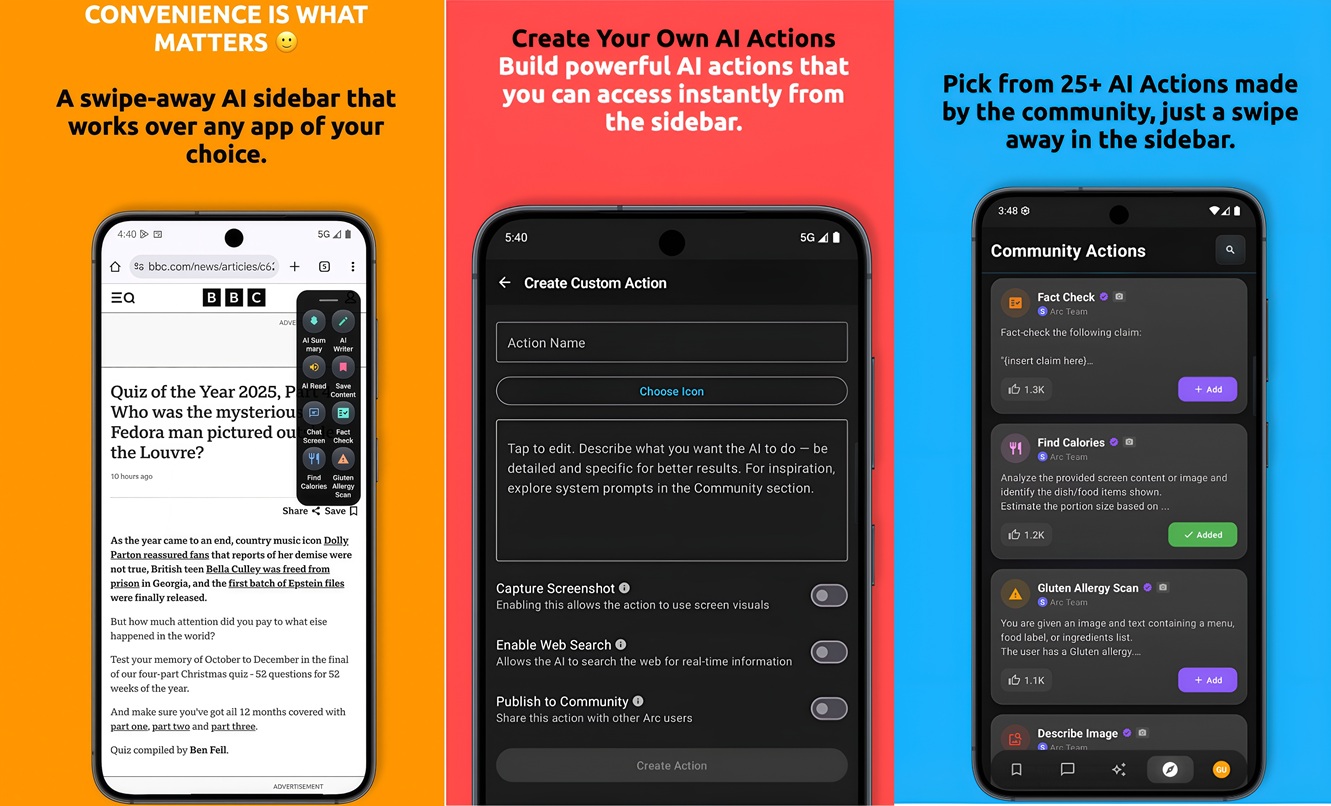
AI is currently buzzing across smartphones, and there’s no turning back. Some phones have dropped access to AI tools and features available right away, while some still need doodling, such as launching an AI chatbot, such as ChatGPT or Gemini. Arc is an AI screen assistant that curtails such resistance and instead, offers more than 25 AI actions and tools available at your fingertips.

Want a summarized account for an email thread or a group message? Want to know the ingredients or a better and healthier swap for junk food? Don’t know how to respond to a message? Arc can assist. The app gives you access to all this and more, working with AI for context-aware conversations, fixing your grammar, being privacy-focused, and having an AI Read feature that gives natural-sounding versions of AI summaries. There’s more to it, but to be honest, you should give it a try once.

Download: Arc: AI Screen Assistant

FlowStack

Category: To-Do list, Time-keeper, Focus App
FlowStack
Image Credits: FlowStack, via Google Play Store

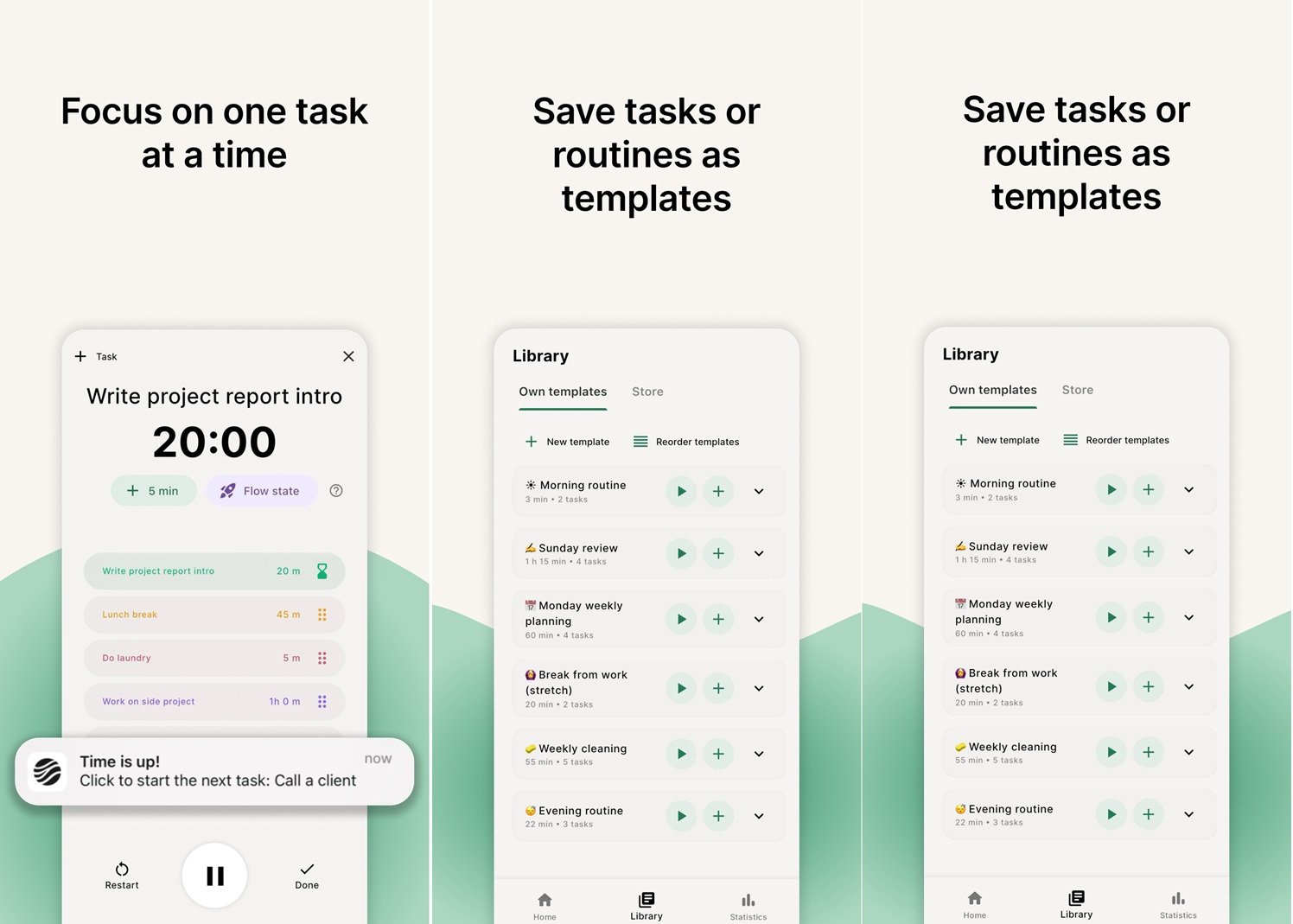
Yes, the Pomodoro technique works in mysterious ways, jolting you down to specific tasks in a focused manner. FlowStack is an app that uses the same principle as plotting your daily tasks into timelines. If a book reading session should last 20 minutes or a specific email has to be drafted and sent in five minutes before you run out of time, FlowStack is an app. It essentially prevents you from getting distracted or spending a lot of time on a task that could’ve been wrapped up sooner. 

For instance, I can jot down this listicle in an hour, but given the fact that I myself can get distracted, sometimes it takes me longer. FlowStack lets you write down tasks, allocate time, add five-ish minutes on the fly, or create a FlowStack wherein the timer doesn’t go off, but rather, it becomes a stopwatch giving you unlimited (yet quantifiable) time to do a specific task, such as your morning walks, writing a blog post, or responding to emails in your office. The app essentially helps you manage your time properly, which is a must-have.

Download: FlowStack

Pixel Bookmarks

Category: Organizer
Pixel Bookmarks
Image Credits: Pixel Bookmarks, via Google Play Store

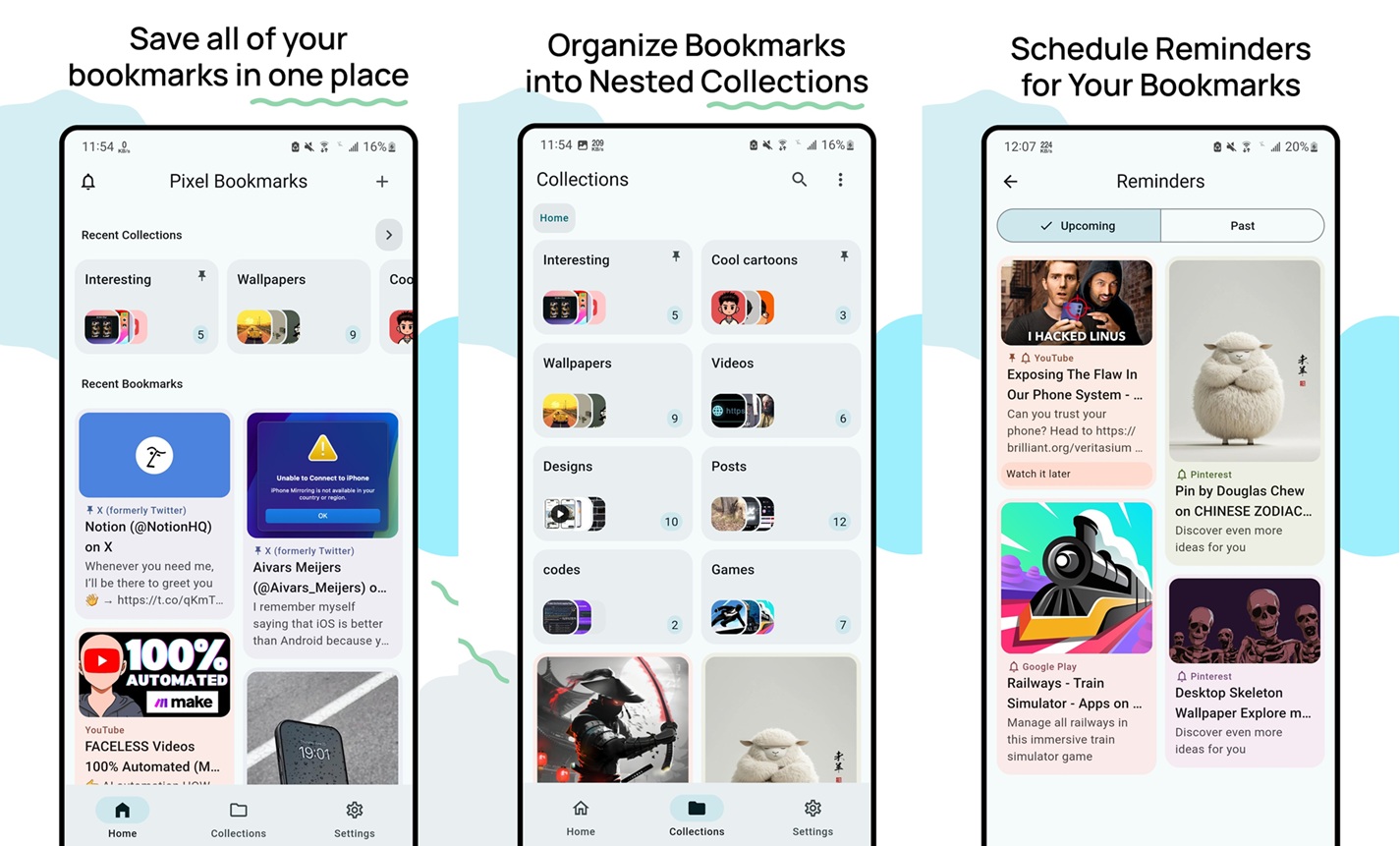
If you are a reader, you’d know how important bookmarks are, especially when you are referring to more than one book, right? Pixel Bookmarks works on a similar principle but lets users create bookmarks across YouTube, Reddit, Instagram, Google, Chrome, or essentially any other app. 

Pixel Bookmarks essentially lets you segregate links and source materials and organize them in collections and nested ones to fit in workflows as you desire, making them easier to browse. The app has a power search option wherein you can search by tags, keywords, collections, and more. There’s support for Google Drive and local backup as well, so that in case of switching between devices, you don’t miss the gems you earlier found on the internet.

Download: Pixel Bookmarks

BNESIM

Category: eSim Provider
BNESIM - best Android apps
Image Credits: BNESIM, via Google Play Store

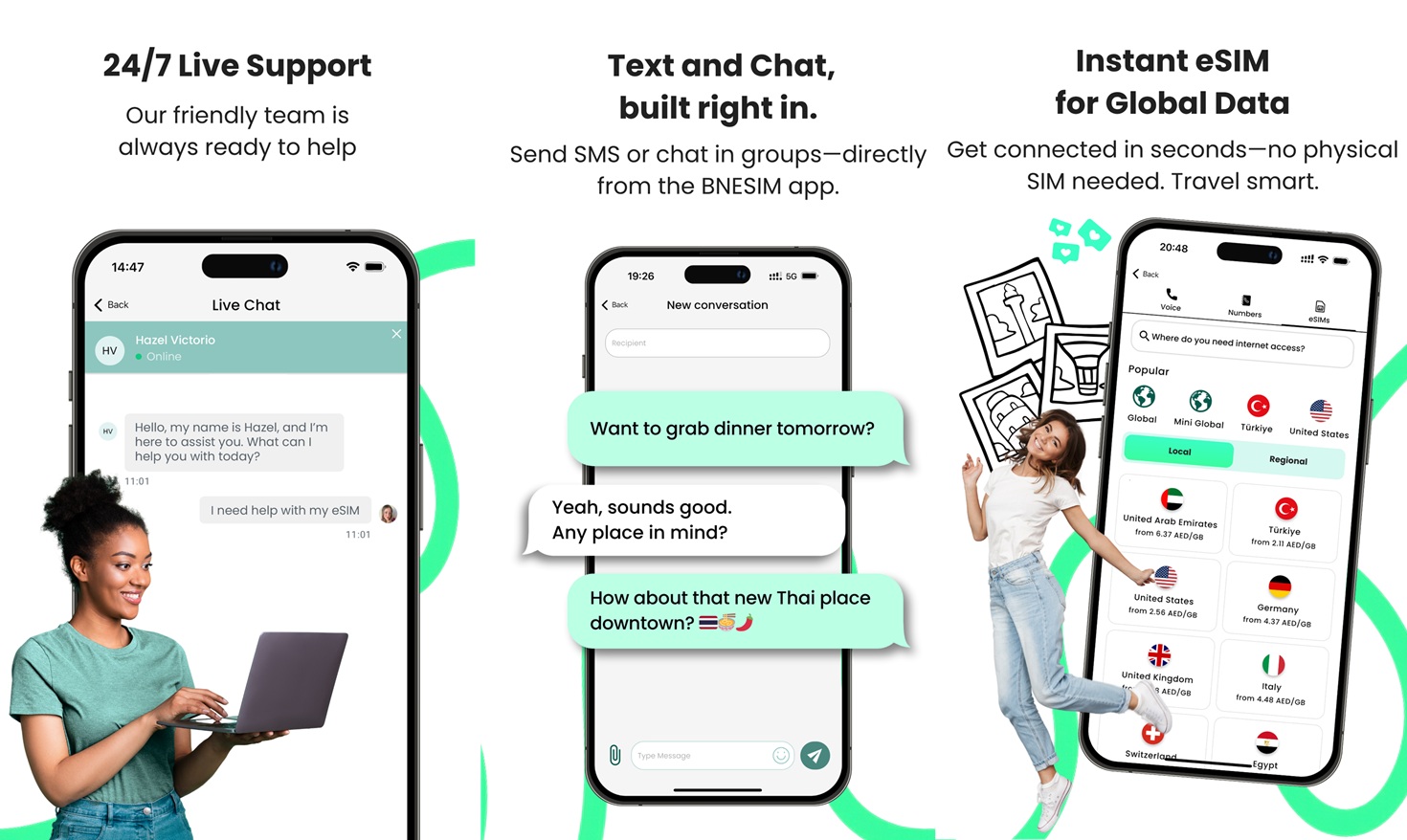
Traveling to a new part of the world is exciting but also tricky when you don’t have calling or internet in that location unless you buy a SIM card or get an eSIM after arriving. With BNESIM, everything becomes a matter of seconds away with coverage of more than 100+ countries. You get an eSIM with calling and data capabilities, something you’ll thank us for when you want to make or receive a call on foreign soil. 

BNESIM has access to multiple landlines or phones, sets up voicemail, forwards to other numbers, makes a desktop phone call, or even calls a conference room, giving you an all-around truly phone experience. A built-in VPN protects your privacy from prying eyes while being battery-friendly. Note that you need to buy credits and access its Pro subscription for AI INVR, voice, and other plans, but it is still worth it.

Download: BNESIM

SuperAlarm

Category: Alarm/Reminder
Super Alarm
Image Credits: Super Alarm, Google Play Store

Do you know what the world’s most difficult thing to do is? Is it a Le Mans race? A triathlon, maybe? Or is it a complex mission to Mars? You hear Elon somewhere? Well, all this can be difficult, but my personal opinion says that waking up in the morning, especially when it is breezy and cold out there and you are tucked in your favorite blanket, is the most difficult of them all. Many times, we press that snooze button, and that’s where the trickle effect of waking up late commences.

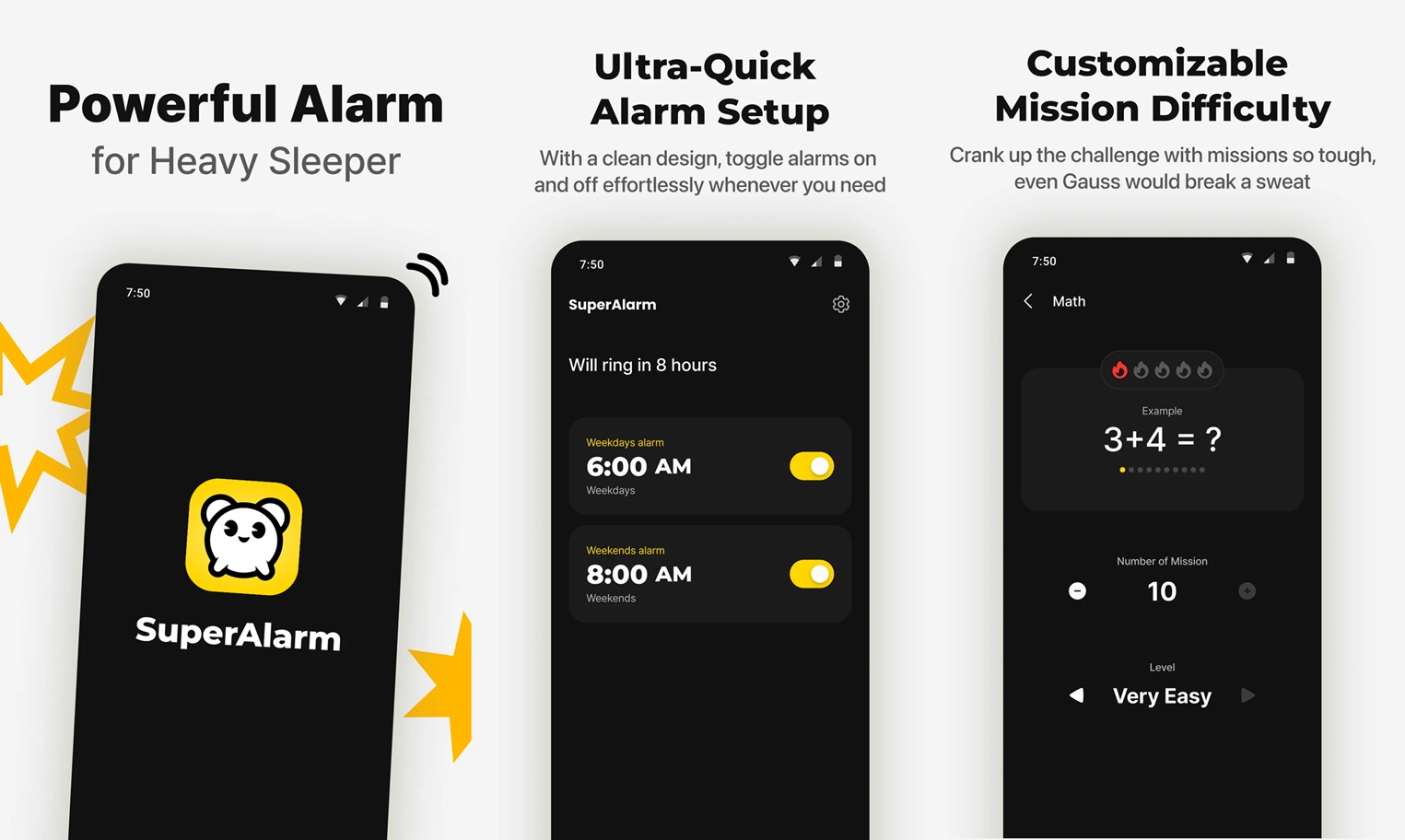
SuperAlarm is a normal-looking alarm clock app that lets you set up alarms when you have to do certain things, such as wake up, get ready, leave home, etc. With SuperAlarm, snoozing becomes a task as you no longer have the ability to snooze an alarm. It introduces innovative challenges to snooze an alert, such as calculations, shaking, walking, memory games, etc., and all that requires you to wake up soundly and respond. It is coupled with powerful sounds that should wake up even a deep sleeper. Give it a try!

Download: SuperAlarm

Wrapping up!

And that’s a wrap, literally. These were our picks for the best Android apps you must try in February 2026, the second month of this year. From using Pomodoro to focus on tasks to keeping your reading materials organized, from using AI to its full extent to assist you in various use cases to keeping your fitness at its prime and beyond, we tried to bring a whole lot of apps at your fingertips from different categories so that there’s one app for you no matter what interests you.

Drop a comment below if you liked our latest February 2026 collection, and try the January 2026 listicle to know what gems we found from the haystack of apps last month.

Share This Article
Follow:
A wordsmith, a kin tech observer, a sci-fi fanatic and a scientific documentary buff.
Highlights
  • Are you searching for trusted apps on the Google Play Store that currently has more than 3 million apps?
  • Well, you have come to the right place as we take you on a journey with our picks for the best Android apps we came across for this month's edition.
  • From a focus app to an AI on-screen assistant, to a eSIM provider with 100+ countries, here's our pick for the best 5 Android apps you must give a try.

There are 3+ million apps on the Play Store, but it is almost a no-brainer that you could be searching for the best Android apps to try every month. Why, you’d ask? The list of best, leading, and most downloaded popular apps has one thing in common—they almost ignore the hidden gems and the ones that may be termed as underrated.

This is the reason why you would land on an app in the Play Store amassing only a few hundred or thousands of downloads, even though you found it to be great, because it wasn’t properly promoted, or not many people know its capabilities.

5 best Android apps you must try in February 2026

Well, we are plotting our picks for this month’s edition. These apps can be from any sect, category, or genre, and we at True-Tech have set out on our journey to “catch ’em all.”

Arc: AI Screen Assistant

Category: AI Assistant

Arc AI Assistant
Image Credits: Arc AI Assistant, via Google Play Store

AI is currently buzzing across smartphones, and there’s no turning back. Some phones have dropped access to AI tools and features available right away, while some still need doodling, such as launching an AI chatbot, such as ChatGPT or Gemini. Arc is an AI screen assistant that curtails such resistance and instead, offers more than 25 AI actions and tools available at your fingertips.

Want a summarized account for an email thread or a group message? Want to know the ingredients or a better and healthier swap for junk food? Don’t know how to respond to a message? Arc can assist. The app gives you access to all this and more, working with AI for context-aware conversations, fixing your grammar, being privacy-focused, and having an AI Read feature that gives natural-sounding versions of AI summaries. There’s more to it, but to be honest, you should give it a try once.

Download: Arc: AI Screen Assistant

FlowStack

Category: To-Do list, Time-keeper, Focus App

FlowStack
Image Credits: FlowStack, via Google Play Store

Yes, the Pomodoro technique works in mysterious ways, jolting you down to specific tasks in a focused manner. FlowStack is an app that uses the same principle as plotting your daily tasks into timelines. If a book reading session should last 20 minutes or a specific email has to be drafted and sent in five minutes before you run out of time, FlowStack is an app. It essentially prevents you from getting distracted or spending a lot of time on a task that could’ve been wrapped up sooner. 

For instance, I can jot down this listicle in an hour, but given the fact that I myself can get distracted, sometimes it takes me longer. FlowStack lets you write down tasks, allocate time, add five-ish minutes on the fly, or create a FlowStack wherein the timer doesn’t go off, but rather, it becomes a stopwatch giving you unlimited (yet quantifiable) time to do a specific task, such as your morning walks, writing a blog post, or responding to emails in your office. The app essentially helps you manage your time properly, which is a must-have.

Download: FlowStack

Pixel Bookmarks

Category: Organizer

Pixel Bookmarks
Image Credits: Pixel Bookmarks, via Google Play Store

If you are a reader, you’d know how important bookmarks are, especially when you are referring to more than one book, right? Pixel Bookmarks works on a similar principle but lets users create bookmarks across YouTube, Reddit, Instagram, Google, Chrome, or essentially any other app. 

Pixel Bookmarks essentially lets you segregate links and source materials and organize them in collections and nested ones to fit in workflows as you desire, making them easier to browse. The app has a power search option wherein you can search by tags, keywords, collections, and more. There’s support for Google Drive and local backup as well, so that in case of switching between devices, you don’t miss the gems you earlier found on the internet.

Download: Pixel Bookmarks

BNESIM

Category: eSim Provider

BNESIM - best Android apps
Image Credits: BNESIM, via Google Play Store

Traveling to a new part of the world is exciting but also tricky when you don’t have calling or internet in that location unless you buy a SIM card or get an eSIM after arriving. With BNESIM, everything becomes a matter of seconds away with coverage of more than 100+ countries. You get an eSIM with calling and data capabilities, something you’ll thank us for when you want to make or receive a call on foreign soil. 

BNESIM has access to multiple landlines or phones, sets up voicemail, forwards to other numbers, makes a desktop phone call, or even calls a conference room, giving you an all-around truly phone experience. A built-in VPN protects your privacy from prying eyes while being battery-friendly. Note that you need to buy credits and access its Pro subscription for AI INVR, voice, and other plans, but it is still worth it.

Download: BNESIM

SuperAlarm

Category: Alarm/Reminder

Super Alarm
Image Credits: Super Alarm, Google Play Store

Do you know what the world’s most difficult thing to do is? Is it a Le Mans race? A triathlon, maybe? Or is it a complex mission to Mars? You hear Elon somewhere? Well, all this can be difficult, but my personal opinion says that waking up in the morning, especially when it is breezy and cold out there and you are tucked in your favorite blanket, is the most difficult of them all. Many times, we press that snooze button, and that’s where the trickle effect of waking up late commences.

SuperAlarm is a normal-looking alarm clock app that lets you set up alarms when you have to do certain things, such as wake up, get ready, leave home, etc. With SuperAlarm, snoozing becomes a task as you no longer have the ability to snooze an alarm. It introduces innovative challenges to snooze an alert, such as calculations, shaking, walking, memory games, etc., and all that requires you to wake up soundly and respond. It is coupled with powerful sounds that should wake up even a deep sleeper. Give it a try!

Download: SuperAlarm

Wrapping up!

And that’s a wrap, literally. These were our picks for the best Android apps you must try in February 2026, the second month of this year. From using Pomodoro to focus on tasks to keeping your reading materials organized, from using AI to its full extent to assist you in various use cases to keeping your fitness at its prime and beyond, we tried to bring a whole lot of apps at your fingertips from different categories so that there’s one app for you no matter what interests you.

Drop a comment below if you liked our latest February 2026 collection, and try the January 2026 listicle to know what gems we found from the haystack of apps last month.
Share This Article
Follow:
A wordsmith, a kin tech observer, a sci-fi fanatic and a scientific documentary buff.