
- WhatsApp now lets you silence unknown callers attempting to reach out.
- Here's how you can actually turn on this feature on Android and iOS devices, or turn it off, if needed.
- This feature adds another layer of privacy protection against prying eyes, attackers, an threat actors, that could potentially cause users harm, if entertained.
WhatsApp keeps adding privacy features to its catalogue for billions of users at a time. One of these features is the ability to silence unknown callers trying to get your attention, whether for spamming, scamming, or simply causing random interruptions. Oftentimes, blocking these unknown callers isn’t an option, since how many people would you block anyway? In such cases, this feature can be a great asset. Here’s how you can use it across both Android and iOS devices.
How to silence unknown callers on WhatsApp for Android?
- Launch WhatsApp on your phone.
- Head over to the “Settings” section by clicking on the three-dot menu in the top-right corner.
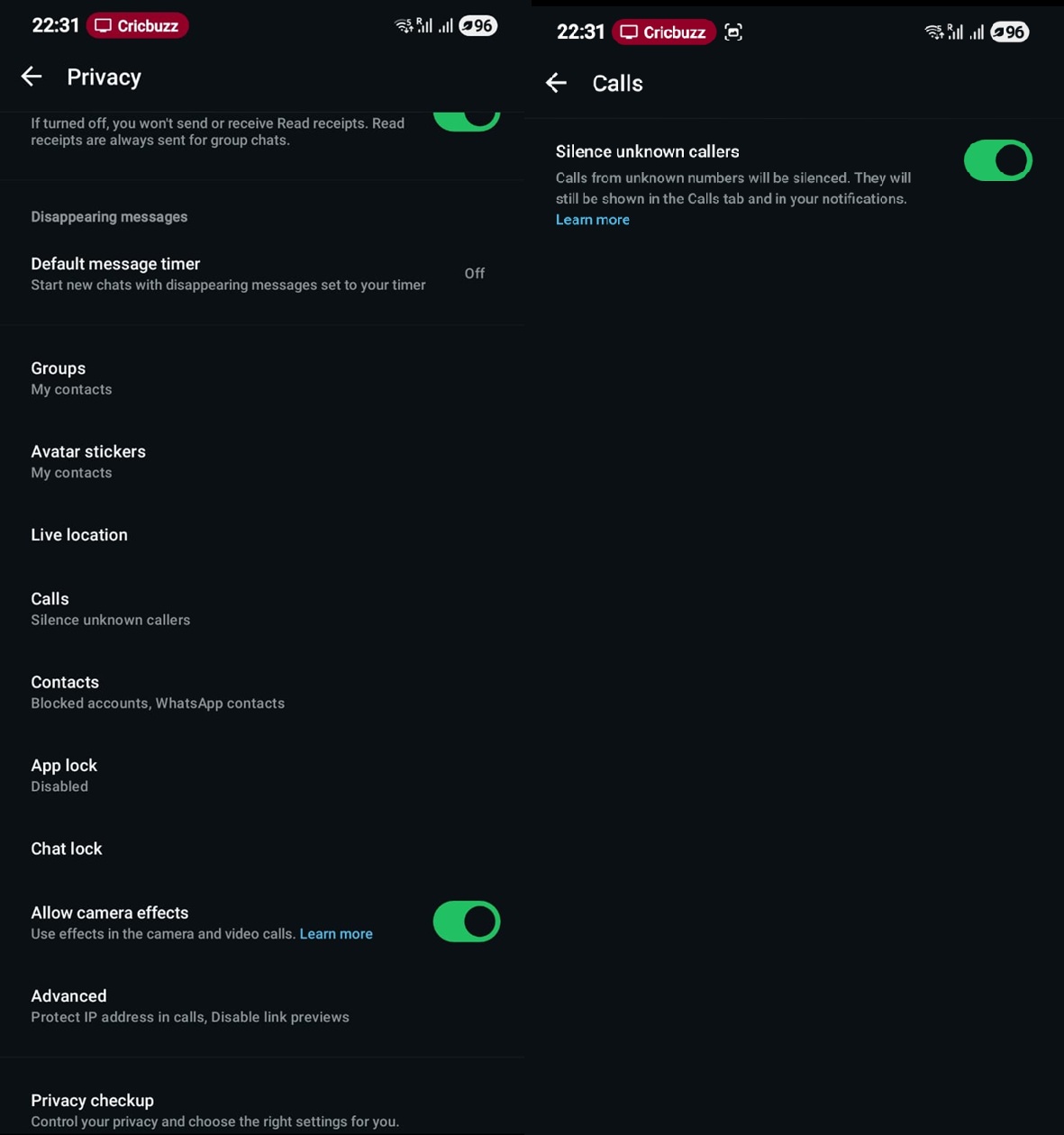
- Navigate to “Privacy.”
- Next up, scroll to find the “Calls” option on the app.
- Now, you need to find “Silence Unknown Callers” and toggle it to enable/ON.
- Toggle it again to turn it OFF.
How to silence unknown callers on WhatsApp for iOS?
- Open “WhatsApp” on your iPhone.
- Navigate to “Settings.”
- Next up, you need to head over to “Privacy.”
- Scroll to find “Calls” and open it.
- Lastly, you need to locate “Silence Unknown Callers” and enable it.

Why do you need to silence unknown callers?
You got a call from a random user the other day. It could be great; however, there’s a great chance it could be marketing or, even worse, scam calls, meaning your phone could be at risk of getting attacked, such as by phishing, skimming, or simply manipulating you into revealing an OTP received from your bank that will eventually help these attackers siphon your life savings.
Yes, it is true that you can choose to ignore such calls or even block them if they are repetitive. However, it is not worth the hustle, given that these calls can come anytime, and you might pick up only to find you got scammed.
Keep up with the tech that actually matters.
Add us as a preferred source on Google Search for quicker access to our coverage.

The privacy feature to silence unknown callers is great in these cases. WhatsApp will detect if the caller’s contacts are saved on your phone or not or if they have a history. If not, these potential spam calls will be silenced. You can still check them in the missed call and decide whether to call or text them if needed. The feature doesn’t prevent contacts from calling you at any time. Well, it’s time to upgrade your privacy suite with this feature on-board WhatsApp.