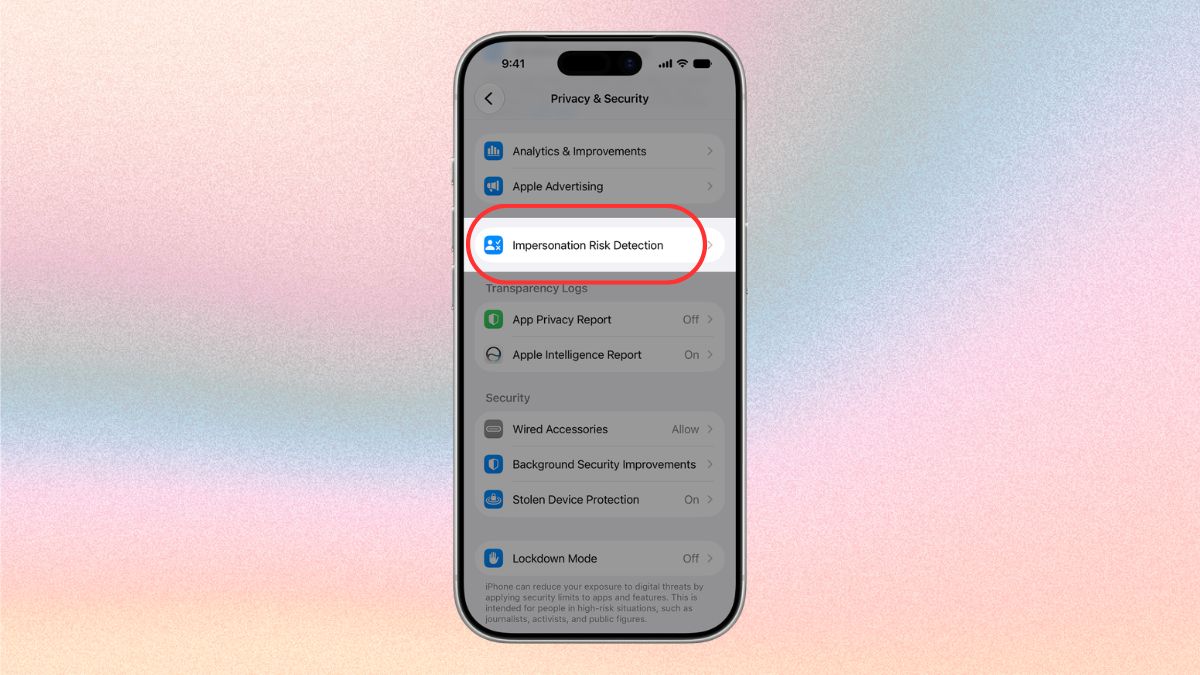
- Apple has introduced 'Impersonation Risk Detection' security feature on-board iOS 27 and iPadOS 27.
- The feature assesses patterns, interaction activities, timings, and other parameters to find suspicious activities on apps.
- It alerts the app and the user preventing any suspicious payments or handing over OTP or other types of social engineering attacks.
Impersonation scams are on the rise as users are receiving calls and messages from fake delivery services, banks, and government agencies, forcing or guiding them to change certain account details or hand out OTPs and access to their banking accounts under pretenses.
Introducing Apple’s latest innovative security feature dubbed Impersonation Risk Detection. As the name suggests, the security feature is built to prevent any impersonation attempts to gain access to your accounts, make payments, or change sensitive account information when someone tries to impersonate a policeman, a key government authority, or scamsters.
Apple introduces the Impersonation Risk Detection feature
Available across iOS 27 and iPadOS 27 (and later), the feature takes a dig at active social engineering scams. Unlike phishing or other types of attacks, an impersonation scam might occur over a call, SMS, WhatsApp, or other mode of communication.
Here, the scamsters usually impersonate a policeman, delivery guy, government employee, or bank employee, among others, trying to convince their victims (aka users) to take certain action. It could be anything from making a so-called payment to get gifts, items, or services in return.
Scamsters might try to hijack your bank accounts, take over OTPs to withdraw exorbitant amounts from your bank, etc. In fact, AI has enabled scamsters to change their voice to a person you trust, asking for money, such as faking an accident.
Apple’s Impersonation Risk Detection feature takes a swing at such active scams by assessing the situation, taking a thorough assessment based on patterns, interaction, timing, and other metrics, when requested by a supporting app.

Once the preliminary assessment is done, it returns a risk level to the app in question, such as GPay (India), alerting if the level is Unknown (no suspicious activity detected), Medium (some signs of suspicious activity), or High (significant signs of suspicious activity). This is when the app and users can decide whether to proceed or not.
Unlike other scams, a social engineering scam basically works by guiding or pressuring victims. With these alerts in place, users will be able to tell if they are being targeted and take preventative measures before any damage can be done.
How to turn on iOS 27 Impersonation Risk Detection?
Although Apple has released this security feature on iOS 27 and iPadOS 27 supported devices, it isn’t enabled by default. Here’s how to turn it ON.
- Open Settings on your iPhone or iPad.
- Proceed to “Privacy & Security” and scroll to find “Impersonation Risk Detection.”
- Now, you need to turn ON the feature “Share with App Developers.”
- You need to sign in to the App Store using your Apple Account to authenticate.
Note: The impersonation risk detection security feature doesn’t take effect right away, as it may take up to 24 hours to take effect. Once it is turned ON completely, it will protect users from potential impersonation scams trying to loot under pretenses.
The aim is to prevent users from falling prey to such scams. Users get app-by-app control over access that they can review and calibrate. The Cupertino-based giant mentions it works with the help of supported apps; however, it hasn’t published the list on its support page yet.
Keep up with the tech that actually matters.
Add us as a preferred source on Google Search for quicker access to our coverage.