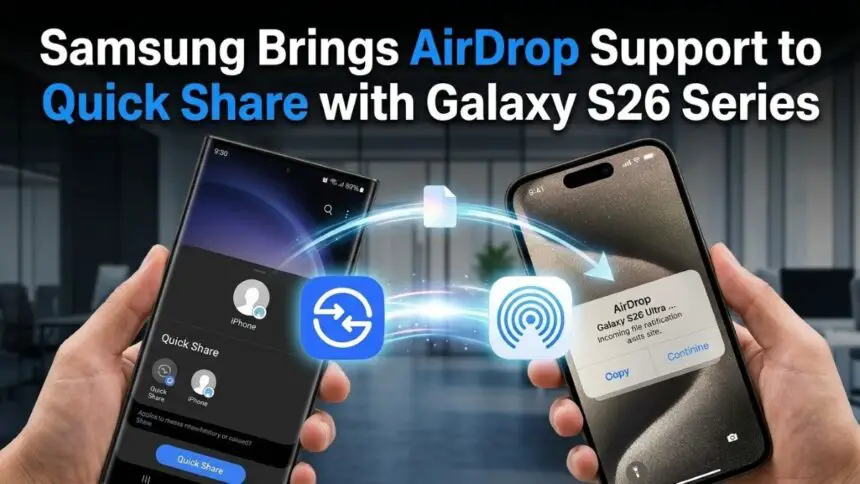
Samsung Galaxy S26 series makes sharing files between Android and iPhone easier than ever

Jeeva Shanmugam
3 Min Read
Highlights
  • Galaxy S26 series AirDrop feature finally lets you send photos and videos between Android and iPhone directly, no extra apps or weird steps needed
  • The sharing is fast, keeps original quality, and works almost like native AirDrop, which honestly makes things much easier now
  • This could slowly remove the gap between Android and iPhone, as more brands are expected to support this kind of sharing soon

For a long time, sending files between Android and iPhone was honestly annoying. You had to depend on apps or links, and sometimes the quality just drops. But now with the recently released Galaxy S26 series AirDrop feature, things are finally getting better. Samsung has added a way to share files directly with Apple devices. It’s simple, fast, and feels like it should have been there already.

Samsung expands file sharing beyond Android

Earlier, if you wanted to send a video from a Samsung phone to an iPhone, you probably used WhatsApp or Google Drive. Not the best option, and it takes time too. With the Galaxy S26 series AirDrop release, you can now send files directly. No third-party apps. No login. Just open share and send.
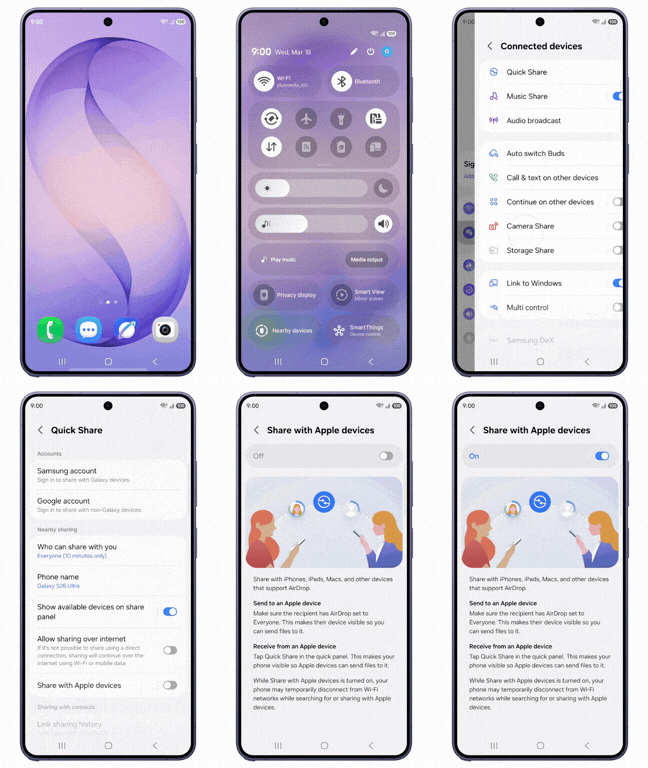
Samsung Galaxy S26 series AirDrop feature finally enables Android and iPhone sharing
Image Credits: Samsung

The transfer is quick, and it keeps the original quality. That part actually matters if you send photos or large videos. This idea didn’t just come out of nowhere. Google already tried something similar on Pixel phones. But Samsung doing this makes it bigger because more people use Galaxy devices.

How the feature works

It’s not complicated. You don’t need to be technical for this.

  • Go to Settings
  • Tap Connected Devices
  • Open Quick Share
  • Turn on Share with Apple devices

That’s it. Once you turn it on, your phone will show up on nearby iPhones when they open their share menu. This is not just another feature. It removes one big problem between Android and iPhone users.

Before, both ecosystems felt locked. Now with the AirDrop feature, that wall is kind of breaking. You don’t have to think twice before sending files to someone using an iPhone. It just works, mostly.

Galaxy S26 series AirDrop feature availability

Right now, this is mainly on the Galaxy S26 series. But it won’t stay like that for long. Other brands like Oppo are already planning to bring similar support. So in 2026, we might see this becoming normal across Android.

Overall, the AirDrop feature is simple but important. It fixes a real problem that users had for years. It’s not perfect yet, maybe, but it’s a big step. Sharing files between Android and iPhone is finally easy. That’s something people actually needed.

Keep up with the tech that actually matters.

From breaking news to deep dives, TrueTech brings you the tech stories worth knowing.
Add us as a preferred source on Google Search for quicker access to our coverage.

Add TrueTech as a preferred source on Google
Share This Article
Making spicy content on the Internet!
Highlights
  • Galaxy S26 series AirDrop feature finally lets you send photos and videos between Android and iPhone directly, no extra apps or weird steps needed
  • The sharing is fast, keeps original quality, and works almost like native AirDrop, which honestly makes things much easier now
  • This could slowly remove the gap between Android and iPhone, as more brands are expected to support this kind of sharing soon

For a long time, sending files between Android and iPhone was honestly annoying. You had to depend on apps or links, and sometimes the quality just drops. But now with the recently released Galaxy S26 series AirDrop feature, things are finally getting better. Samsung has added a way to share files directly with Apple devices. It’s simple, fast, and feels like it should have been there already.

Samsung expands file sharing beyond Android

Earlier, if you wanted to send a video from a Samsung phone to an iPhone, you probably used WhatsApp or Google Drive. Not the best option, and it takes time too. With the Galaxy S26 series AirDrop release, you can now send files directly. No third-party apps. No login. Just open share and send.

Samsung Galaxy S26 series AirDrop feature finally enables Android and iPhone sharing
Image Credits: Samsung

The transfer is quick, and it keeps the original quality. That part actually matters if you send photos or large videos. This idea didn’t just come out of nowhere. Google already tried something similar on Pixel phones. But Samsung doing this makes it bigger because more people use Galaxy devices.

How the feature works

It’s not complicated. You don’t need to be technical for this.

  • Go to Settings
  • Tap Connected Devices
  • Open Quick Share
  • Turn on Share with Apple devices

That’s it. Once you turn it on, your phone will show up on nearby iPhones when they open their share menu. This is not just another feature. It removes one big problem between Android and iPhone users.

Before, both ecosystems felt locked. Now with the AirDrop feature, that wall is kind of breaking. You don’t have to think twice before sending files to someone using an iPhone. It just works, mostly.

Galaxy S26 series AirDrop feature availability

Right now, this is mainly on the Galaxy S26 series. But it won’t stay like that for long. Other brands like Oppo are already planning to bring similar support. So in 2026, we might see this becoming normal across Android.

Overall, the AirDrop feature is simple but important. It fixes a real problem that users had for years. It’s not perfect yet, maybe, but it’s a big step. Sharing files between Android and iPhone is finally easy. That’s something people actually needed.

Keep up with the tech that actually matters.

From breaking news to deep dives, TrueTech brings you the tech stories worth knowing.
Add us as a preferred source on Google Search for quicker access to our coverage.

Add TrueTech as a preferred source on Google
Share This Article
Making spicy content on the Internet!