- WhatsApp now lets you reserve usernames on your account.
- Rolled out to a limited number of users for now, the feature lets users safeguard their phone numbers when sharing WhatsApp details with with someone
- The feature is currently locked till reserving a username, however, it's usability will be enabled soon.
WhatsApp usernames are a new thing! I mean, it has become the talk of the town (just a metaphor) as people are hurrying to reserve a WhatsApp username of their choice before someone else reserves it.
It is super useful, as you can read more about it here. You can set it up on your Android or iOS devices using these easy-to-follow step-by-step instructions.
How to reserve a WhatsApp username on Android
Let’s see how you can set up a WhatsApp username on any Android smartphone.
- Open WhatsApp on your phone (duh!).
- Tap on the three vertically stacked dots for options and proceed to “Settings.”
- Now, go to “Account” and then “Username.”
- You will be greeted with a new screen saying “Usernames are coming soon,” but here’s the kicker: you can reserve it right away.
- You can click on “Create Username” to suggest a new identifier for yourself, or you can connect “WhatsApp” with “Instagram” or “Facebook” to use the username mentioned there.
- WhatsApp will alert you if your username is already taken.
- Once selected, hit “Save >> Done,” and voilà, it’s done.
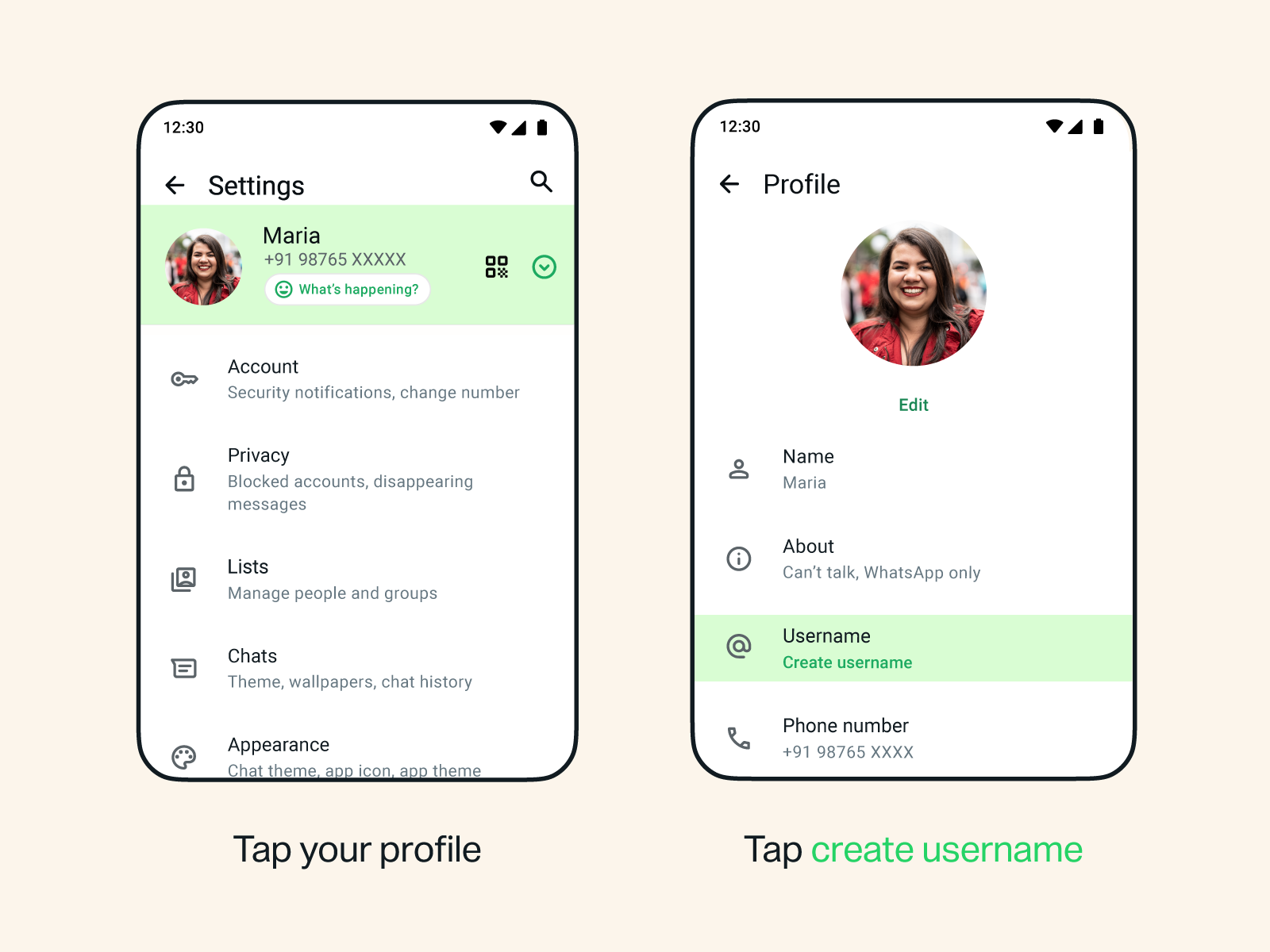
For instance, I was able to connect to Instagram to get my username “Imaadilraval.” Note that although reserving WhatsApp usernames has started, the feature is still in the works and will take some more time before it actually becomes usable.
How to reserve a WhatsApp username on iPhone
Here’s how you can set it up on iPhones and other iOS devices.
- First, open WhatsApp.
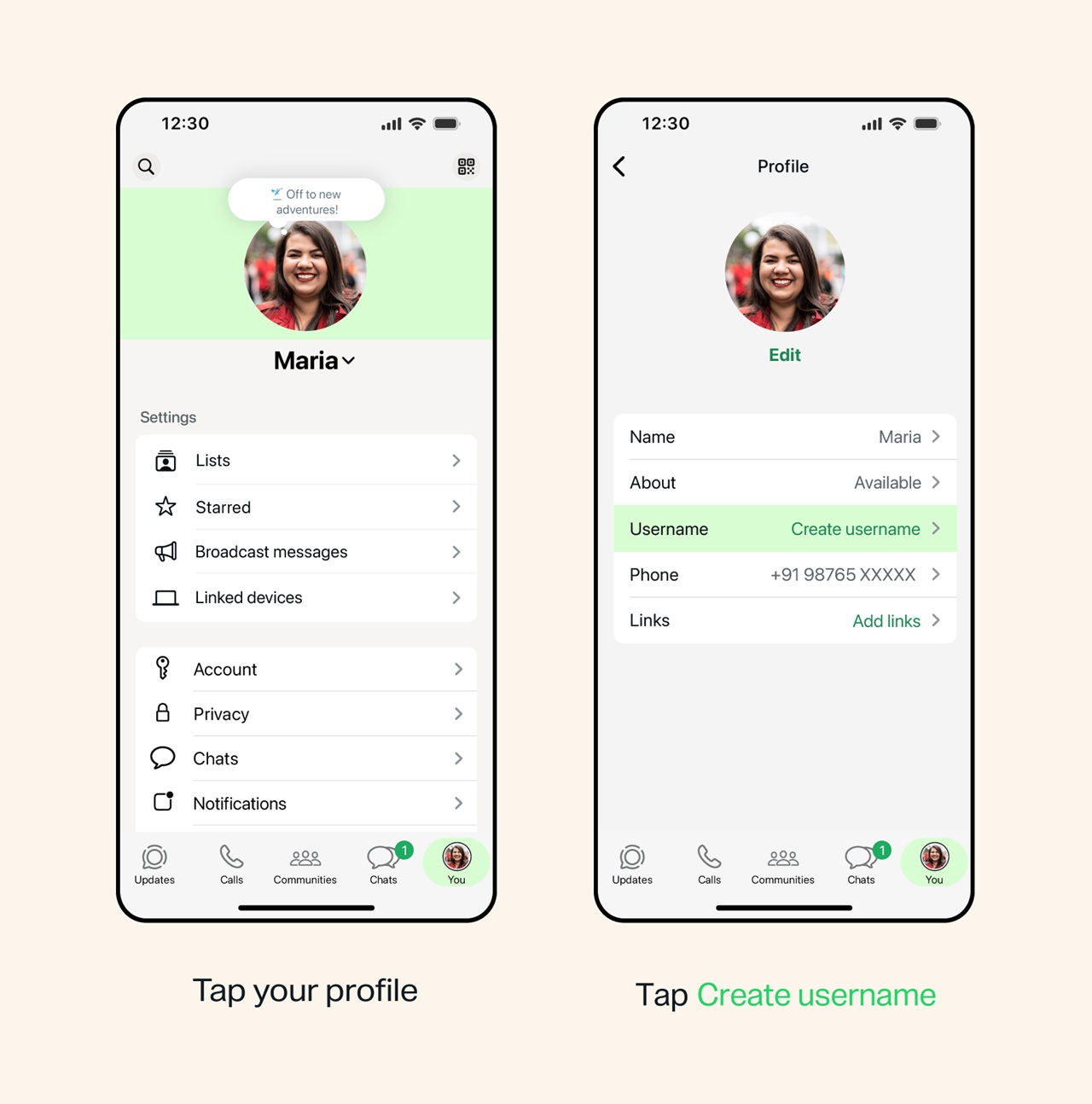
- Proceed to the “You” tab.
- Next, tap on your profile or navigate through “Account” and select “Create username.”
- Tap on “Username,” which should be blank for now.
- Tap on “Create username” and set up the name of your choice, or you can connect to Instagram or Facebook to set the same username accordingly.
- If available, you should get confirmation right away. If not, you will have to generate suggestions or come up with something unique for yourself.
- Hit “Save >> Done” and voilà.
Why reserving your username now could be worthwhile
The feature is still being worked on and will be unleashed in the coming days. However, WhatsApp has opened its doors to let users select their username right away, given that there are more than 3 billion users it has to cater to.

The feature is still rolling out
For now, the feature seems to be available across a limited number of users; however, as the feature rolls out across more, it would be difficult to get the username of your choice if it is already reserved by someone sharing the same name (or so). I was able to secure an Instagram username on WhatsApp, and in fact, it appears to be a common practice, as the instant messaging app appears to be reserving legit usernames for users before anyone else can use them.
You know how Gmail runs out of email addresses, where you have to write numbers and symbols to ensure your name is still on that address. Thus, it is crucial to reserve it now unless you are okay with keeping a different username altogether. This is especially true for organizations that will want to keep their names as usernames and not rely on numbers or symbols as prefixes or suffixes.
Keep up with the tech that actually matters.
Add us as a preferred source on Google Search for quicker access to our coverage.