
OpenAI launches an education-focused feature to encourage critical thinking among students

Aadil Raval
3 Min Read
Highlights
  • OpenAI introduces a new way to interact with its AI aka the Study Mode.
  • The aim is to help students understand concepts with step-by-step instructions and prompts rather than giving them answers right away.
  • It will help with their critical thinking, something skeptics are worried about, ever since the AI chatbot era commenced.

OpenAI ChatGPT has transformed how we perceive the web, and now, it is donning a new hat of a tutor. The AI giant has launched a tool called “Study Mode” that essentially uses a different tactic to return answers. Here’s our take on how the Study Mode will help users and why it was brought on-board to begin with.

ChatGPT introduces ‘study mode’

The emergence of AI chatbots such as ChatGPT and Gemini has become a blessing for people, especially those with homework at their schools and colleges. Although it is a great learning tool, it takes away the learning experience that a tutor would give. With these concerns in place, the folks at OpenAI have released ‘Study Mode’, a new way of studying on the GenAI chatbot that embraces ‘real learning’. 

OpenAI ChatGPT Study Mode
Image Credits: ChatGPT

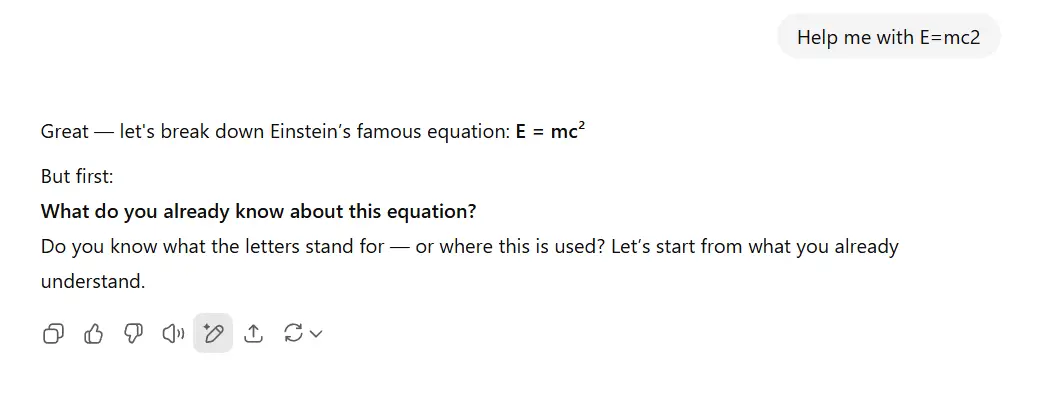
According to OpenAI, the mode uses Socratic questioning, self-reflection, and hints to understand what the student wants to achieve, their objectives and skill levels, furnishing responses based on one’s acumen.

We tried a few complex calculations, which gave us step-by-step instructions to find the solutions. Failing which, the chatbot would take us a step back and resume with the appropriate answers. The Study Mode on-board ChatGPT prompts users to answer certain questions at each step helping them understand the concepts better.

The aim is to unleash critical thinking among students, which is something that usual ChatGPT searches would take away the stimulus from. With the new mode enabled, ChatGPT allows students to think critically rather than relying solely on it. This should push students to use their minds and capabilities along with the power of AI when preparing for new concepts and exams, ultimately helping them grow and not restrict their abilities as it was perceived to.

How to use OpenAI’s ChatGPT study mode feature?

There’s no rocket science involved. You can start by going to OpenAI’s ChatGPT on your browser. Here are the steps – 

Step 1: Go to www.chatgpt.com.
OpenAI ChatGPT Study Mode
Image Credits: ChatGPT

Step 2: On the prompt section, tap on “Tools” and select “Study and Learn” from the dropdown.

Step 3: Once you are there, you can just ask a question such as “Help me with NPV?” or “Help me with Pythagoras’ theorem,” and ChatGPT should revert with step-by-step instructions. 

TAGGED:
SOURCES:OpenAI
Share This Article
Follow:
A wordsmith, a kin tech observer, a sci-fi fanatic and a scientific documentary buff.
Highlights
  • OpenAI introduces a new way to interact with its AI aka the Study Mode.
  • The aim is to help students understand concepts with step-by-step instructions and prompts rather than giving them answers right away.
  • It will help with their critical thinking, something skeptics are worried about, ever since the AI chatbot era commenced.

OpenAI ChatGPT has transformed how we perceive the web, and now, it is donning a new hat of a tutor. The AI giant has launched a tool called “Study Mode” that essentially uses a different tactic to return answers. Here’s our take on how the Study Mode will help users and why it was brought on-board to begin with.

ChatGPT introduces ‘study mode’

The emergence of AI chatbots such as ChatGPT and Gemini has become a blessing for people, especially those with homework at their schools and colleges. Although it is a great learning tool, it takes away the learning experience that a tutor would give. With these concerns in place, the folks at OpenAI have released ‘Study Mode’, a new way of studying on the GenAI chatbot that embraces ‘real learning’. 

OpenAI ChatGPT Study Mode
Image Credits: ChatGPT

According to OpenAI, the mode uses Socratic questioning, self-reflection, and hints to understand what the student wants to achieve, their objectives and skill levels, furnishing responses based on one’s acumen.

We tried a few complex calculations, which gave us step-by-step instructions to find the solutions. Failing which, the chatbot would take us a step back and resume with the appropriate answers. The Study Mode on-board ChatGPT prompts users to answer certain questions at each step helping them understand the concepts better.

The aim is to unleash critical thinking among students, which is something that usual ChatGPT searches would take away the stimulus from. With the new mode enabled, ChatGPT allows students to think critically rather than relying solely on it. This should push students to use their minds and capabilities along with the power of AI when preparing for new concepts and exams, ultimately helping them grow and not restrict their abilities as it was perceived to.

How to use OpenAI’s ChatGPT study mode feature?

There’s no rocket science involved. You can start by going to OpenAI’s ChatGPT on your browser. Here are the steps – 

Step 1: Go to www.chatgpt.com.

OpenAI ChatGPT Study Mode
Image Credits: ChatGPT

Step 2: On the prompt section, tap on “Tools” and select “Study and Learn” from the dropdown.

Step 3: Once you are there, you can just ask a question such as “Help me with NPV?” or “Help me with Pythagoras’ theorem,” and ChatGPT should revert with step-by-step instructions. 

TAGGED:
SOURCES:OpenAI
Share This Article
Follow:
A wordsmith, a kin tech observer, a sci-fi fanatic and a scientific documentary buff.