- WhatsApp beta for Android is testing a feature to disappear messages.
- The feature allows users to set disappearing messages after they read it.
- The feature is still under development and may take time before it arrives officially.
WhatsApp beta for Android v2.26.15.11 is testing disappearing messages, a new way to make messages disappear right after they are read. It gives exceptional controls to the senders on when their messages will vanish and can be a great asset for privacy-oriented users.
WhatsApp beta adds feature to disappear messages when ‘read’
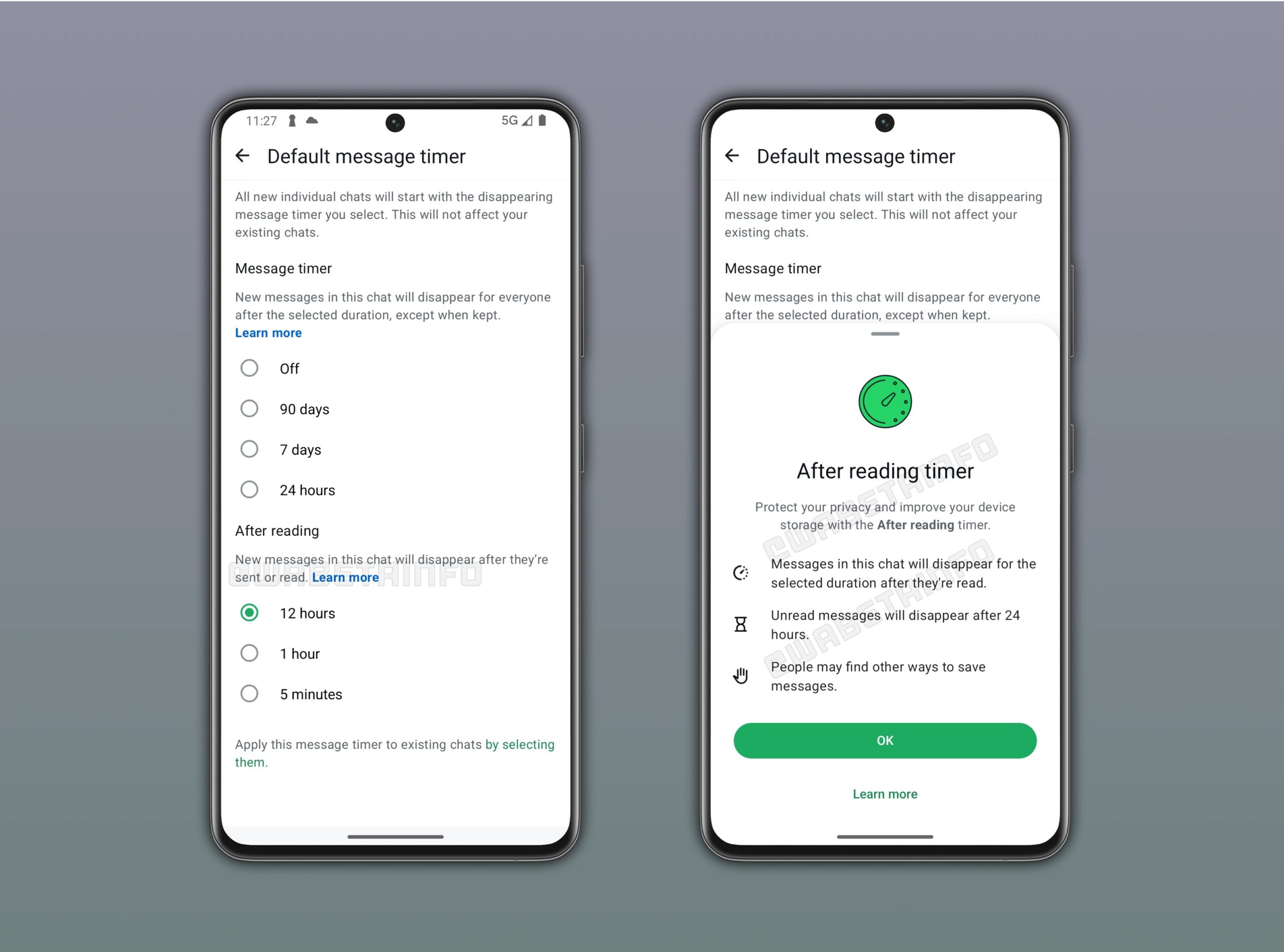
According to WABetaInfo, WhatsApp is working on a new feature aboard Android beta v2.26.15.11. The feature actually lets users delete or disappear messages reliably once the recipient reads them. Based on the inputs from previous testing, WhatsApp has gone a step forward, adding timers on such messages that extend from 5 minutes to 12 hours.
Unlike the standard disappearing messages that basically let users set 1 day, 1 week, or 90 days, after which the whole message will vanish, this privacy feature exercises greater control over messages. If chosen, senders can ensure the sent message is deleted as soon as the timer elapses.
How does it work?
For instance, if the sender selects ‘5 minutes’ as the timer, the message from the sender’s device will vanish right after the timer goes off. On the other hand, the recipients will still be able to see the messages even if they see them 4 or 5 hours after they were originally sent. The timer will only commence once the recipient sees it, and thus, if it’s after 4 hours, the messages will vanish exactly at 4 hours and 5 minutes.

Note that this functionality is currently under testing and will require further refinement before it reaches users. It is a part of the disappearing messages functionality, where one of the features is to make messages disappear at a specific time, irrespective of whether the recipient views them or not. Users can set it anywhere between 24 hours and 90 days or even turn it off.
On the contrary, this particular feature gives better control over how long the message stays visible without taking away the ability of the recipient to view it. The aim is to refine the user experience and give exceptional controls when sharing something personal or transactional, such as an OTP or verification code, or documents that shouldn’t be saved.
Do note that although the features are designed to give users privacy functionalities when on WhatsApp, they can be misused. Thus, it is always advised to use or let others use it with caution, especially if it involves you as the recipient.
Keep up with the tech that actually matters.
Add us as a preferred source on Google Search for quicker access to our coverage.