5 best Android apps you must try in March 2026

Aadil Raval
8 Min Read
Highlights
  • Good news as we are back with our take on the 5 best Android apps you should try in March 2026.
  • With more than 1.50 million apps, it becomes a task finding those that really matter and our listicle helps you with just that - picks of 5 at a time.
  • This edition consists of apps ranging from productivity, utility, AI assistant, and more giving you an wholesome experience.

Welcome aboard the ultimate guide to the 5 best Android apps you must try in March 2026. As usual, we tried bringing apps from different categories, such as utility, productivity, social media, and AI-powered apps, among others, to give our users an all-around experience. 

With more than 1.5 million apps (earlier 3.5 million before being curbed down), the Google Play Store is home to apps that can refine your user experience. Since most users may not even cross the 1K apps mark, we decided to bring apps from the expanse of the Play Store, often including lesser-known or downright underrated apps that you must try. 

Best Android apps you must try in March 2026

Well, let’s start without any further ado.

TypeAI

Category: Utility/Productivity/AI Writing Assistant
TypeAI
Image Credits: TypeAI, via Google Play Store

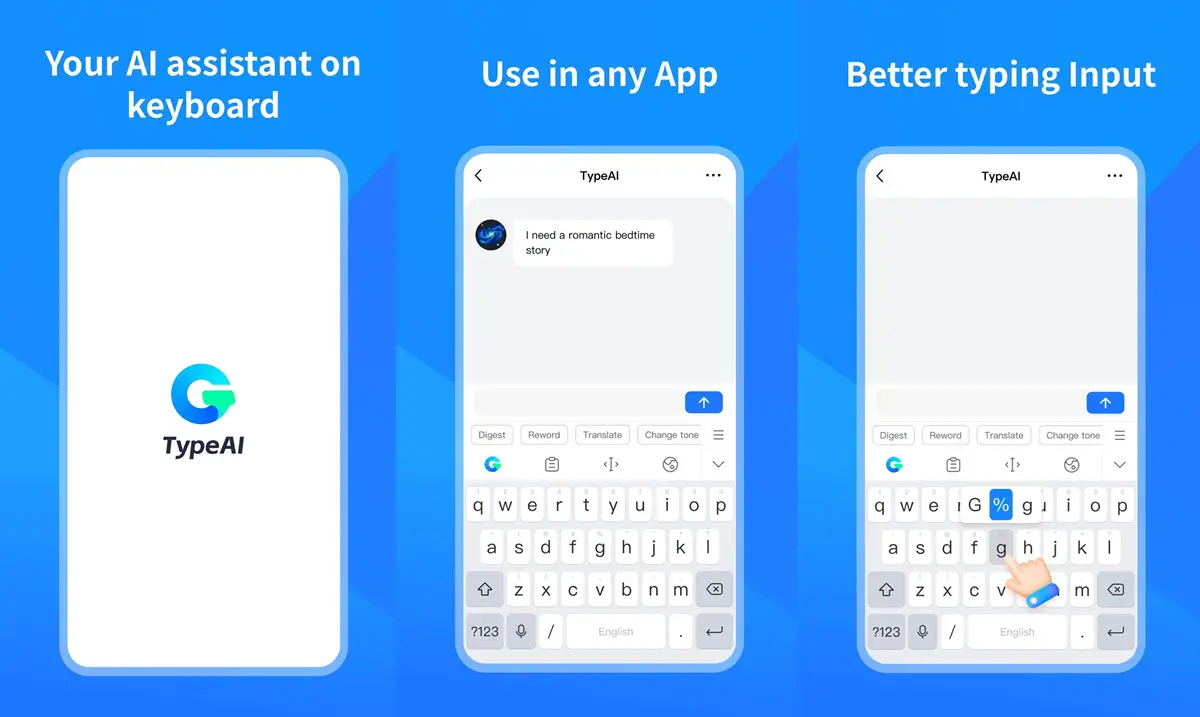
Thanks to ChatGPT and Gemini, you can write responses to an email eloquently without needing an English connoisseur. But it is still a hassle for many if they don’t know how to use these AI chatbots or don’t want to end up in a few more stops before sending a response. TypeAI is an excellent AI writing assistant that offers an ultimate keyboard interface. Instead of adding a few more steps to check for grammar errors, all you have to do is type “@fix” after a sentence while you are still on the WhatsApp text, and the app will take care of it.

TypeAI supports commands such as “rephrase,” “polite,” and “improve,” among others, based on which it can generate AI responses that suit your personality the best. Its goal is to introduce AI-backed texts without needing to go that extra mile on a ChatGPT or Gemini app to rephrase or check your grammar.

Download: TypeAI

LocalStream

Category: File Support / Remote / Utility
LocalStream
Image Credits: LocalStream, via Google Play Store

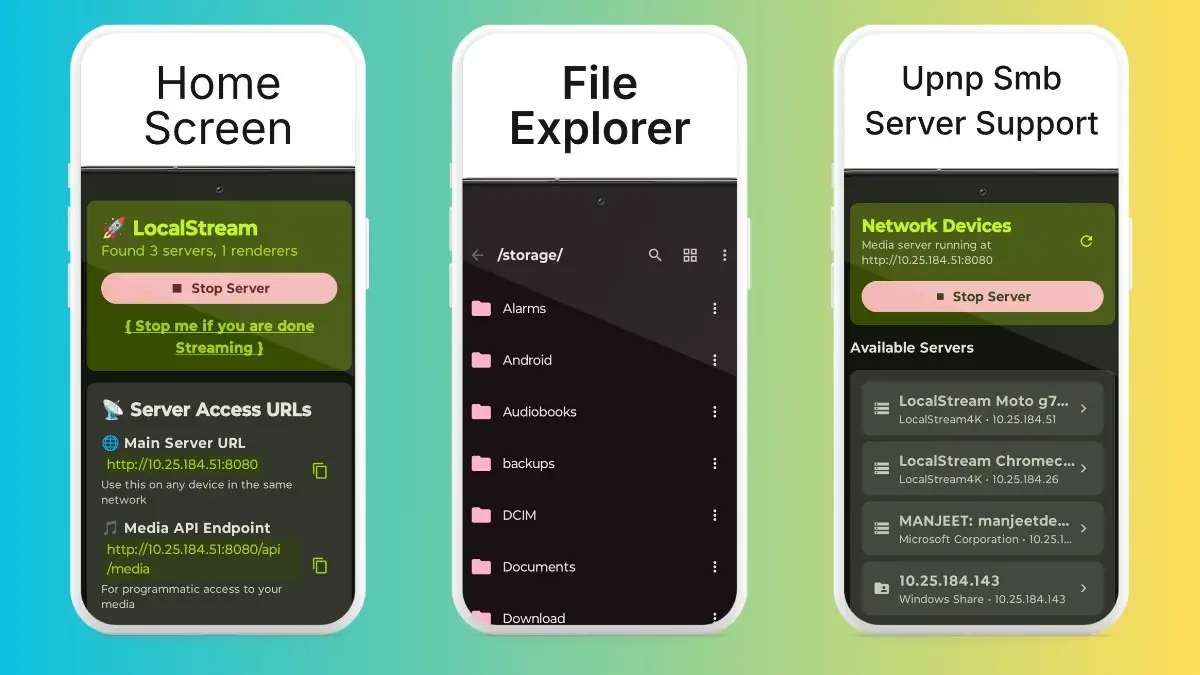
LocalStream, as the name suggests, streams something onto something, right? Well, the app essentially acts as a powerful file manager, allowing users to browse and manage files from different devices, such as iPhone to Android or Android to iPhone, etc. The app lets users access files, PDFs, archives, APKs, and media files, among others, without needing to physically connect the two devices. 

For instance, users can connect their Android phones with an iPhone to access files from one to the other. The app supports external storage file management as well as USB drives and SD cards. There’s also functionality to stream music, photos, and videos from your Android phone to a PC, smart TV, or console. Other features include a remote D-pad, full UPnP/DLNA compatibility, a built-in media player, etc. 

Download: LocalStream

Something OS Widgets

Category: Widgets
Something OS Widgets
Image Credits: Something OS Widgets, via Google Play Store

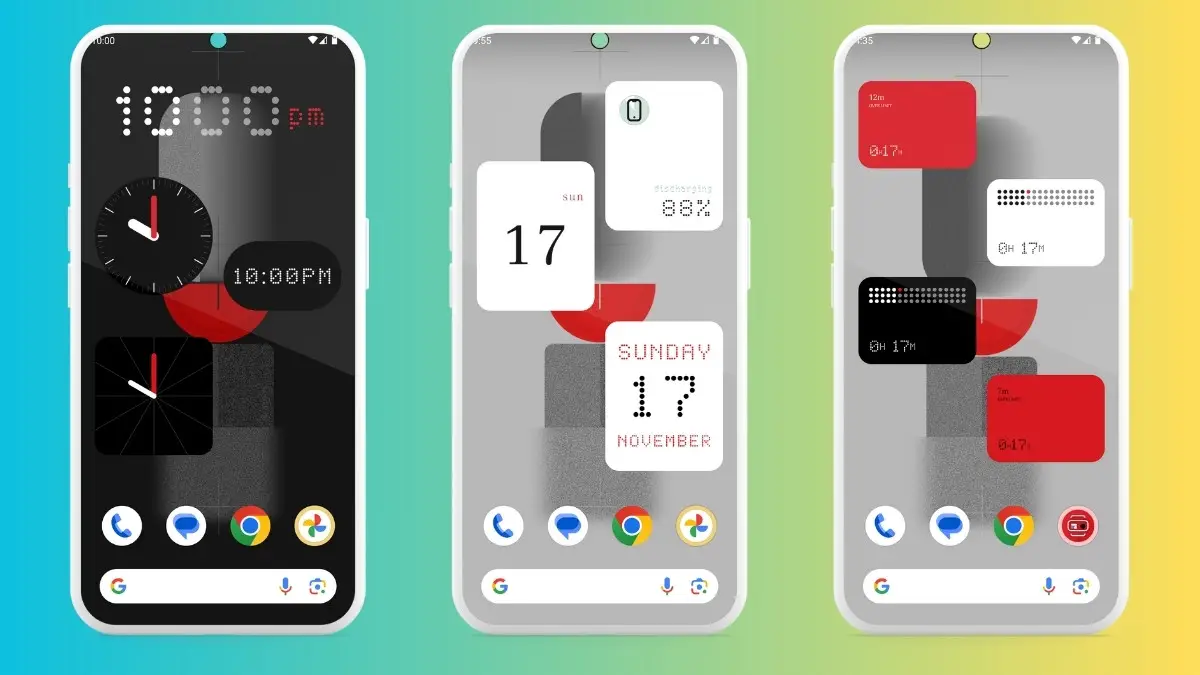
I am a big widgets guy who acts as eyeglasses on your phone without needing to open a phone. You can place crucial widgets on the home screen, such as a clock, alarms, stopwatch, battery info, weather info, etc. However, your phone might have a limited or cosmetically old UI/UX for these widgets that takes the fun out of them.

With Something OS Widgets, you eventually end up with minimalist Nothing OS-flavored widgets on your phone. From weather info to battery, calendar to music, and search to countdowns, this is one of the best Android apps out there for widgets. As aforementioned, these widgets are basically inspired by Nothing’s OS, which is reflected in their design, agility, and overall look and feel. 

Download: Something OS Widgets

Use As

Category: Utility
Use As app
Image Credits: Use As, via Google Play Store

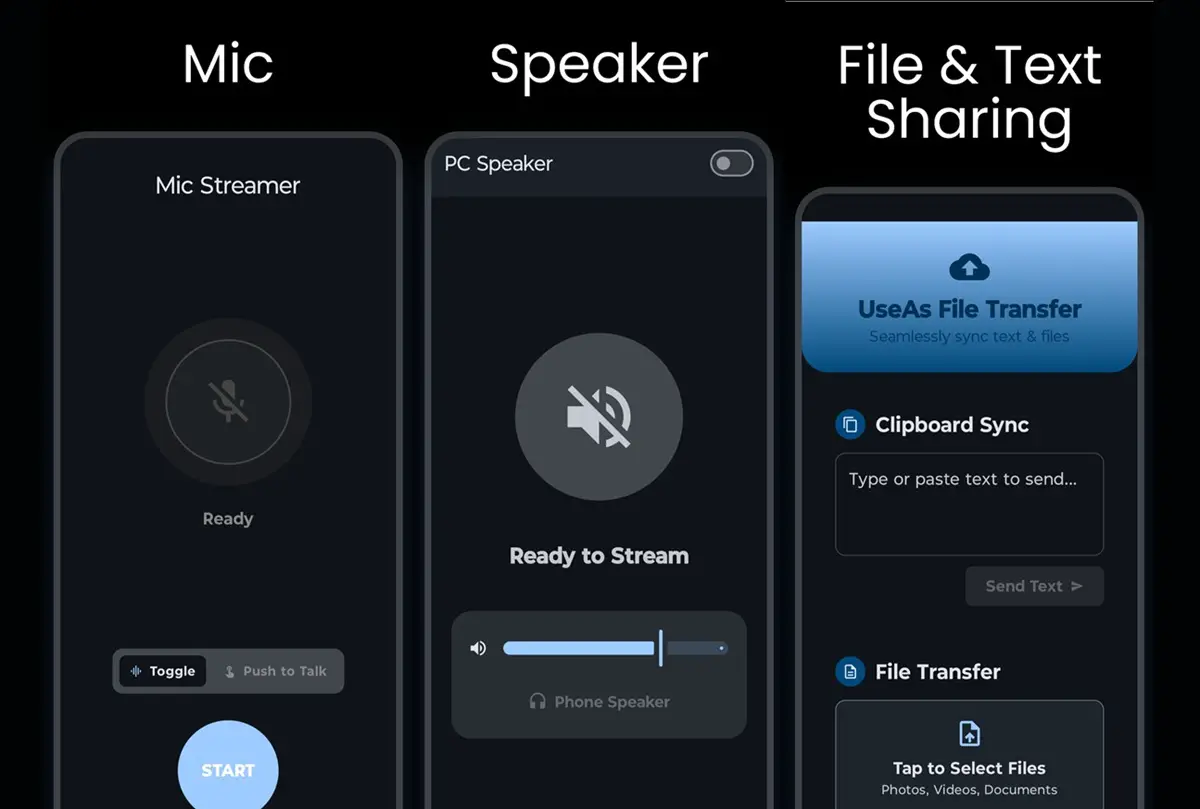
If you are on an Android and Windows ecosystem, you’ll love this utility app. The ultimate all-in-one PC utility suite, Use As is an app that lets you do wonders when paired with your Windows desktop or laptop. You can use your phone’s camera as a webcam to get that high-def video feed that the native webcam can’t do. There’s an option to control your PC, such as scrolling right from your phone. Imagine you are dumb scrolling on your PC and want a better interface to scroll than your phone (or if it is too far), your phone can double as a high-quality scroller.

The app lets you emulate Xbox 360 controllers compatible with many modern games out there. You can feed speaker audio from your PC directly to your phone. You can indulge in a high-speed file transfer session that lets you move around media, documents, and more at lightning-fast speeds without any hassle.

Download: Use As

Volume Scroll

Category: Utility
Volume Scroll
Image Credits: Volume Scroll, via Google Play Store

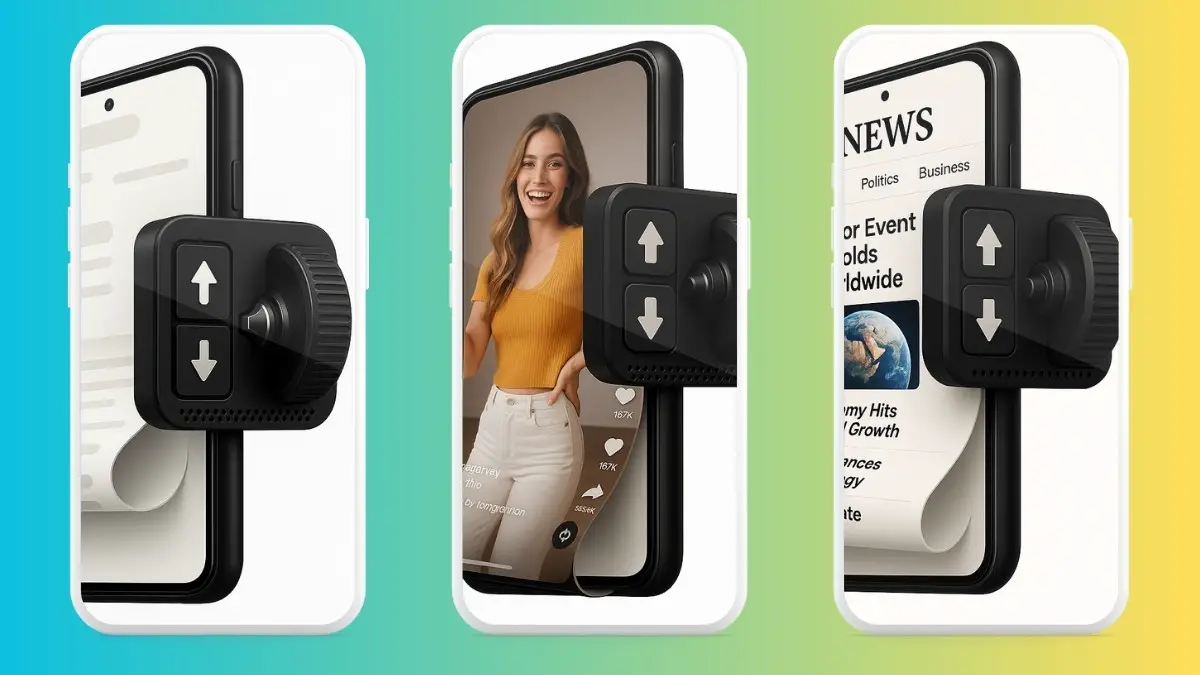
Phones are getting bigger every day, and in fact, so much so that I often find it difficult to reach the top of the screen while using just one hand, especially when I am traveling. Cut to now, Volume Scroll is an app that helps with all the scrolling you might want. Volume Scroll lets you scroll through documents, browsers, or any other app out there, meaning you don’t have to touch the screen every time you wish to scroll.

Volume Scroll lets you adjust speeds, scroll amount, and change scroll style from instant to smooth to natural, as well as how much coverage you want with each scroll. There’s functionality to select scrolling on a per-app basis, and that’s all, while you can still use volume rockers as usual. Ideal use cases include one-hand usage, browsing, and scrolling social media feeds, recipes, etc. 

Download: Volume Scroll

Wrapping up!

Looks like we are at the end of our take on the 5 best Android apps you should be on the lookout for. This listicle gives you access to apps from categories such as utility, productivity, social media, and digital detox, to name a few. Of course, there are plenty more fish in the sea—say 1.5 million of them—so keep an eye on our listicle for monthly updates.

Share This Article
Follow:
A wordsmith, a kin tech observer, a sci-fi fanatic and a scientific documentary buff.
Highlights
  • Good news as we are back with our take on the 5 best Android apps you should try in March 2026.
  • With more than 1.50 million apps, it becomes a task finding those that really matter and our listicle helps you with just that - picks of 5 at a time.
  • This edition consists of apps ranging from productivity, utility, AI assistant, and more giving you an wholesome experience.

Welcome aboard the ultimate guide to the 5 best Android apps you must try in March 2026. As usual, we tried bringing apps from different categories, such as utility, productivity, social media, and AI-powered apps, among others, to give our users an all-around experience. 

With more than 1.5 million apps (earlier 3.5 million before being curbed down), the Google Play Store is home to apps that can refine your user experience. Since most users may not even cross the 1K apps mark, we decided to bring apps from the expanse of the Play Store, often including lesser-known or downright underrated apps that you must try. 

Best Android apps you must try in March 2026

Well, let’s start without any further ado.

TypeAI

Category: Utility/Productivity/AI Writing Assistant

TypeAI
Image Credits: TypeAI, via Google Play Store

Thanks to ChatGPT and Gemini, you can write responses to an email eloquently without needing an English connoisseur. But it is still a hassle for many if they don’t know how to use these AI chatbots or don’t want to end up in a few more stops before sending a response. TypeAI is an excellent AI writing assistant that offers an ultimate keyboard interface. Instead of adding a few more steps to check for grammar errors, all you have to do is type “@fix” after a sentence while you are still on the WhatsApp text, and the app will take care of it.

TypeAI supports commands such as “rephrase,” “polite,” and “improve,” among others, based on which it can generate AI responses that suit your personality the best. Its goal is to introduce AI-backed texts without needing to go that extra mile on a ChatGPT or Gemini app to rephrase or check your grammar.

Download: TypeAI

LocalStream

Category: File Support / Remote / Utility

LocalStream
Image Credits: LocalStream, via Google Play Store

LocalStream, as the name suggests, streams something onto something, right? Well, the app essentially acts as a powerful file manager, allowing users to browse and manage files from different devices, such as iPhone to Android or Android to iPhone, etc. The app lets users access files, PDFs, archives, APKs, and media files, among others, without needing to physically connect the two devices. 

For instance, users can connect their Android phones with an iPhone to access files from one to the other. The app supports external storage file management as well as USB drives and SD cards. There’s also functionality to stream music, photos, and videos from your Android phone to a PC, smart TV, or console. Other features include a remote D-pad, full UPnP/DLNA compatibility, a built-in media player, etc. 

Download: LocalStream

Something OS Widgets

Category: Widgets

Something OS Widgets
Image Credits: Something OS Widgets, via Google Play Store

I am a big widgets guy who acts as eyeglasses on your phone without needing to open a phone. You can place crucial widgets on the home screen, such as a clock, alarms, stopwatch, battery info, weather info, etc. However, your phone might have a limited or cosmetically old UI/UX for these widgets that takes the fun out of them.

With Something OS Widgets, you eventually end up with minimalist Nothing OS-flavored widgets on your phone. From weather info to battery, calendar to music, and search to countdowns, this is one of the best Android apps out there for widgets. As aforementioned, these widgets are basically inspired by Nothing’s OS, which is reflected in their design, agility, and overall look and feel. 

Download: Something OS Widgets

Use As

Category: Utility

Use As app
Image Credits: Use As, via Google Play Store

If you are on an Android and Windows ecosystem, you’ll love this utility app. The ultimate all-in-one PC utility suite, Use As is an app that lets you do wonders when paired with your Windows desktop or laptop. You can use your phone’s camera as a webcam to get that high-def video feed that the native webcam can’t do. There’s an option to control your PC, such as scrolling right from your phone. Imagine you are dumb scrolling on your PC and want a better interface to scroll than your phone (or if it is too far), your phone can double as a high-quality scroller.

The app lets you emulate Xbox 360 controllers compatible with many modern games out there. You can feed speaker audio from your PC directly to your phone. You can indulge in a high-speed file transfer session that lets you move around media, documents, and more at lightning-fast speeds without any hassle.

Download: Use As

Volume Scroll

Category: Utility

Volume Scroll
Image Credits: Volume Scroll, via Google Play Store

Phones are getting bigger every day, and in fact, so much so that I often find it difficult to reach the top of the screen while using just one hand, especially when I am traveling. Cut to now, Volume Scroll is an app that helps with all the scrolling you might want. Volume Scroll lets you scroll through documents, browsers, or any other app out there, meaning you don’t have to touch the screen every time you wish to scroll.

Volume Scroll lets you adjust speeds, scroll amount, and change scroll style from instant to smooth to natural, as well as how much coverage you want with each scroll. There’s functionality to select scrolling on a per-app basis, and that’s all, while you can still use volume rockers as usual. Ideal use cases include one-hand usage, browsing, and scrolling social media feeds, recipes, etc. 

Download: Volume Scroll

Wrapping up!

Looks like we are at the end of our take on the 5 best Android apps you should be on the lookout for. This listicle gives you access to apps from categories such as utility, productivity, social media, and digital detox, to name a few. Of course, there are plenty more fish in the sea—say 1.5 million of them—so keep an eye on our listicle for monthly updates.
Share This Article
Follow:
A wordsmith, a kin tech observer, a sci-fi fanatic and a scientific documentary buff.