- There are millions of apps on the App Store making it impossible to scour through them all.
- We come up with our pick of five best iOS apps you must try apart from the usual suspects.
- Stick around for more such apps which are often left undiscovered or receive an underwhelming response shrouded with other popular and trending apps.
Make a quick Google search for the ‘best iOS Apps’ and you will stumble upon a similar-looking listicle on popular and demanding apps for your iPhone. However, given the fact that there are more than 1.5 million apps on the App Store, does it make sense that you will stick to the usual suspects all your life? Of course, we often course through apps via recommendations or, say, accidental discovery, but is it all enough?
True-Tech has been tracking apps across the expanse of the App Store. Whether it’s for productivity or resolving a certain use case or challenge, we bring lesser-known and less-discovered apps that you might not find in usual recommendations from your favorite tech YouTubers or publications.
5 best iOS apps you must try this month
Toolbox
Category: Utility

Every once in a while, you need an app or a web app to convert files from one format to another, say PNG to PDF or vice versa. Instead of going on the web and taking all sorts of backlash in terms of privacy issues, Toolbox is an app that you’ll need. Toolbox lets you convert pictures, video, and audio from one format to another. It supports a bucket load of formats such as MP4, WEBP, BMP, PNG, JPG, AVI, WMV, FLV, 3GP, GIF, HEIC, TIF, and the list goes on.
Toolbox has everything you need for your use cases. There’s also a zipping and unzipping function with password protection on-board. Isn’t it great?
Download: Toolbox
Lock Launcher
Category: Accessibility

Whether you are a seasoned user or a light user, you must have a list of certain apps that you use regularly. For instance, I use WhatsApp, Camera, and the Phone app extensively. With Lock Launcher, you can launch all these much-used apps and shortcuts using a tap on the lock screen. The app allows users to assign shortcuts, custom URLs, websites, and apps in the widget, unlocking the potential of your iPhone to launch regular apps in just a click.
Lock Launcher is equipped with a quick QR code scanner, PiP mode, music actions, custom URL scheme, app clip, and more., that unlocks countless possibilities at your helm.
Download: Lock Launcher
GuideAlong
Category: Audio-based Narrator/ Guide

Imagine you are in Yosemite National Park, driving or assisting a friend riding through, and suddenly a mule deer walks by. However, you weren’t able to see because you were too busy tracking your whereabouts on a map (digital or physical ones). Now this will cause utter frustration as you came just to see those exotic animals, but eventually became too engulfed in maps or talking to someone and missed that opportunity.
With GuideAlong, you are met with an audio-based narration paired with GPS, with a ton of insights, stories, and tips — all at your pace. The app actually courses through step-by-step instructions, commentary on the way, giving you complete information about parks across the globe. It also allows users to download offline maps with turn-by-turn directions and guidance that makes your national park safari a bliss.
Download: GuideAlong
ChefGPT
Category: Recipes using AI
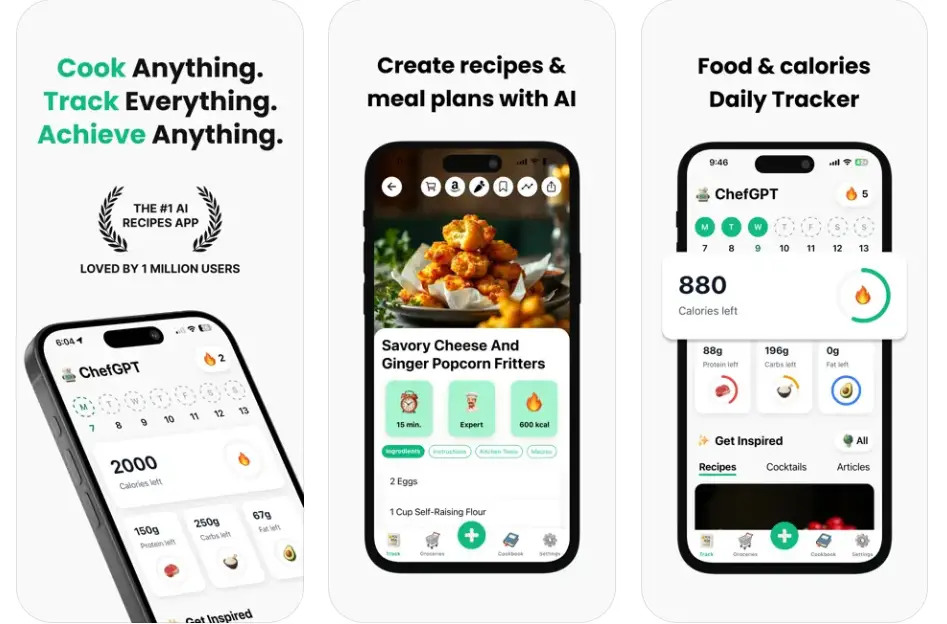
Imagine a ChatGPT but for recipes. Well, that’s what ChefGPT offers. It helps you generate recipes based on your preferences, dietary requirements, and available ingredients, making it easier to cook amazing and lip-smacking meals with ease. You can start by entering the ingredients, selecting the type of meal, kitchen tools available, and how much time you have, as well as your cooking skills, and ChefGPT will generate the rest.
Unfortunately, the free version is limited to 5 recipes using AI a month and limited recipe saving into the cookbook section. Upgrade to its premium plan (enjoy a 7-day trial) to unlock unlimited generated recipes, MasterChef Mode that generates highly-personalized recipes, unlimited recipes in your cookbook, and of course, no ads. There are various other modes available on the paid plan that answer your specific use cases.
Download: ChefGPT
Open Food Facts
Category: Food/Nutrition Barcode Scanner
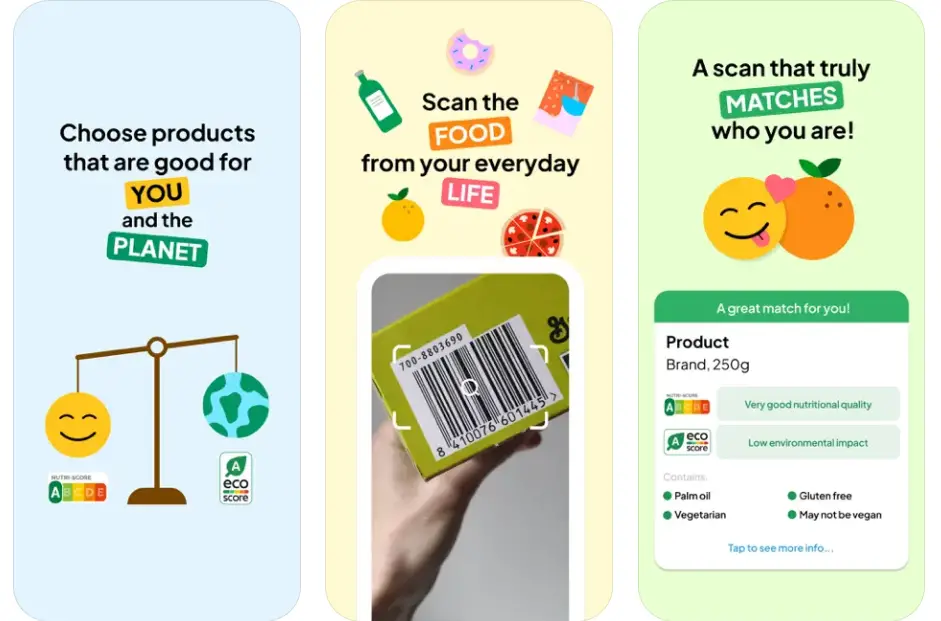
The food you buy, irrespective of the source, may contain additives, preservatives, allergens, or something that your body might not be able to tolerate. With Open Food Facts, you are set on a journey of discovery. Simply scan the barcode, and it will tell you whether the product is suitable for you or not. With more than 3.5 million food products scanned and compared, the app actually looks for environmental concerns, health, salt, ultra-processed foods, additives, allergens, etc.
Open Food Facts tells you the nutritional quality of the product and whether you should avoid ultra-processed foods, something that can play a prank in your health. The aim is to make informed choices about what you put in your mouth. The app has actually been a foundation for 150+ similar product scanning apps, making it the best of all.
Download: Open Food Facts
Wrapping Up
And with that, we wrap our take on the five best iOS apps that we came across, August 2025. We tried to include apps catering to multiple use cases and waiting for feedback on these listicles. Of course, we will come back with our pick of the best iOS apps every month, so stay tuned on True-Tech for more such updates.