Google unveils Gemini 2.5 computer use model for smarter app and browser control

See how AI finally learns to click, type, and navigate like a human!

Jeeva Shanmugam
3 Min Read
Highlights
  • Gemini 2.5 computer use model lets AI perform real tasks on software interfaces without needing APIs.
  • It works seamlessly on web and mobile apps while maintaining fast, low-latency performance.
  • Built-in safety features ensure secure actions and prevent AI from performing risky operations.

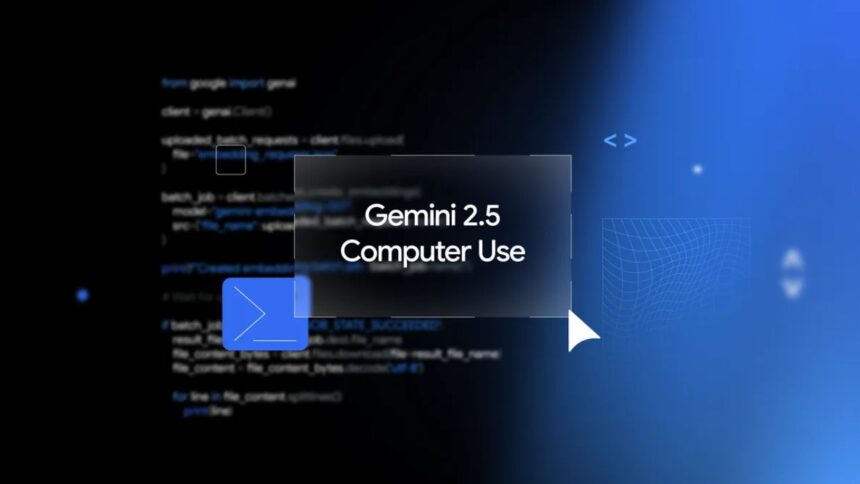
Google has released the Gemini 2.5 computer use model, a new AI system designed to work directly with software interfaces. Most AI tools usually need structured code called APIs to communicate with software. But many real-world tasks, like filling online forms or navigating websites, still need a human to click buttons and type text. This new model is built to handle that.

Gemini 2.5: Google bridges the gap between AI and real-world tasks

The Gemini 2.5 can bypass APIs and work on graphical interfaces. That means it can do things like choose items from dropdown menus, scroll pages, login step by step, or fill forms automatically. Google says this model performs very well and has low latency, meaning it works fast compared to other similar AI systems. Tests like Browserbase’s Online-Mind2Web show it is among the top performers.
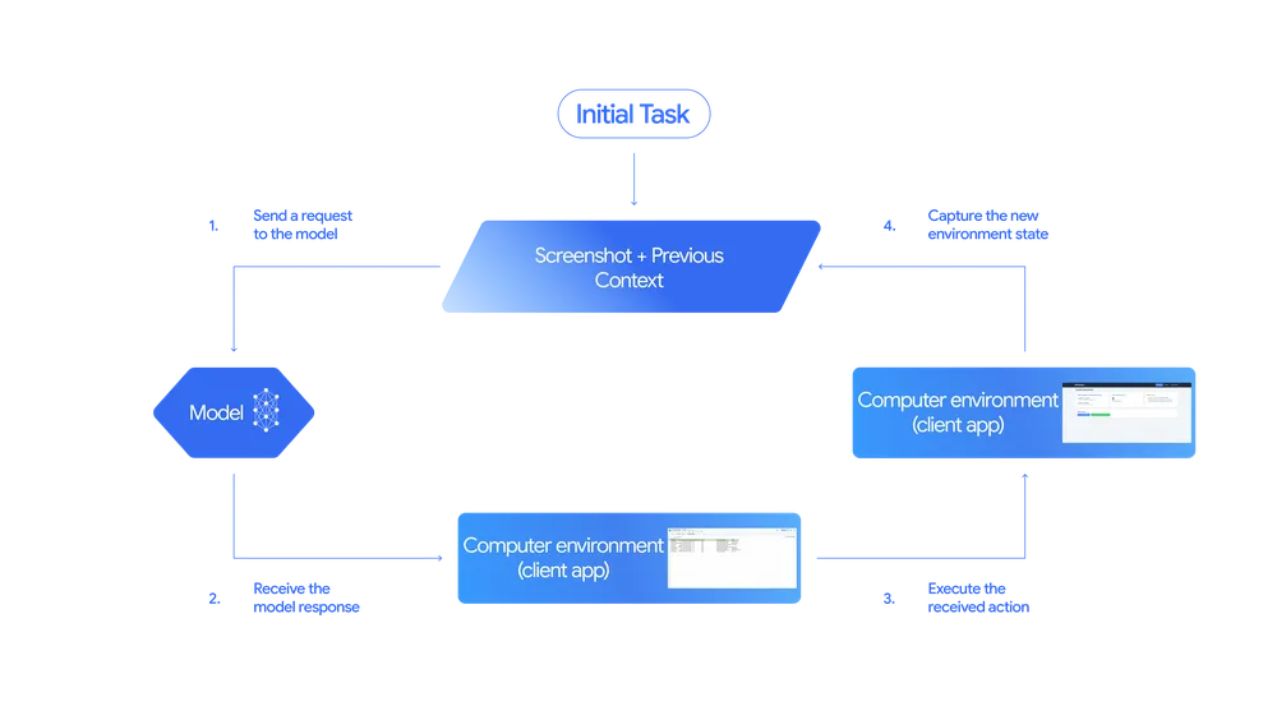
Image Credits: Google

How Gemini 2.5 works

The AI works through the new computer_use tool inside the Gemini API. The process is simple:

  • Input: The AI gets your request, a screenshot of the screen, and a list of recent actions.
  • Processing: It decides what action to take next like clicking or typing. If the action is sensitive, like buying something online, it waits for user confirmation.
  • Execution and Feedback: It executes the action, takes a new screenshot and URL, and continues until the task is finished or stopped by safety rules or the user.

Right now it works best with web browsers and is showing early results for mobile apps. It does not fully support desktop OS automation yet.

Built-in safety measures

Google built safety into the Gemini 2.5 computer use model because AI controlling software can be risky. Some safety measures are:

  • Per-Step Safety Review: Every action is checked before it happens.
  • System Rules: Developers can block risky actions or require confirmation from the user.

This helps prevent mistakes or misuse of the AI.

Applications and availability

Google is already using the model for things like UI testing to speed up software quality checks and improve AI in search features. Developers can access the Gemini 2.5 in public preview through Google AI Studio and Vertex AI. You can also try demos from Browserbase or integrate it using tools like Playwright.

Overall, the Gemini 2.5 is a big step in AI. It allows agents to interact directly with interfaces like humans. This makes automation, testing, and AI assistants more capable. It is not perfect yet, but it shows a lot of promise for the future.

Share This Article
Making spicy content on the Internet!
Highlights
  • Gemini 2.5 computer use model lets AI perform real tasks on software interfaces without needing APIs.
  • It works seamlessly on web and mobile apps while maintaining fast, low-latency performance.
  • Built-in safety features ensure secure actions and prevent AI from performing risky operations.

Google has released the Gemini 2.5 computer use model, a new AI system designed to work directly with software interfaces. Most AI tools usually need structured code called APIs to communicate with software. But many real-world tasks, like filling online forms or navigating websites, still need a human to click buttons and type text. This new model is built to handle that.

Gemini 2.5: Google bridges the gap between AI and real-world tasks

The Gemini 2.5 can bypass APIs and work on graphical interfaces. That means it can do things like choose items from dropdown menus, scroll pages, login step by step, or fill forms automatically. Google says this model performs very well and has low latency, meaning it works fast compared to other similar AI systems. Tests like Browserbase’s Online-Mind2Web show it is among the top performers.

Image Credits: Google

How Gemini 2.5 works

The AI works through the new computer_use tool inside the Gemini API. The process is simple:

  • Input: The AI gets your request, a screenshot of the screen, and a list of recent actions.
  • Processing: It decides what action to take next like clicking or typing. If the action is sensitive, like buying something online, it waits for user confirmation.
  • Execution and Feedback: It executes the action, takes a new screenshot and URL, and continues until the task is finished or stopped by safety rules or the user.

Right now it works best with web browsers and is showing early results for mobile apps. It does not fully support desktop OS automation yet.

Built-in safety measures

Google built safety into the Gemini 2.5 computer use model because AI controlling software can be risky. Some safety measures are:

  • Per-Step Safety Review: Every action is checked before it happens.
  • System Rules: Developers can block risky actions or require confirmation from the user.

This helps prevent mistakes or misuse of the AI.

Applications and availability

Google is already using the model for things like UI testing to speed up software quality checks and improve AI in search features. Developers can access the Gemini 2.5 in public preview through Google AI Studio and Vertex AI. You can also try demos from Browserbase or integrate it using tools like Playwright.

Overall, the Gemini 2.5 is a big step in AI. It allows agents to interact directly with interfaces like humans. This makes automation, testing, and AI assistants more capable. It is not perfect yet, but it shows a lot of promise for the future.
Share This Article
Making spicy content on the Internet!