How to use the reshare Stories on Instagram feature?

Aadil Raval
3 Min Read
Highlights
  • Instagram now lets you reshare stories on your profile.
  • The feature is rolling out across iOS and Android and allows users to share public stories only.
  • Users can still turn off the ability for anyone to share their stories using the "Settings >> Privacy" option.

For all those Instagrammers out there, you can now reshare Stories on Instagram using the latest feature. Termed as game-changing, the feature allows users to re-share stories posted by anyone, assuming that these are public accounts and public stories. 

Up till now, you could only share stories if the user tagged you, but now, it has been abolished. You can share a public story directly to your profile, and here’s how you can do it.

How to use the reshare Stories on Instagram feature?

Now that the feature is up and running and available across the majority of devices, here’s how to use it.

  • Open the Instagram app and find a public Story you want to share. This could be a post from Drake, Lewis Hamilton, your favorite marketing company, or any public creator you follow.
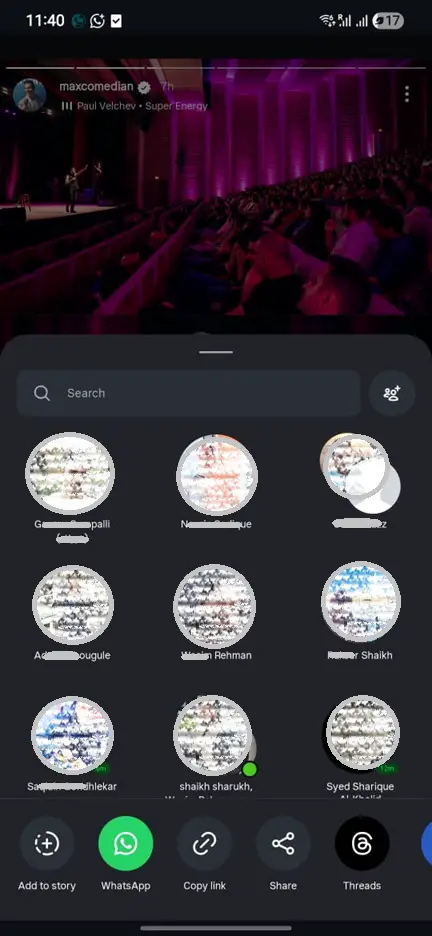
  • Tap the Share button at the bottom of the Story. A list of sharing options will appear.
How to use the reshare Stories on Instagram feature?
Image Credits: Aadil Raval, True-Tech
  • Select “Add to Story.” The Story will load in the editor without losing image quality or resolution.
  • Customize it—add stickers, GIFs, text, or mentions just like you would with any Story. Once you’re done, hit Confirm and tap Share to publish it.

As usual, the story will still carry the original creator’s name, and if the user clicks on the story, this will take the user to the original creator. 

Privacy controls you should know about

The ability to reshare Stories only applies to public accounts. If the creator’s profile is private, the feature won’t work unless they’ve tagged you in the Story, following Instagram’s existing privacy rules.

For users who prefer not to have their Stories reshared by others, Instagram offers a simple toggle: Settings → Privacy → Story → Allow Sharing to Story. Switching this off prevents others from reposting your Stories.

The feature is now actively available on both iOS and Android devices. I have been using it for a while without realizing (my bad). In case the feature is not available on your app, update it or wait for some time, as Instagram will be patching you with the update shortly. 

Share This Article
Follow:
A wordsmith, a kin tech observer, a sci-fi fanatic and a scientific documentary buff.
Highlights
  • Instagram now lets you reshare stories on your profile.
  • The feature is rolling out across iOS and Android and allows users to share public stories only.
  • Users can still turn off the ability for anyone to share their stories using the "Settings >> Privacy" option.

For all those Instagrammers out there, you can now reshare Stories on Instagram using the latest feature. Termed as game-changing, the feature allows users to re-share stories posted by anyone, assuming that these are public accounts and public stories. 

Up till now, you could only share stories if the user tagged you, but now, it has been abolished. You can share a public story directly to your profile, and here’s how you can do it.

How to use the reshare Stories on Instagram feature?

Now that the feature is up and running and available across the majority of devices, here’s how to use it.

  • Open the Instagram app and find a public Story you want to share. This could be a post from Drake, Lewis Hamilton, your favorite marketing company, or any public creator you follow.
  • Tap the Share button at the bottom of the Story. A list of sharing options will appear.
How to use the reshare Stories on Instagram feature?
Image Credits: Aadil Raval, True-Tech
  • Select “Add to Story.” The Story will load in the editor without losing image quality or resolution.
  • Customize it—add stickers, GIFs, text, or mentions just like you would with any Story. Once you’re done, hit Confirm and tap Share to publish it.

As usual, the story will still carry the original creator’s name, and if the user clicks on the story, this will take the user to the original creator. 

Privacy controls you should know about

The ability to reshare Stories only applies to public accounts. If the creator’s profile is private, the feature won’t work unless they’ve tagged you in the Story, following Instagram’s existing privacy rules.

For users who prefer not to have their Stories reshared by others, Instagram offers a simple toggle: Settings → Privacy → Story → Allow Sharing to Story. Switching this off prevents others from reposting your Stories.

The feature is now actively available on both iOS and Android devices. I have been using it for a while without realizing (my bad). In case the feature is not available on your app, update it or wait for some time, as Instagram will be patching you with the update shortly. 

Share This Article
Follow:
A wordsmith, a kin tech observer, a sci-fi fanatic and a scientific documentary buff.