Top 5 best Android apps you must try in December 2025

Aadil Raval
8 Min Read

We have nearly 3 million Android apps on the Google Play Store, which is an enormous number, considering the average user will likely install only around 0.06% of these apps in their lifetime. Every month, we see new and ever-powerful apps launching while some older ones get buried in the expanse of the Play Store, making it difficult to discover.

That’s where our pick for the best Android apps comes into play. We tend to find the five best apps every month for Android users (best iOS apps have a distinct list too), and here’s the December 2025 listicle. We tried covering different categories, including productivity, safety, and wellness, to name a few.

Top 5 best Android apps you must try this month!

Well, let’s take a dive into five Android apps that you must be looking out for.

Intently

Category: Wellness
Intently App
Image Credits: Intently, via Google Play Store

There’s no rocket science here — we all end up using our phones for pretty much hours at a stretch, period. Although your phone can do wonders, we end up doing nothing but dumb-scrolling endlessly on social media, YouTube, or your name it. The best way is to restrict yourself from using the phone only when needed, but hey, when does that help, right?

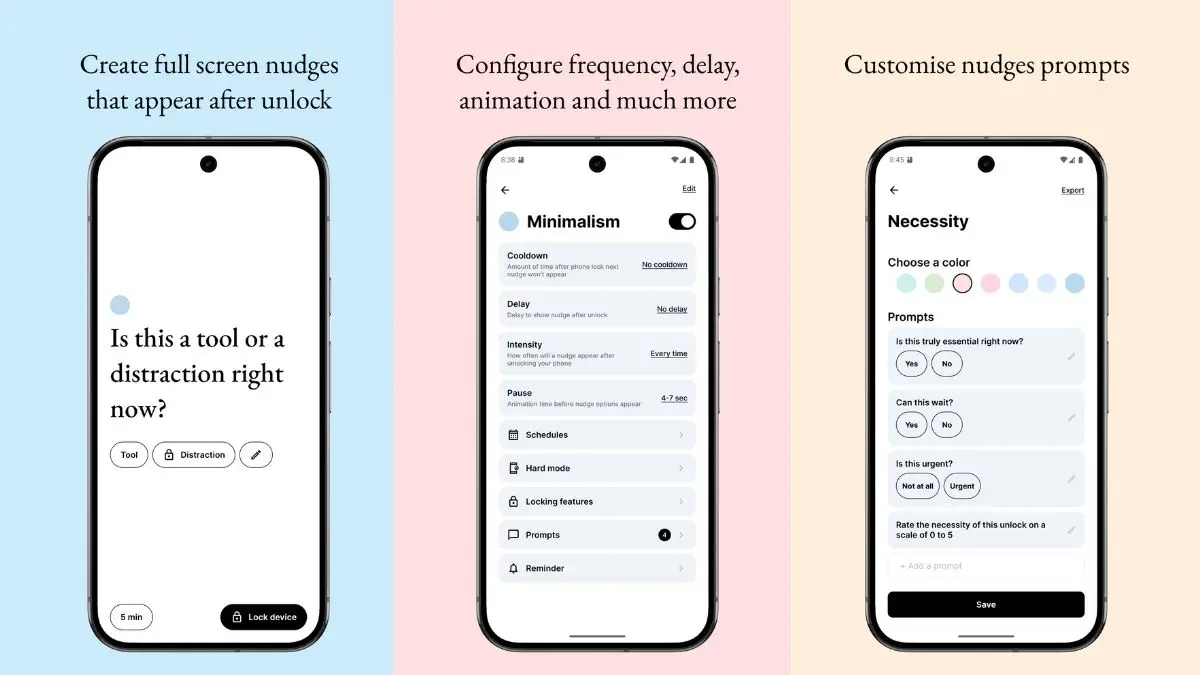
Intently is an app that flashes full-screen nudges and prompts to users when they want to unlock their phones. The thing is, the app actually sends a notification asking you whether it’s important to unlock the phone at that very instance. It doesn’t block you from using your phone, though, but it does tame your urge to use your phone too often. It has a minimalist design, which is what makes it easier to use and less irritating. Moreover, the app can be used to set clear purposes or intentions, necessary grounding, reminders to pull back and maintain physical wellbeing, and beyond. I happen to love the app a lot because it has reduced the overall time I have to unlock the phone without anything to do in the first place. 

Download: Intently

Inkt

Category: Text to handwriting
Inkt - best Android apps you must try in December 2025
Image Credits: Inkt, via Google Play Store

The next app in our picks for the best Android apps to try this month is for those who are still in school or college. ChatGPT can do wonders, generating responses for your queries and even writing an entire project or assignment. However, you still have to write it down manually if your school or college needs handwritten assignments, and that takes a lot of time.

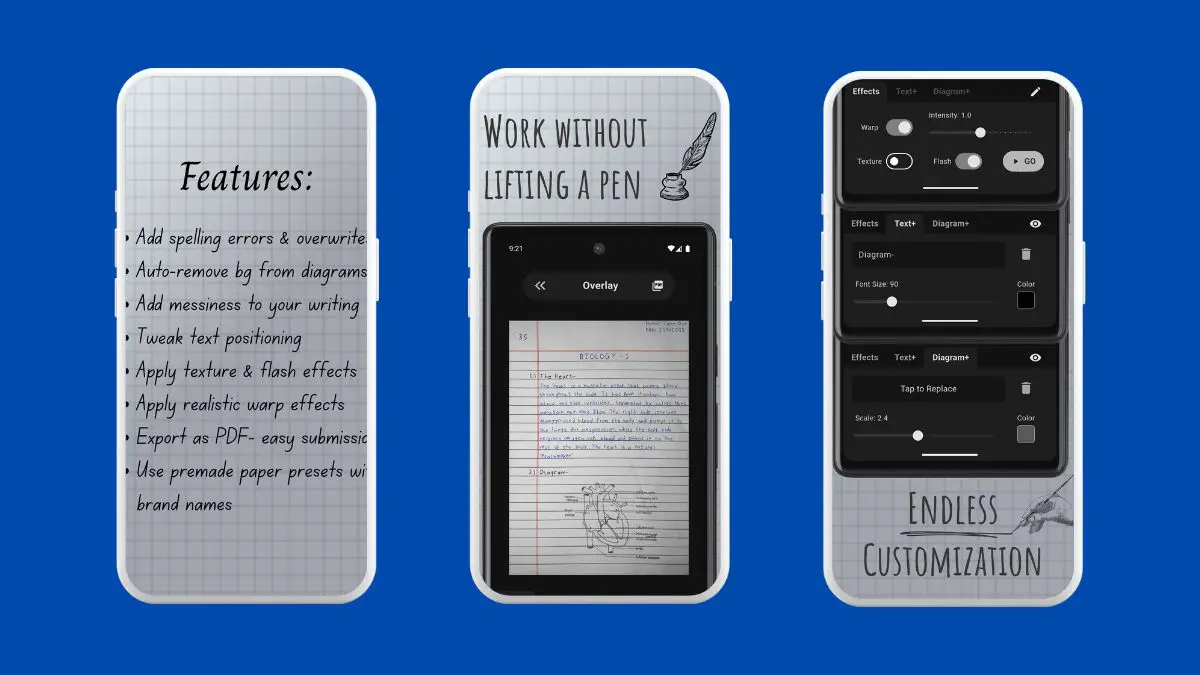
With Inkt, you inch closer to handwritten notes thanks to its powerful AI under the hood that converts plain computer-written text into handwritten text. It can convert full handwritten notes, has features to add headers and other annotations, and also diagrams. You can introduce different handwriting styles, sizes, ink colors, margins, and even intentional spelling mistakes to ensure the notes are legit-looking handwritten ones. Export to PDF or image, take printouts, and voila, you are all done.

Download: Inkt

PCLink

Category: Utility / Remote PC
PCLink - best Android apps you must try in December 2025
Image Credits: PCLink, via Google Play Store

There comes a time when you need to access your PC, and it turns out you are practically miles away. Yes, you can ask someone to help you with your PC, but that doesn’t work every time, does it? Well, PCLink solves the problem by giving you remote access to your PC in three simple steps: download the PCLink app on your phone, go to the server’s link on your PC, download the file, and scan a QR to secure a connection using your Android phone. That’s it.

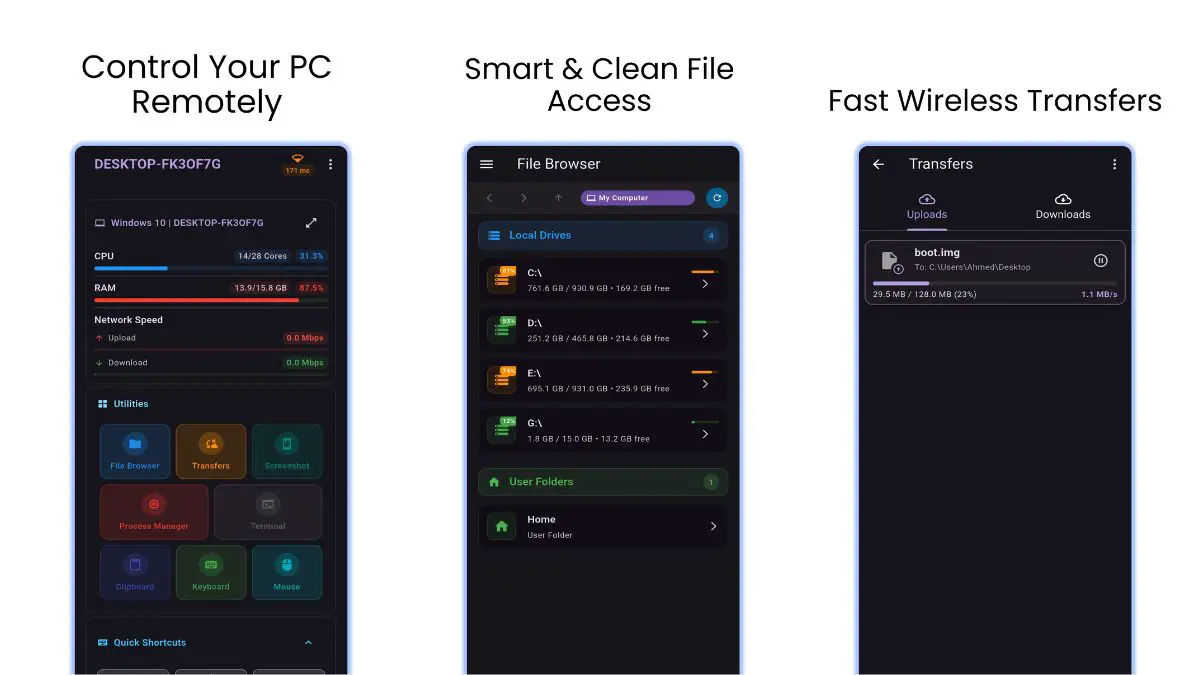
You can do wonders with PCLink, right from browsing PC files to uploading documents/files from phone to PC and vice versa. You can open PC files remotely, zip and unzip files, check live system usage, use a full wireless keyboard, shut down or restart your PC, take remote screenshots, run macros, access the terminal, and beyond. PCLink is currently available for Windows and Linux, although a macOS source code is available if you want to use it on Macs. 

Download: PCLink

URLCheck

Category: Link Checker / Safety
URLCheck
Image Credits: URLCheck, via Google Play Store

You received a link from an unknown source on WhatsApp or your email, asking you to click to find out its content. Well, usually I would click on links sent by my friends and family, but it is always suspicious when a random person sends you a link with no context or something that is too good to be true, such as ‘here’s the link to your bank statement’ coming from a non-banking email address. 

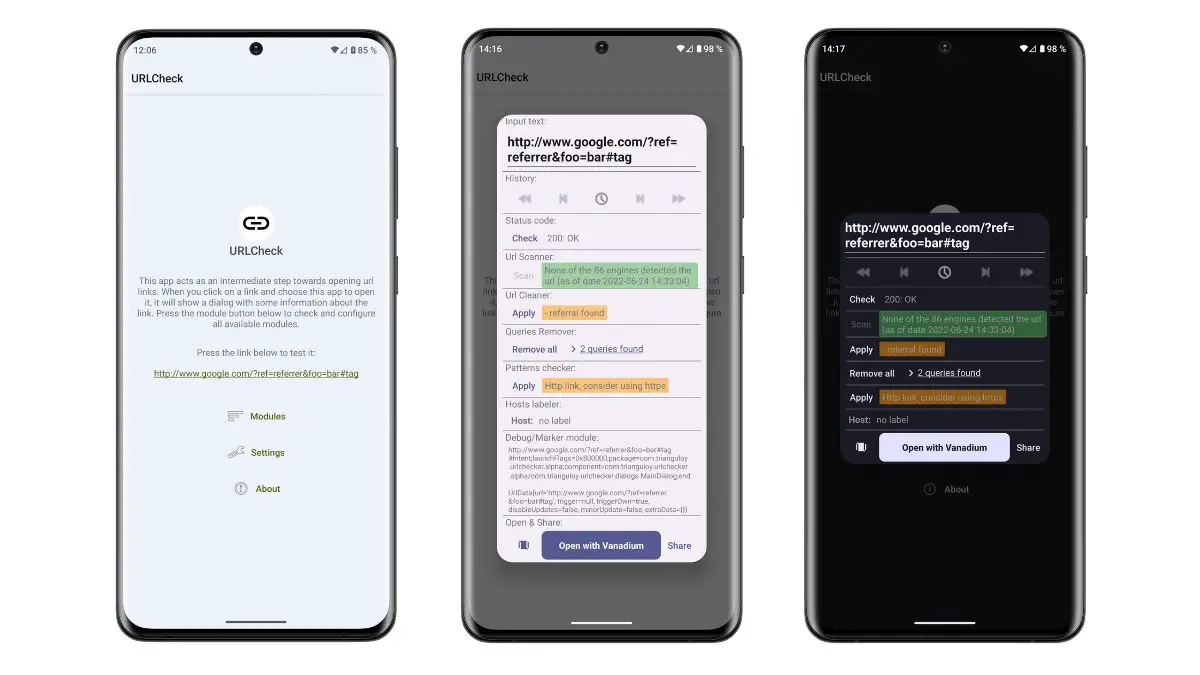
URLCheck is an app that acts as an intermediary. It scans the URL for information and alerts when there’s something fishy. The app itself requires a few permissions to operate, but once it opens, it scans all the links sent to you and keeps track of them.

Download: URLCheck

Pin Notify

Category: To-Do Lists
Pin Notify
Image Credits: Pin Notify, via Google Play Store

You create a to-do list on your phone, such as the grocery shopping list or things you need to pack before you set off to the airport. However, if you aren’t used to that to-do list app, I bet you will remember to check the list items anyway.

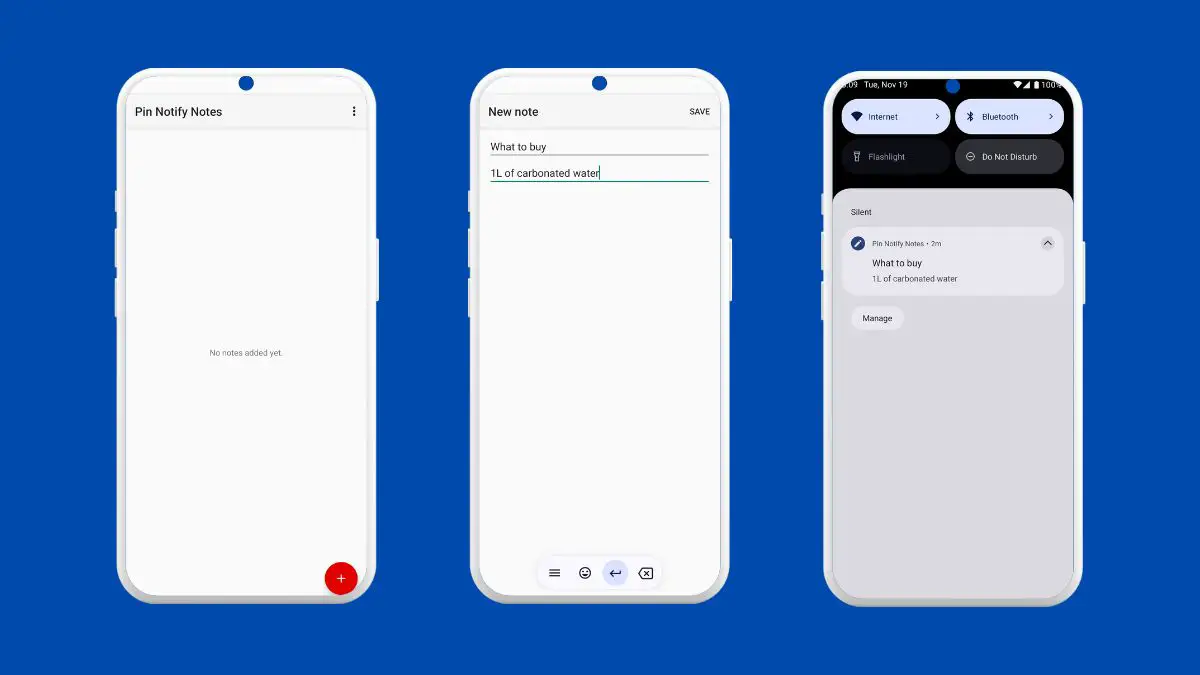
With Pin Notify, you will never forget to check your to-do lists. The app pins the list items on the notification tray, which is easier to keep track of. Since we all use the notification panel on our phones now and then, Pin Notify ensures you remember all the list items without fail. The app allows multiple notes, and you can toggle individual notifications when you are done with that particular list item.

Download: Pin Notify

Wrapping up!

Well, that’s the end of our listicle on the best Android apps for this month i.e., December 2025. We are certain that you will end up trying more than one app as these are the hidden gems left either undiscovered or lesser-known compared to a handful of well-marketed apps out there. Let us know in the comments on apps you think fit our next edition and if we like it, you’ll get a shoutout as well.


Share This Article
Follow:
A wordsmith, a kin tech observer, a sci-fi fanatic and a scientific documentary buff.

We have nearly 3 million Android apps on the Google Play Store, which is an enormous number, considering the average user will likely install only around 0.06% of these apps in their lifetime. Every month, we see new and ever-powerful apps launching while some older ones get buried in the expanse of the Play Store, making it difficult to discover.

That’s where our pick for the best Android apps comes into play. We tend to find the five best apps every month for Android users (best iOS apps have a distinct list too), and here’s the December 2025 listicle. We tried covering different categories, including productivity, safety, and wellness, to name a few.

Top 5 best Android apps you must try this month!

Well, let’s take a dive into five Android apps that you must be looking out for.

Intently

Category: Wellness

Intently App
Image Credits: Intently, via Google Play Store

There’s no rocket science here — we all end up using our phones for pretty much hours at a stretch, period. Although your phone can do wonders, we end up doing nothing but dumb-scrolling endlessly on social media, YouTube, or your name it. The best way is to restrict yourself from using the phone only when needed, but hey, when does that help, right?

Intently is an app that flashes full-screen nudges and prompts to users when they want to unlock their phones. The thing is, the app actually sends a notification asking you whether it’s important to unlock the phone at that very instance. It doesn’t block you from using your phone, though, but it does tame your urge to use your phone too often. It has a minimalist design, which is what makes it easier to use and less irritating. Moreover, the app can be used to set clear purposes or intentions, necessary grounding, reminders to pull back and maintain physical wellbeing, and beyond. I happen to love the app a lot because it has reduced the overall time I have to unlock the phone without anything to do in the first place. 

Download: Intently

Inkt

Category: Text to handwriting

Inkt - best Android apps you must try in December 2025
Image Credits: Inkt, via Google Play Store

The next app in our picks for the best Android apps to try this month is for those who are still in school or college. ChatGPT can do wonders, generating responses for your queries and even writing an entire project or assignment. However, you still have to write it down manually if your school or college needs handwritten assignments, and that takes a lot of time.

With Inkt, you inch closer to handwritten notes thanks to its powerful AI under the hood that converts plain computer-written text into handwritten text. It can convert full handwritten notes, has features to add headers and other annotations, and also diagrams. You can introduce different handwriting styles, sizes, ink colors, margins, and even intentional spelling mistakes to ensure the notes are legit-looking handwritten ones. Export to PDF or image, take printouts, and voila, you are all done.

Download: Inkt

PCLink

Category: Utility / Remote PC

PCLink - best Android apps you must try in December 2025
Image Credits: PCLink, via Google Play Store

There comes a time when you need to access your PC, and it turns out you are practically miles away. Yes, you can ask someone to help you with your PC, but that doesn’t work every time, does it? Well, PCLink solves the problem by giving you remote access to your PC in three simple steps: download the PCLink app on your phone, go to the server’s link on your PC, download the file, and scan a QR to secure a connection using your Android phone. That’s it.

You can do wonders with PCLink, right from browsing PC files to uploading documents/files from phone to PC and vice versa. You can open PC files remotely, zip and unzip files, check live system usage, use a full wireless keyboard, shut down or restart your PC, take remote screenshots, run macros, access the terminal, and beyond. PCLink is currently available for Windows and Linux, although a macOS source code is available if you want to use it on Macs. 

Download: PCLink

URLCheck

Category: Link Checker / Safety

URLCheck
Image Credits: URLCheck, via Google Play Store

You received a link from an unknown source on WhatsApp or your email, asking you to click to find out its content. Well, usually I would click on links sent by my friends and family, but it is always suspicious when a random person sends you a link with no context or something that is too good to be true, such as ‘here’s the link to your bank statement’ coming from a non-banking email address. 

URLCheck is an app that acts as an intermediary. It scans the URL for information and alerts when there’s something fishy. The app itself requires a few permissions to operate, but once it opens, it scans all the links sent to you and keeps track of them.

Download: URLCheck

Pin Notify

Category: To-Do Lists

Pin Notify
Image Credits: Pin Notify, via Google Play Store

You create a to-do list on your phone, such as the grocery shopping list or things you need to pack before you set off to the airport. However, if you aren’t used to that to-do list app, I bet you will remember to check the list items anyway.

With Pin Notify, you will never forget to check your to-do lists. The app pins the list items on the notification tray, which is easier to keep track of. Since we all use the notification panel on our phones now and then, Pin Notify ensures you remember all the list items without fail. The app allows multiple notes, and you can toggle individual notifications when you are done with that particular list item.

Download: Pin Notify

Wrapping up!

Well, that’s the end of our listicle on the best Android apps for this month i.e., December 2025. We are certain that you will end up trying more than one app as these are the hidden gems left either undiscovered or lesser-known compared to a handful of well-marketed apps out there. Let us know in the comments on apps you think fit our next edition and if we like it, you’ll get a shoutout as well.

Share This Article
Follow:
A wordsmith, a kin tech observer, a sci-fi fanatic and a scientific documentary buff.