5 best iOS apps you must try in March 2026

Aadil Raval
8 Min Read
Highlights
  • Welcome to the March 2026 edition of the 'Best iOS Apps' as we bring hot picks of the month.
  • March 2026 edition brings an app that can help you remember things to do, an app that can take care of your exercises, and what else you want?
  • Try the knowledge-driven WikTok to fix endless scrolling problem, or try Minipaper, to create your own wallpapers.

What if I tell you to dig for the best iOS apps, like for real, and you’ll come across some insane apps often overshadowed by popular and ‘hyped’ apps out there? Trust me, there are 1.8 million+ apps on the App Store, and as iPhone users, you get to see the top charts, popular ones, and more trending ones by category, and that’s all. It’s given that the app store deliberately, or say, by design, chooses to keep some really useful apps in the shade, and that’s a problem.

We at True-Tech recognized this problem and wanted to resolve it at large. That’s where our picks for the 5 best iOS apps come into play. A monthly listicle series that takes you on a roller coaster ride with carefully picked items from our readers and editors, spread across a spectrum of use cases, categories, and user bases, to give our readers an all-around reading experience.

Still with us? Let’s check out the listicle right here.

Best iOS apps you must try this month

You know what? You can also hover over these apps’ listicle right away without reading the intro *chuckles*. This time, I really mean it; let’s get to the listicle here.

WikTok

Category: Entertainment
WikTok -5 best iOS apps you must try in March 2026
Image Credits: WikTok, via App Store

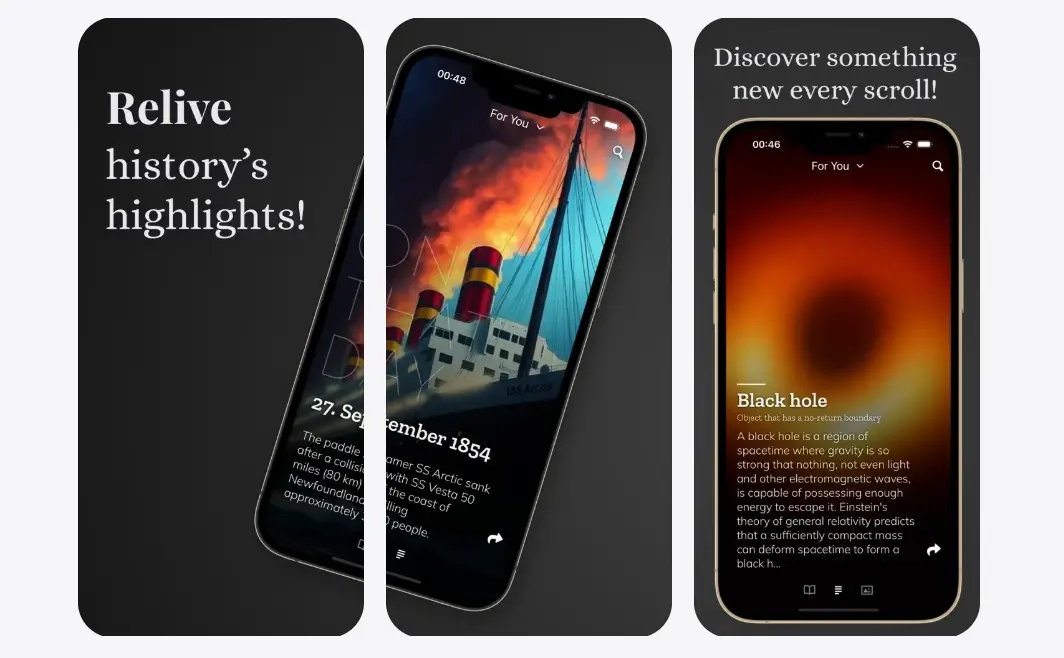
Mindless and endless scrolling has become a thing that knows no boundaries. I mean, just think about it—we end up waiting hours on social media scrolling through reels and TikTok, just like there’s no tomorrow. With WikTok, a funny name, btw, the app lets you explore something new and interesting with every tap.

Swipe, and you get bite-sized knowledge pieces such as art, history, people, geography, science, etc. In fact, the app lets you switch between these categories so that you can interest yourself with what takes the floor off your feet. You can share the articles as well, so that you can tell your friend what caught your attention. 

Download: WikTok

Minipaper

Category: Wallpapers Maker
Minipaper
Image Credits: Minipaper, via App Store

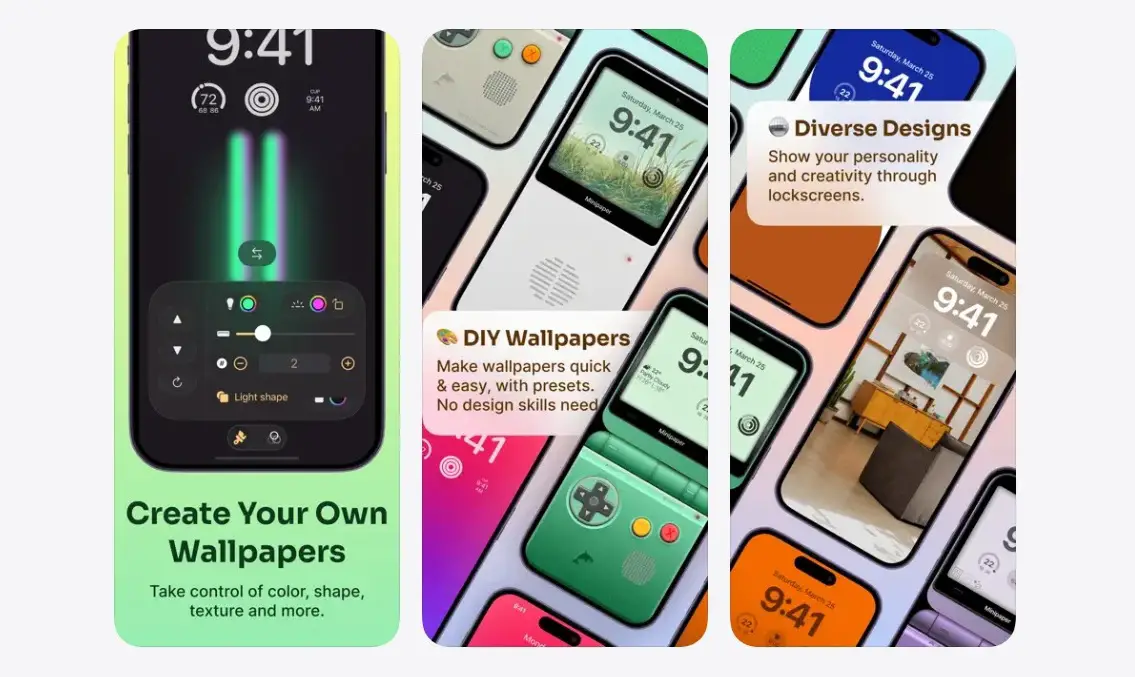
Wallpapers aren’t just for keeping, but rather. They can influence how you function throughout the day. I would change the wallpapers of your iPhone a few times a month to ensure it looks fresh because I tend to get bored with the same old wallpapers. With Minipaper, you get access to countless premade wallpapers that sound the same thing—minimalist. 

Moreover, it is incredibly easy to use when it comes to customizations that essentially help you make it yours truly. You can add shades, gradients, and iridescent light and customize the wallpapers using a lot of different styles and tools available at your disposal. Minipaper can grab you the perfect wallpaper you have been looking for. 

Download: Minipaper

Did I Do?

Category: To-do lists
Did I Do? - Best iOS apps
Image Credits: Did I Do, via App Store

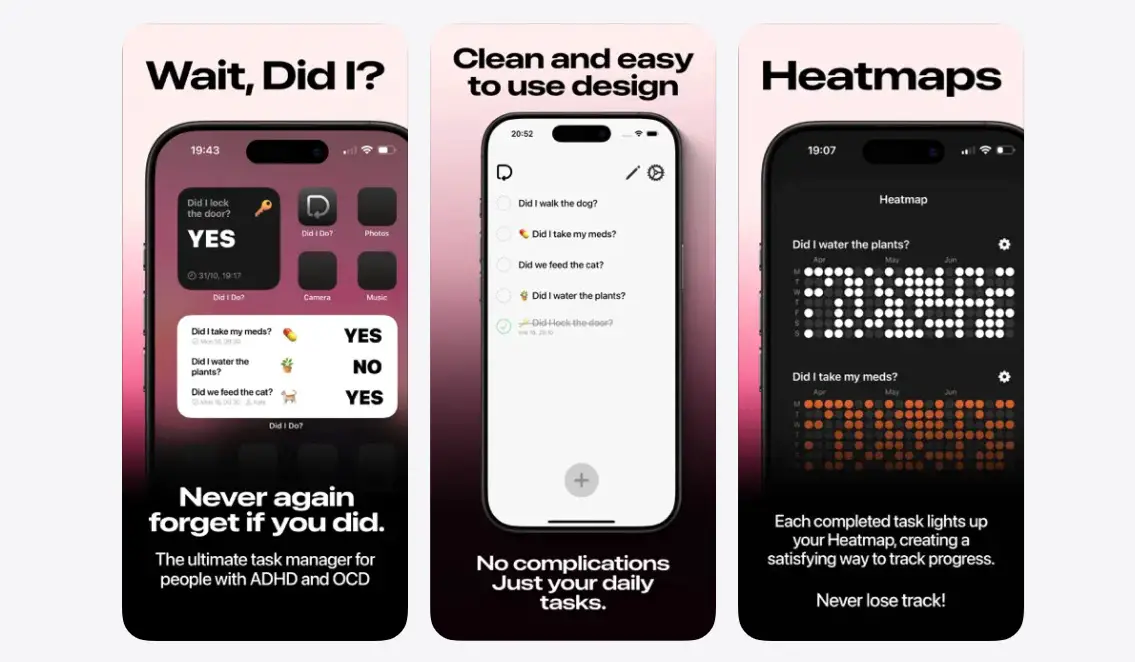
You’ve got ten things to do in a day. The thing is, you might not be able to remember everything on a given day, and that’s a problem. With Did I Do?, you get access to to-do lists like never before. With a beautiful and minimal UI in the works, the app reminds you about things you should remember on any given day. From reminders to take medicines to feed your cat to turning off the stove, Did I Do? Has everything you need.

Need to flick the listicle to yes, simply toggle. Or if you want to make sure you really did what you have in the list, add a setting to include a photo as well. The app has customizable notifications, iCloud sync access, and an amazing ‘widget’ to keep up with items to do.

Download: Did I Do?

Bevel

Category: Fitness
Bevel
Image Credits: Bevel, via App Store

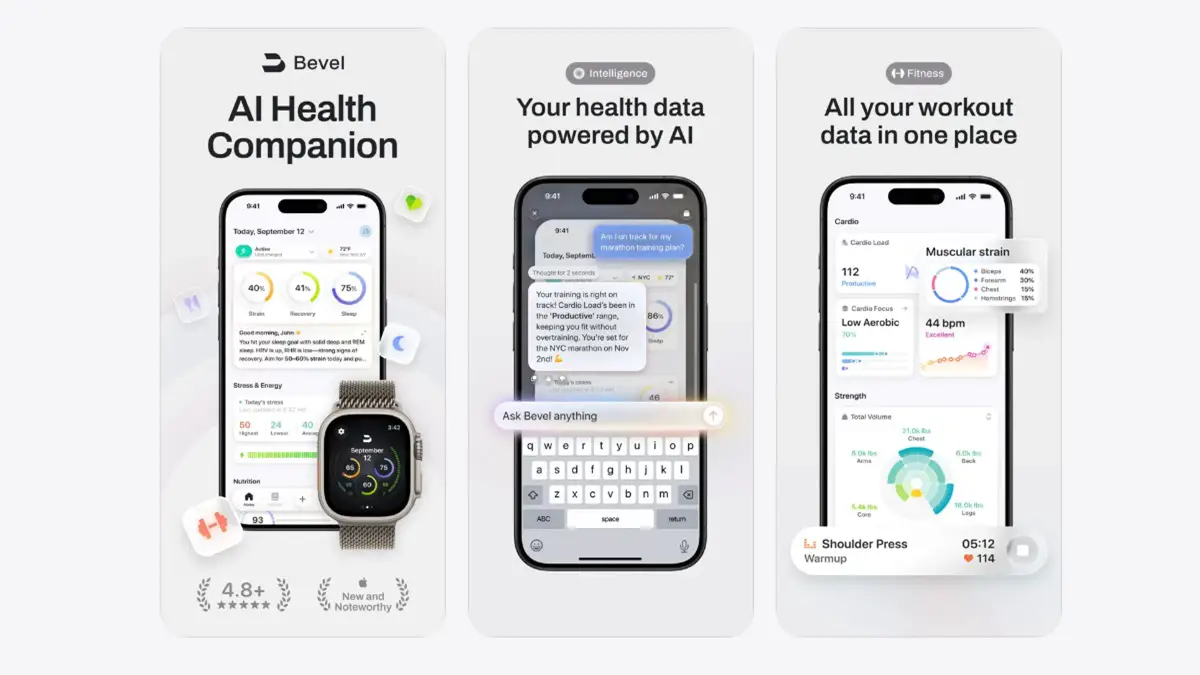
Get ready for a fitness extravaganza with Bevel, the all-in-one #1 app for improving your health, longevity, and performance. The app brings an intelligent health engine on board, giving you access to instant feedback and personalized recommendations. The Sleep Score feature rates your sleep, accounting for sleep stages, duration, and beyond. The Strain Score is another feature that keeps track of how hard your body is working out throughout the day, whether it’s sleeping, working out, or recovering; it brings all the data on a unified dashboard.

Bevel has a nutrition score, a feature to log meals, recipe creation, and a database of more than 6 million foods that make up our daily food items. There are plenty of other features, including 700+ exercises under its Strength Builder, Energy Bank, Stress Score, and more. Some of the features mentioned above are technically behind a paywall, but once you set out on a fitness journey, Bevel will be a great companion.

Download: Bevel

MoYo

Category: Widgets / Screen Customization
Moyo Widgets
Image Credits: Moyo Widgets, via App Store

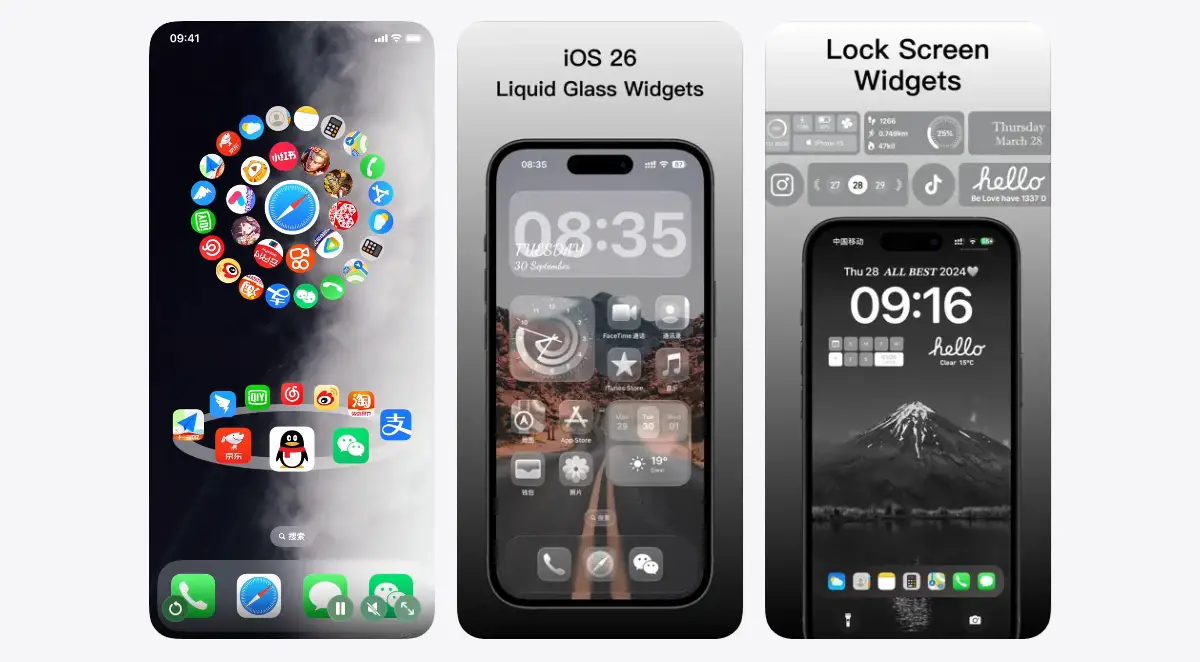
I am a big widgets geek on my iPhone, and why won’t I be, given these widgets actually help achieve certain tasks for which you might have to open a full-blown app? However, iOS offers limited resources when it comes to widgets natively. MoYo Widgets is an app that brings a wide range of widgets spread across different sizes and textures for home screens, control centers, lock screens, you name it.

I tried a transparent widget for some of the widely used apps, and it worked great. Of course, you can choose between widgets from exercises and fitness, calendar, scheduling, photo, weather, X-panel, clock, and all sorts of creative widgets with animations, made to fit your iPhone like a long-lost missing piece of the puzzle. I vouch for it if you are a big widgets person; it’s a must-try for sure.

Download: MoYo Widgets

Wrapping up

And that’s a wrap for the coveted listicle on the 5 best iOS apps you must try this month. From making your day more productive to energizing you with decent bite-sized knowledge and beyond, this month’s edition does offer a wide range of apps you can give a try. Comment below if you find them interesting.

Share This Article
Follow:
A wordsmith, a kin tech observer, a sci-fi fanatic and a scientific documentary buff.
Highlights
  • Welcome to the March 2026 edition of the 'Best iOS Apps' as we bring hot picks of the month.
  • March 2026 edition brings an app that can help you remember things to do, an app that can take care of your exercises, and what else you want?
  • Try the knowledge-driven WikTok to fix endless scrolling problem, or try Minipaper, to create your own wallpapers.

What if I tell you to dig for the best iOS apps, like for real, and you’ll come across some insane apps often overshadowed by popular and ‘hyped’ apps out there? Trust me, there are 1.8 million+ apps on the App Store, and as iPhone users, you get to see the top charts, popular ones, and more trending ones by category, and that’s all. It’s given that the app store deliberately, or say, by design, chooses to keep some really useful apps in the shade, and that’s a problem.

We at True-Tech recognized this problem and wanted to resolve it at large. That’s where our picks for the 5 best iOS apps come into play. A monthly listicle series that takes you on a roller coaster ride with carefully picked items from our readers and editors, spread across a spectrum of use cases, categories, and user bases, to give our readers an all-around reading experience.

Still with us? Let’s check out the listicle right here.

Best iOS apps you must try this month

You know what? You can also hover over these apps’ listicle right away without reading the intro *chuckles*. This time, I really mean it; let’s get to the listicle here.

WikTok

Category: Entertainment

WikTok -5 best iOS apps you must try in March 2026
Image Credits: WikTok, via App Store

Mindless and endless scrolling has become a thing that knows no boundaries. I mean, just think about it—we end up waiting hours on social media scrolling through reels and TikTok, just like there’s no tomorrow. With WikTok, a funny name, btw, the app lets you explore something new and interesting with every tap.

Swipe, and you get bite-sized knowledge pieces such as art, history, people, geography, science, etc. In fact, the app lets you switch between these categories so that you can interest yourself with what takes the floor off your feet. You can share the articles as well, so that you can tell your friend what caught your attention. 

Download: WikTok

Minipaper

Category: Wallpapers Maker

Minipaper
Image Credits: Minipaper, via App Store

Wallpapers aren’t just for keeping, but rather. They can influence how you function throughout the day. I would change the wallpapers of your iPhone a few times a month to ensure it looks fresh because I tend to get bored with the same old wallpapers. With Minipaper, you get access to countless premade wallpapers that sound the same thing—minimalist. 

Moreover, it is incredibly easy to use when it comes to customizations that essentially help you make it yours truly. You can add shades, gradients, and iridescent light and customize the wallpapers using a lot of different styles and tools available at your disposal. Minipaper can grab you the perfect wallpaper you have been looking for. 

Download: Minipaper

Did I Do?

Category: To-do lists

Did I Do? - Best iOS apps
Image Credits: Did I Do, via App Store

You’ve got ten things to do in a day. The thing is, you might not be able to remember everything on a given day, and that’s a problem. With Did I Do?, you get access to to-do lists like never before. With a beautiful and minimal UI in the works, the app reminds you about things you should remember on any given day. From reminders to take medicines to feed your cat to turning off the stove, Did I Do? Has everything you need.

Need to flick the listicle to yes, simply toggle. Or if you want to make sure you really did what you have in the list, add a setting to include a photo as well. The app has customizable notifications, iCloud sync access, and an amazing ‘widget’ to keep up with items to do.

Download: Did I Do?

Bevel

Category: Fitness

Bevel
Image Credits: Bevel, via App Store

Get ready for a fitness extravaganza with Bevel, the all-in-one #1 app for improving your health, longevity, and performance. The app brings an intelligent health engine on board, giving you access to instant feedback and personalized recommendations. The Sleep Score feature rates your sleep, accounting for sleep stages, duration, and beyond. The Strain Score is another feature that keeps track of how hard your body is working out throughout the day, whether it’s sleeping, working out, or recovering; it brings all the data on a unified dashboard.

Bevel has a nutrition score, a feature to log meals, recipe creation, and a database of more than 6 million foods that make up our daily food items. There are plenty of other features, including 700+ exercises under its Strength Builder, Energy Bank, Stress Score, and more. Some of the features mentioned above are technically behind a paywall, but once you set out on a fitness journey, Bevel will be a great companion.

Download: Bevel

MoYo

Category: Widgets / Screen Customization

Moyo Widgets
Image Credits: Moyo Widgets, via App Store

I am a big widgets geek on my iPhone, and why won’t I be, given these widgets actually help achieve certain tasks for which you might have to open a full-blown app? However, iOS offers limited resources when it comes to widgets natively. MoYo Widgets is an app that brings a wide range of widgets spread across different sizes and textures for home screens, control centers, lock screens, you name it.

I tried a transparent widget for some of the widely used apps, and it worked great. Of course, you can choose between widgets from exercises and fitness, calendar, scheduling, photo, weather, X-panel, clock, and all sorts of creative widgets with animations, made to fit your iPhone like a long-lost missing piece of the puzzle. I vouch for it if you are a big widgets person; it’s a must-try for sure.

Download: MoYo Widgets

Wrapping up

And that’s a wrap for the coveted listicle on the 5 best iOS apps you must try this month. From making your day more productive to energizing you with decent bite-sized knowledge and beyond, this month’s edition does offer a wide range of apps you can give a try. Comment below if you find them interesting.

Share This Article
Follow:
A wordsmith, a kin tech observer, a sci-fi fanatic and a scientific documentary buff.