- With billion of users worldwide, Instagram is apparently the go-to photo-sharing app out there with a lot of features on-board.
- Here's how you can schedule messages on Instagram for both individual and group chats - something that has been anticipated for a while.
- You can schedule texts up to one month in advance and delete if required from the 'X Scheduled Messages' section under the particular user/group.
Messages on Instagram are great; I mean, just text someone and bingo. It is a great way to connect and communicate; however, it lacks one major feature—the ability to schedule messages on Instagram.
Think about it: you want to wish someone “Happy Birthday”; however, the time zone differs, and you want to be sure that the message goes exactly at the stroke of midnight. Well, a scheduled Instagram message would go out exactly at 12:00 AM for any day you select without you needing to personally send a text.
There are hundreds of use cases here. For instance, you can schedule an Instagram message to send a congratulation, or you need to drop a text teasing a friend, or alert your loved one when you board a flight, etc.
How to schedule messages on Instagram?
- Launch Instagram on your Android or iPhone.
- Check into the existing chat, either individual or group, where you want to schedule a text message.
- Type in the message and long-press on the ‘Send’ button instead of pressing it once to send.
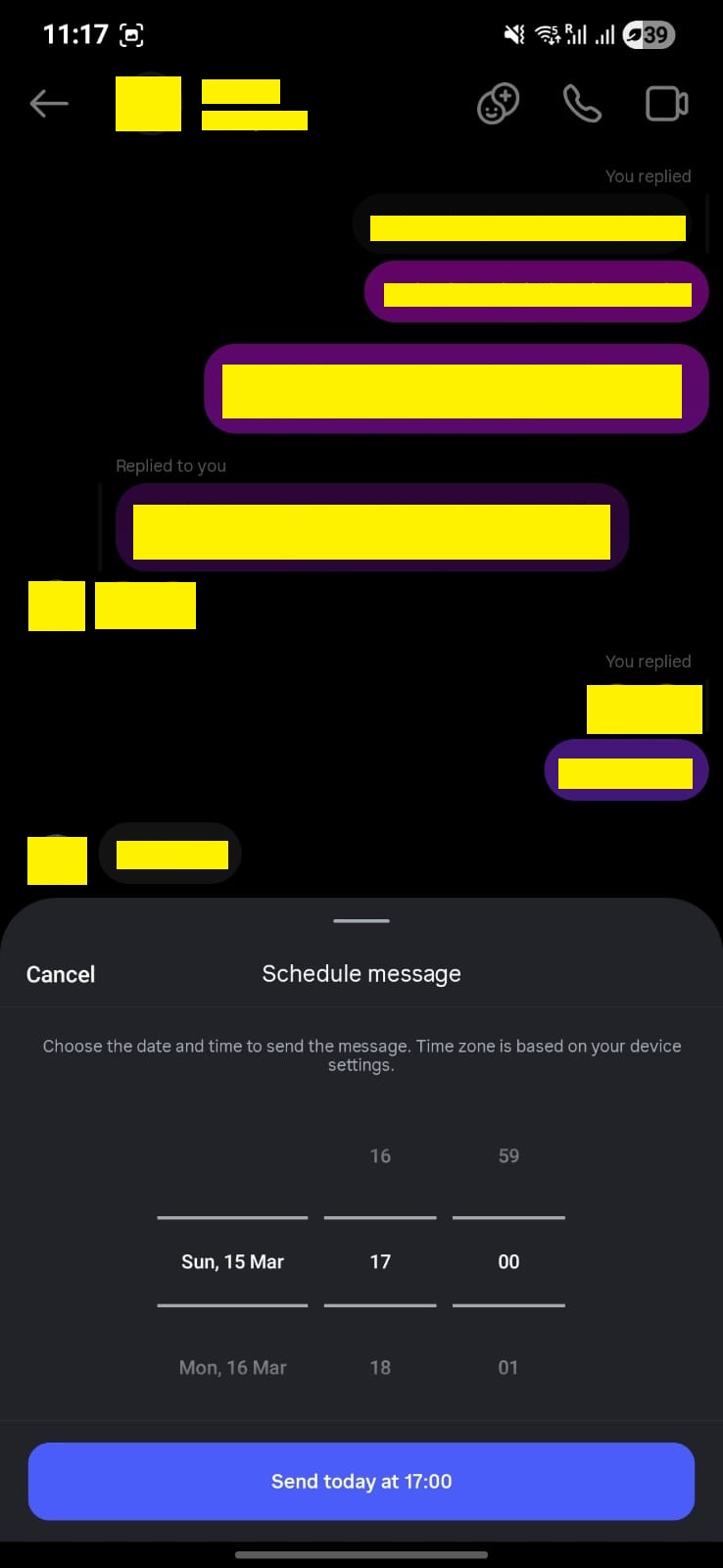
- Now, you need to select a date that is a month from today.
- You can scroll the time as well so that the message will be sent DD, MM at XX: XX am/pm.
- Once you select the time and date, hit the large blue button that should reflect the selected date and time as well.
- Henceforth, whenever you open the said chat, it should say “X (number of) scheduled messages” that can be clicked on to check.
- Should you want to delete a scheduled message on Instagram, long-press on the text message and select “Delete” from the menu listed.

Limitations and constraints
The feature to schedule messages on Instagram was silently launched a few months ago. It doesn’t have many FAQs attached to it. However, certain limitations include that you can schedule messages on both individual and group chats only for a month starting today. There’s no option to schedule texts on web applications as of now, as the feature is available on Android and iPhone.
You may not be able to send scheduled texts to pages, such as I tried with Instagram, Lovin’ Dubai, and others. Also, you can’t send to individuals who haven’t accepted your message requests as well. The safe bet is you can send and receive scheduled messages to followers and following individuals or groups.
Wrapping up!
Well, that’s actually our guide on how you schedule Instagram messages available across both individual and group chats. I am loving the feature, as it gives me that chance to send a text at a predefined time and forget about it. This is where procrastination picks up the front seat, especially when it is about wishing someone luck for their exams, interviews, birthdays, anniversaries, and so on.
Keep up with the tech that actually matters.
Add us as a preferred source on Google Search for quicker access to our coverage.