Top 5 best Android apps to try in October 2026

Aadil Raval
7 Min Read
Highlights
  • Out of 2+ million apps on the Google Play Store, choosing the one that makes it count is a task.
  • We dig through recommendations and suggestions from readers and editors to bring you a take on the five picks for Android apps every month.
  • This month, we have apps for automation, fitness, utility to connect with Mac, a privacy feature, and an universal file opener.

Every now and then, we come across some of the best Android apps we have ever used. Better, we get recommendations from actual users suggesting some apps that I might never have used before. This is where we bring our picks for the best Android apps you must try in the October 2026 edition. With apps ranging from health and fitness to utility connecting with your Mac and more, here’s our pick for this month.

5 best Android apps you should try this month!

LinkMyMac

Category: Cross-device streaming
LinkMyMac
Image Credits: LinkMyMac, via Play Store

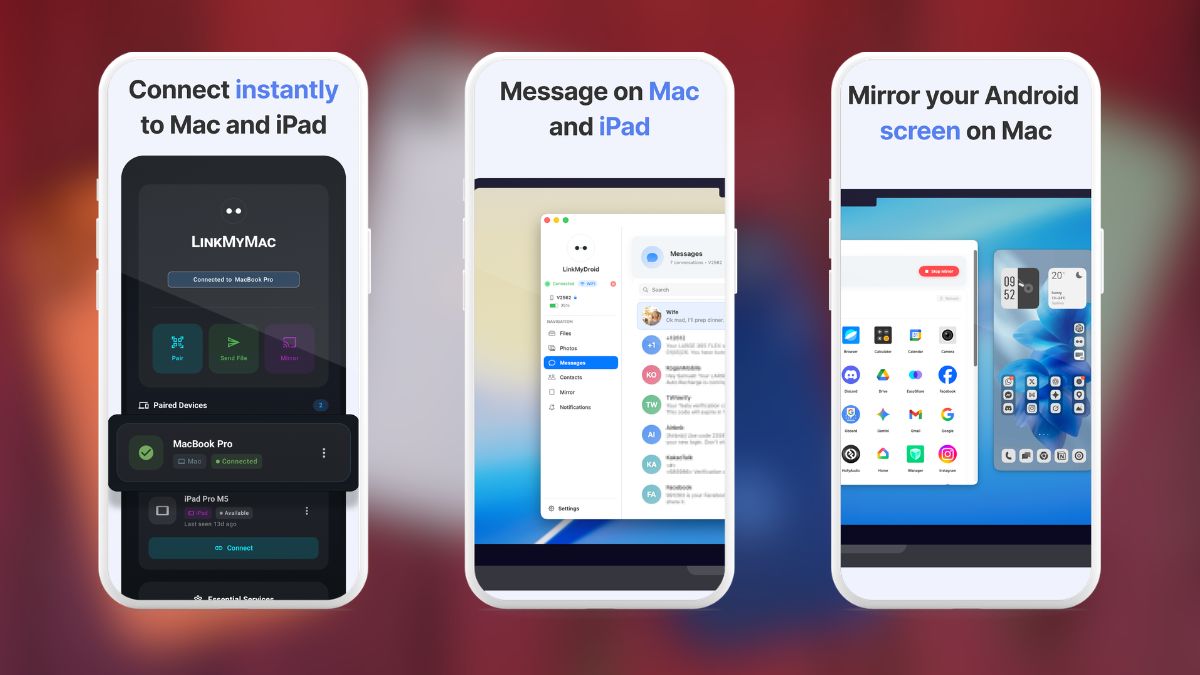
I am an Android+Windows guy, which means pairing both is super easy. However, I can’t always say the same for Android+Mac, but it seems things are changing. LinkMyMac is a great application that brings cross-device functionality where I can connect my Android phone to my Mac, no accounts are needed, and no cables are needed to be attached.

From mirroring content from my Android phone to the Mac to sharing files between both devices or controlling my phone from the Mac, the app does offer the best of both worlds. If I want to set up a call using my phone’s camera, well, I can do this with LinkMyMac, which gives me better call quality on Meet, Teams, Zoom, etc. I can view notifications from Android on my Mac (such as WhatsApp) and even reply to them. Isn’t it great?

The only (sort of) caveat is that the Mac companion app is paid. It isn’t a perpetual license, though; it is a one-off payment. Easy to set up, easy to use, and reliable over Wi-Fi, and that’s great.

Download: LinkMyMac

ShadeType

Category: Utility
ShadeType
Image Credits: ShadeType, via Play Store

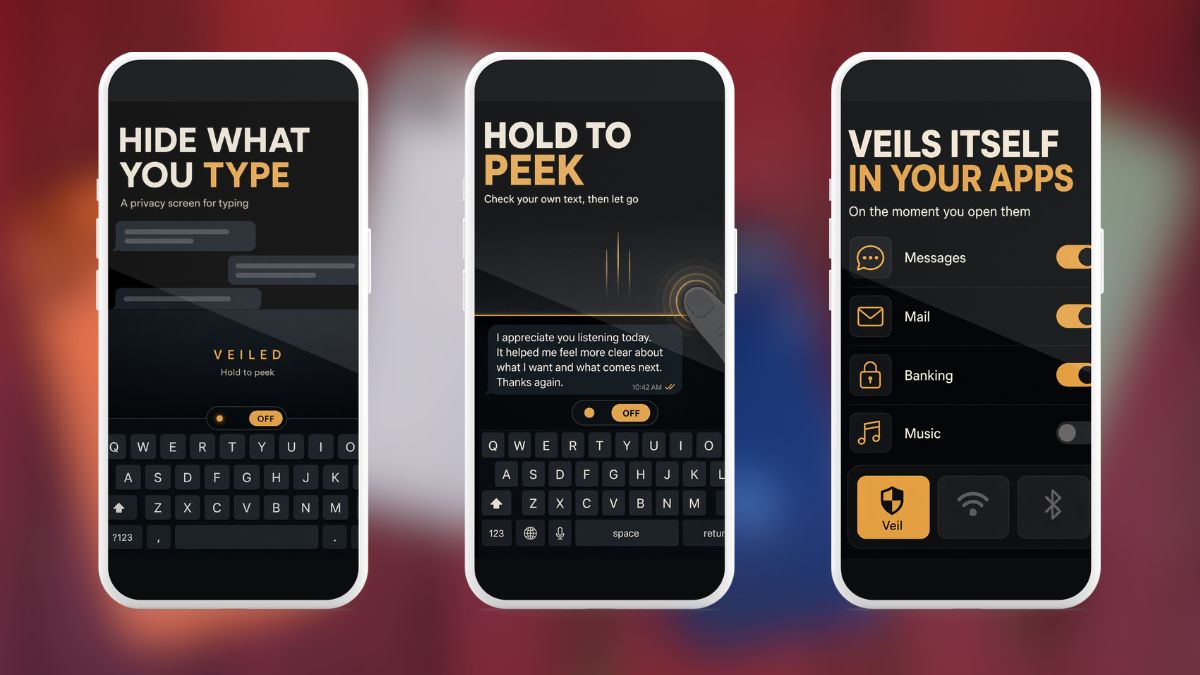
Not every phone comes with its privacy screen functionality. This makes it difficult to hide what you are typing or texting when there are a lot of prying eyes, such as on a bus or train. Whether it’s texting, entering a password, or working on a super important doc file, ShadeType is an app you should try. It covers your screen with a black veil except for the keyboard, which means you can still type what you want while making it difficult for anyone else to view your screen.

By default, the free version puts a black silhouette on the text area, while a premium subscription gets you a pro-grade silhouette that even you can’t pierce through. You can turn on the veil with just a click of a button and turn it off just like that. ShadeType works with every app you choose, such as social media, banking, browsers, notes, email, etc.

Download: ShadeType

Caliber Strength Training

Category: Health & Fitness
Caliber Strength Training
Image Credits: Caliber Strength Training, via Play Store

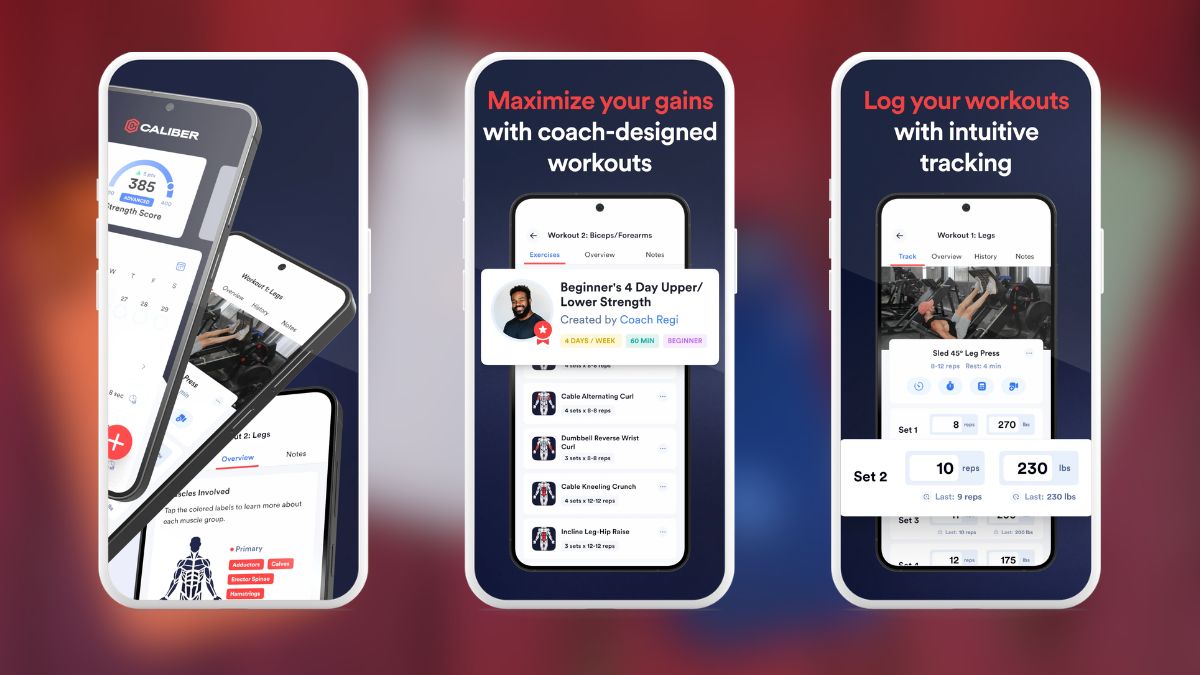
Well, you don’t always need to spend 2 hours a day at a gym trying to get in shape. Each body is made differently, which means they have different requirements. With Caliber, you enter a phase of science-based strength training as the app combines cardio, resistance training, habit tracking, and nutrition to help you lose weight, gain muscle, and improve overall fitness.

The free version lets you create and track workouts, access 800+ detailed exercises, and train with friends. The fun unravels with the ‘Pro’ subscription that unlocks coach-designed training plans, strength scores, Caliber Lessons from experts, and advanced training features including personalized nutrition targets, supersets, etc. There’s also premium coaching at an upgrade that gives you the 1-on-1 training your body needs.

Download: Caliber Strength Training

Universal File Opener

Category: Utility
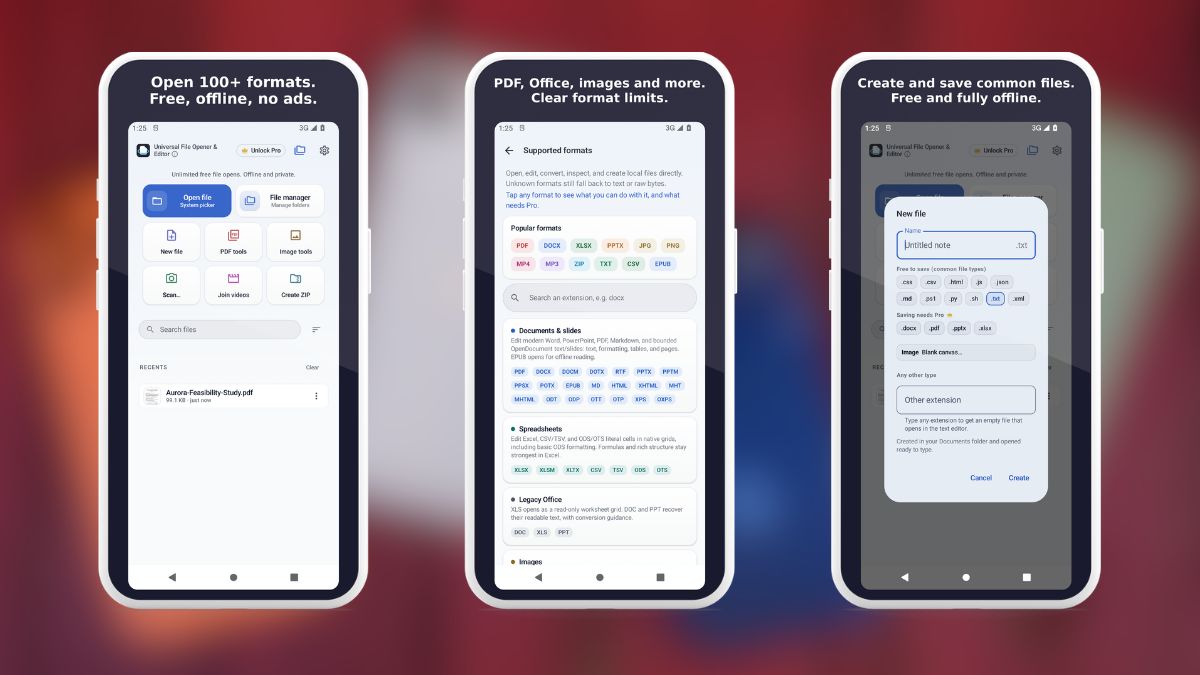
Universal File Opener - best Android apps October 2026
Image Credits: Universal File Opener, via Play Store

Amid all the files ever on your Android phone, we often come across files that may have an unfamiliar extension, making them difficult to open. Universal File Opener, as the name suggests, is an app that provides access to more than 375 file extensions, making it easier to open.

The app can open anything from PowerPoint, PDF, Word, Excel, code, media, archives, images, and anything from its array of 375 file extensions, and that too, offline. You can stitch files together, batch convert them, edit for sizing, cropping, extending, and more. There are no ads, no daily quota, no watermark, and no account needed. Call it a Swiss Army knife of the best Android apps to open files of different extensions. 

Download: Universal File Opener

Impresiv

Category: Automation

Impresiv
Image Credits: Impresiv, via Play Store

I love how your Android phone is equipped with all the chops to make it a powerful smartphone. Impresiv is an app that uses AI for automation. You can connect a number of apps, triggers, and actions, building a workflow in the app to execute a task. For instance, I can let it control my WhatsApp Business, where, in case of an inquiry, I can set up an automated response (or a conversation), and it will work wonders.

The app lets you build workflows on your own, or you can check out the pre-made templates and use them. It has a visual drag-and-drop builder that makes it easier to visualize triggers to actions. There’s no coding involved; the app is free to use unless you check out its AI builder, which is paid. I fell in love with this app, as it makes automation both fun and easy.

Download: Impresiv

Conclusion

We ran out of the top five spots pretty quickly, but guess what: we have more Android apps that you might want to try, but that’s for another time. For now, let us know which of these apps actually pulled your attention and which one failed in the comments below.

Keep up with the tech that actually matters.

From breaking news to deep dives, TrueTech brings you the tech stories worth knowing.
Add us as a preferred source on Google Search for quicker access to our coverage.

Add TrueTech as a preferred source on Google
Share This Article
Follow:
A wordsmith, a kin tech observer, a sci-fi fanatic and a scientific documentary buff.
Highlights
  • Out of 2+ million apps on the Google Play Store, choosing the one that makes it count is a task.
  • We dig through recommendations and suggestions from readers and editors to bring you a take on the five picks for Android apps every month.
  • This month, we have apps for automation, fitness, utility to connect with Mac, a privacy feature, and an universal file opener.

Every now and then, we come across some of the best Android apps we have ever used. Better, we get recommendations from actual users suggesting some apps that I might never have used before. This is where we bring our picks for the best Android apps you must try in the October 2026 edition. With apps ranging from health and fitness to utility connecting with your Mac and more, here’s our pick for this month.

5 best Android apps you should try this month!

LinkMyMac

Category: Cross-device streaming

LinkMyMac
Image Credits: LinkMyMac, via Play Store

I am an Android+Windows guy, which means pairing both is super easy. However, I can’t always say the same for Android+Mac, but it seems things are changing. LinkMyMac is a great application that brings cross-device functionality where I can connect my Android phone to my Mac, no accounts are needed, and no cables are needed to be attached.

From mirroring content from my Android phone to the Mac to sharing files between both devices or controlling my phone from the Mac, the app does offer the best of both worlds. If I want to set up a call using my phone’s camera, well, I can do this with LinkMyMac, which gives me better call quality on Meet, Teams, Zoom, etc. I can view notifications from Android on my Mac (such as WhatsApp) and even reply to them. Isn’t it great?

The only (sort of) caveat is that the Mac companion app is paid. It isn’t a perpetual license, though; it is a one-off payment. Easy to set up, easy to use, and reliable over Wi-Fi, and that’s great.

Download: LinkMyMac

ShadeType

Category: Utility

ShadeType
Image Credits: ShadeType, via Play Store

Not every phone comes with its privacy screen functionality. This makes it difficult to hide what you are typing or texting when there are a lot of prying eyes, such as on a bus or train. Whether it’s texting, entering a password, or working on a super important doc file, ShadeType is an app you should try. It covers your screen with a black veil except for the keyboard, which means you can still type what you want while making it difficult for anyone else to view your screen.

By default, the free version puts a black silhouette on the text area, while a premium subscription gets you a pro-grade silhouette that even you can’t pierce through. You can turn on the veil with just a click of a button and turn it off just like that. ShadeType works with every app you choose, such as social media, banking, browsers, notes, email, etc.

Download: ShadeType

Caliber Strength Training

Category: Health & Fitness

Caliber Strength Training
Image Credits: Caliber Strength Training, via Play Store

Well, you don’t always need to spend 2 hours a day at a gym trying to get in shape. Each body is made differently, which means they have different requirements. With Caliber, you enter a phase of science-based strength training as the app combines cardio, resistance training, habit tracking, and nutrition to help you lose weight, gain muscle, and improve overall fitness.

The free version lets you create and track workouts, access 800+ detailed exercises, and train with friends. The fun unravels with the ‘Pro’ subscription that unlocks coach-designed training plans, strength scores, Caliber Lessons from experts, and advanced training features including personalized nutrition targets, supersets, etc. There’s also premium coaching at an upgrade that gives you the 1-on-1 training your body needs.

Download: Caliber Strength Training

Universal File Opener

Category: Utility

Universal File Opener - best Android apps October 2026
Image Credits: Universal File Opener, via Play Store

Amid all the files ever on your Android phone, we often come across files that may have an unfamiliar extension, making them difficult to open. Universal File Opener, as the name suggests, is an app that provides access to more than 375 file extensions, making it easier to open.

The app can open anything from PowerPoint, PDF, Word, Excel, code, media, archives, images, and anything from its array of 375 file extensions, and that too, offline. You can stitch files together, batch convert them, edit for sizing, cropping, extending, and more. There are no ads, no daily quota, no watermark, and no account needed. Call it a Swiss Army knife of the best Android apps to open files of different extensions. 

Download: Universal File Opener

Impresiv

Category: Automation

Impresiv
Image Credits: Impresiv, via Play Store

I love how your Android phone is equipped with all the chops to make it a powerful smartphone. Impresiv is an app that uses AI for automation. You can connect a number of apps, triggers, and actions, building a workflow in the app to execute a task. For instance, I can let it control my WhatsApp Business, where, in case of an inquiry, I can set up an automated response (or a conversation), and it will work wonders.

The app lets you build workflows on your own, or you can check out the pre-made templates and use them. It has a visual drag-and-drop builder that makes it easier to visualize triggers to actions. There’s no coding involved; the app is free to use unless you check out its AI builder, which is paid. I fell in love with this app, as it makes automation both fun and easy.

Download: Impresiv

Conclusion

We ran out of the top five spots pretty quickly, but guess what: we have more Android apps that you might want to try, but that’s for another time. For now, let us know which of these apps actually pulled your attention and which one failed in the comments below.

Keep up with the tech that actually matters.

From breaking news to deep dives, TrueTech brings you the tech stories worth knowing.
Add us as a preferred source on Google Search for quicker access to our coverage.

Add TrueTech as a preferred source on Google
Share This Article
Follow:
A wordsmith, a kin tech observer, a sci-fi fanatic and a scientific documentary buff.