Microsoft starts auto-updating Windows 11 PCs to version 25H2

Akarsh Rasik
3 Min Read
Highlights
  • Microsoft is automatically upgrading eligible Windows 11 24H2 devices to the newer 25H2 version.
  • The rollout targets Home and Pro users, while managed or enterprise systems are currently excluded.
  • Users cannot fully opt out, but they can delay the update or install it manually if eligible.

Microsoft has begun automatically upgrading eligible PCs to Windows 11 version 25H2 from Windows 11 version 24H2, as part of its ongoing effort to keep devices secure and up to date. The announcement is coming ahead of the official end-of-support date for version 24H2 on October 13, 2026, and shows the company’s goal toward a more streamlined update experience.

Who will get the update automatically?

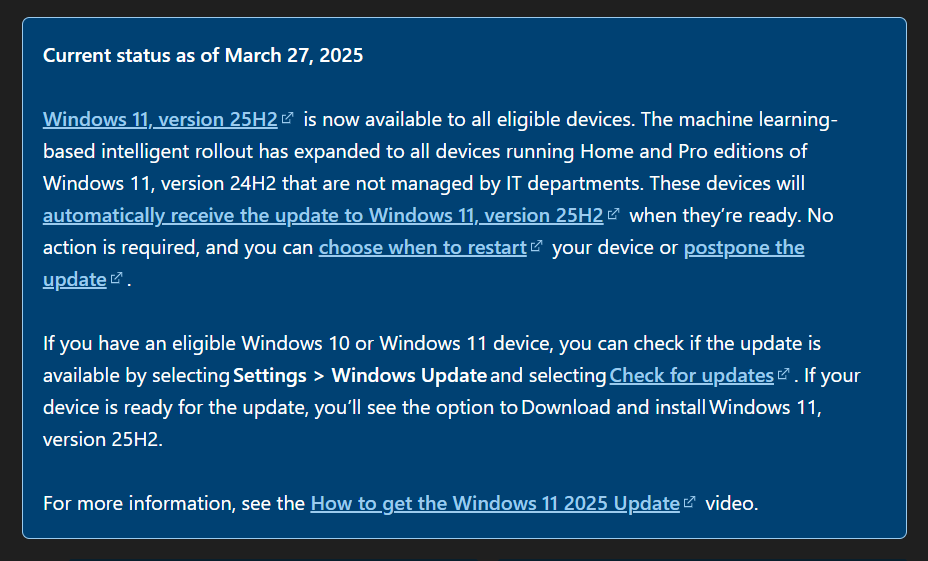
Based on details from Microsoft’s Windows 11 25H2 support page, the automatic rollout mainly affects devices running Home and Pro editions of Windows 11, version 24H2. PCs that are managed by businesses, schools, or IT administrators are not included in this rollout for now.

Microsoft says the update will be delivered using an “intelligent” system powered by machine learning, which decides when a device is ready for the upgrade. The goal is to reduce issues like crashes or compatibility problems by rolling out the update gradually.
Microsoft begins automatic upgrade to Windows 11 version 25H2
Image Credits: Microsoft

Questions around how the system works

While the idea of a smarter update system sounds promising, Microsoft hasn’t shared much detail about how this machine learning system actually decides readiness.

This lack of clarity may concern users who prefer more control over their systems. Without knowing what factors are considered, such as hardware performance, usage patterns, or software compatibility, it’s harder for users to predict exactly when the update will arrive.

Can you avoid the update?

Since this is a mandatory update, users won’t be able to opt out completely. However, there is some flexibility:

  • You can delay the update for a limited time
  • Or install it manually by going to Settings > Windows Update > Check for updates (if your device is eligible)

Recent update issues and fix

The rollout comes shortly after Microsoft dealt with a problematic update earlier this year. A preview update called KB5079391, released in late March, failed to install on many systems.

Users reported seeing error code 0x80073712, which usually points to missing or corrupted files. Microsoft acknowledged the issue, pulled the faulty update, and released a replacement patch, KB5086672.

The new update fixes the installation problem and includes the improvements that were originally planned.

Editor’s remarks

For most users, this automatic upgrade means better security, improved performance, and continued support without needing to take much action.

At the same time, the forced nature of the update, and the limited transparency around how it’s rolled out, may not sit well with those who prefer hands-on control over their devices.

Keep up with the tech that actually matters.

From breaking news to deep dives, TrueTech brings you the tech stories worth knowing.
Add us as a preferred source on Google Search for quicker access to our coverage.

Add TrueTech as a preferred source on Google
Share This Article
Follow:
Writing about emerging gadgets and technology news, as well as keeping you updated on movie and music news, with a focus on all things K-pop.
Highlights
  • Microsoft is automatically upgrading eligible Windows 11 24H2 devices to the newer 25H2 version.
  • The rollout targets Home and Pro users, while managed or enterprise systems are currently excluded.
  • Users cannot fully opt out, but they can delay the update or install it manually if eligible.

Microsoft has begun automatically upgrading eligible PCs to Windows 11 version 25H2 from Windows 11 version 24H2, as part of its ongoing effort to keep devices secure and up to date. The announcement is coming ahead of the official end-of-support date for version 24H2 on October 13, 2026, and shows the company’s goal toward a more streamlined update experience.

Who will get the update automatically?

Based on details from Microsoft’s Windows 11 25H2 support page, the automatic rollout mainly affects devices running Home and Pro editions of Windows 11, version 24H2. PCs that are managed by businesses, schools, or IT administrators are not included in this rollout for now.

Microsoft says the update will be delivered using an “intelligent” system powered by machine learning, which decides when a device is ready for the upgrade. The goal is to reduce issues like crashes or compatibility problems by rolling out the update gradually.

Microsoft begins automatic upgrade to Windows 11 version 25H2
Image Credits: Microsoft

Questions around how the system works

While the idea of a smarter update system sounds promising, Microsoft hasn’t shared much detail about how this machine learning system actually decides readiness.

This lack of clarity may concern users who prefer more control over their systems. Without knowing what factors are considered, such as hardware performance, usage patterns, or software compatibility, it’s harder for users to predict exactly when the update will arrive.

Can you avoid the update?

Since this is a mandatory update, users won’t be able to opt out completely. However, there is some flexibility:

  • You can delay the update for a limited time
  • Or install it manually by going to Settings > Windows Update > Check for updates (if your device is eligible)

Recent update issues and fix

The rollout comes shortly after Microsoft dealt with a problematic update earlier this year. A preview update called KB5079391, released in late March, failed to install on many systems.

Users reported seeing error code 0x80073712, which usually points to missing or corrupted files. Microsoft acknowledged the issue, pulled the faulty update, and released a replacement patch, KB5086672.

The new update fixes the installation problem and includes the improvements that were originally planned.

Editor’s remarks

For most users, this automatic upgrade means better security, improved performance, and continued support without needing to take much action.

At the same time, the forced nature of the update, and the limited transparency around how it’s rolled out, may not sit well with those who prefer hands-on control over their devices.

Keep up with the tech that actually matters.

From breaking news to deep dives, TrueTech brings you the tech stories worth knowing.
Add us as a preferred source on Google Search for quicker access to our coverage.

Add TrueTech as a preferred source on Google
Share This Article
Follow:
Writing about emerging gadgets and technology news, as well as keeping you updated on movie and music news, with a focus on all things K-pop.