- Google has now rolled out Gemini app for Mac users as a native experience.
- Available as a native app, Gemini lets users generate responses, analyze screens, generate images and videos, and beyond.
- Gemini becomes the third AI app to arrive natively on macOS after Anthropic's Claude and OpenAI's ChatGPT.
Google just released a Gemini app for Mac, and it is a huge thing in the news out there. Launched as a native app, users can launch Gemini for Mac using a simple keyboard shortcut, allowing users to review their files, analyze their screens, generate images, and more.
Gemini app for Mac rolls out for native experience
Although Gemini was available on Mac as a web interface, having a native app ensures users are more receptive to using the service. Gemini becomes the third AI service to arrive on macOS after OpenAI and Anthropic launched their respective apps a while ago.
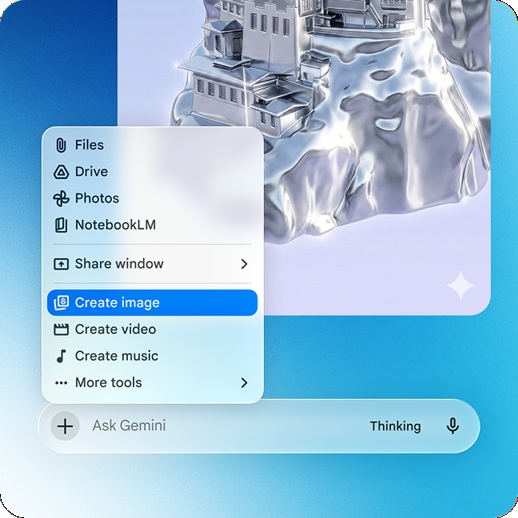
The Gemini app for Mac will allow users to analyze what’s happening on the screen to provide more contextual assistance. Think about a coding problem, or you are stuck at a presentation where you can just engage the ‘Share Window’ feature on board Gemini and ask questions. I find it amusing how it can help get rid of the luggage barrier or bias by simply letting users share their screens. This gives Gemini more context, and thus, it returns personalized results.

You can access the Gemini app on a Mac by simply pressing the dedicated keyboard shortcut—Option + Shift + Space. You can also launch Gemini from the menu bar or from the Dock. With plenty of AI iterations and versions under the hood, users can perform a lot of different activities with Gemini, such as draft emails, analyze documents, generate images and videos using prompts, and so on.
The app is available across macOS 15 and later. Free to download and use, Google Gemini offers a smooth user experience with limited capabilities. Users can engage a Google AI Plus subscription at $7.99/mo, Google AI Pro at $19.99/mo, or Google AI Ultra at $249.99/mo to get access to premium features such as Google Veo, Google Flow, etc.
Keep up with the tech that actually matters.
Add us as a preferred source on Google Search for quicker access to our coverage.