New Essential Space update adds flexible file sharing for Nothing phones

Tired of struggling to share voice clips or screenshots? Here's what the latest Nothing update actually fixes for you.

Jeeva Shanmugam
3 Min Read
Highlights
  • The latest Nothing Essential Space update now lets you share audio clips in multiple formats like audio, image, PDF, and Markdown.
  • Memories stored in Essential Space, including screenshots and photos, can also be shared easily in different file types.
  • The update is rolling out via the Google Play Store for Nothing Phone (3), (3a), and (3a) Pro users.

Nothing just dropped a new update to its Essential Space app, and I think this one actually makes a difference. If you’re using a Nothing Phone (3), or the (3a) or (3a) Pro, this update is worth checking out. They’ve focused on something we all do almost every day, sharing stuff quickly and without hassle. I tried it out, and here’s the deal.

New Nothing Essential Space update makes sharing easier than ever

What’s new in the Nothing Essential Space update

Before this, you could record audio using that Flip-to-Record thing, which is cool, honestly, but sharing those voice clips was a bit annoying. With this new Nothing Essential Space update, it’s way better now.
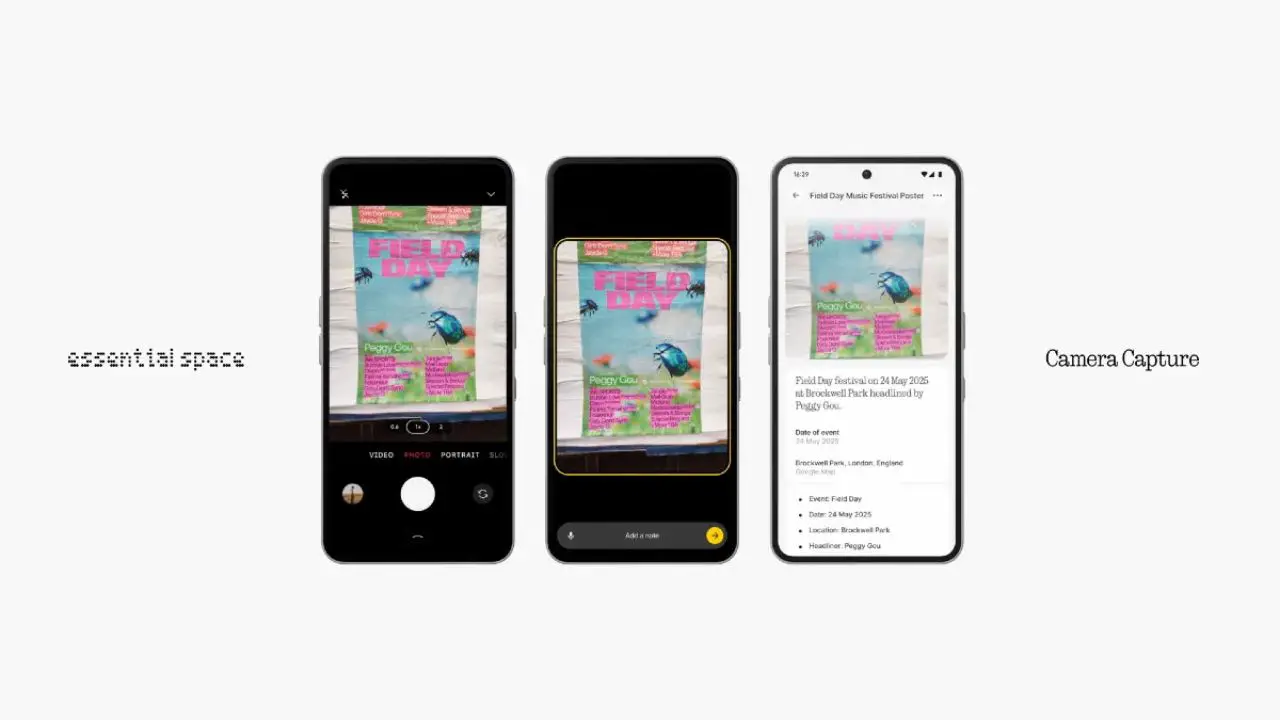
Nothing Essential Space update
Image Credits: Nothing

You can just take that audio clip and send it as an audio file, or even as an image, a PDF, or a Markdown file. I wasn’t expecting that level of flexibility, but it’s there. Makes sense for those who use their phones for work or content creation. You can just record something and send it in the format that fits the moment.

Also, they added the same sharing options to Memories. These are the images and screenshots that the app keeps in one place. Now you can send those in the same way, image, PDF, or markdown. It’s all about making sharing feel less like a task.

Getting the update

The update is already rolling out on the Play Store, so you don’t have to do anything fancy. Just search for the Essential Space app and hit update. If it’s not showing for you yet, just wait a bit. It’s one of those staged rollouts. But yeah, once it’s there, install it and you’re good.

Honestly, this Nothing Essential Space update is small but useful. It doesn’t try to be flashy or over the top. It just makes something you already use a bit easier. If you’ve got one of the newer Nothing phones, you should probably try it. Sharing feels smoother now, and that’s kinda the whole point.

Share This Article
Making spicy content on the Internet!
Highlights
  • The latest Nothing Essential Space update now lets you share audio clips in multiple formats like audio, image, PDF, and Markdown.
  • Memories stored in Essential Space, including screenshots and photos, can also be shared easily in different file types.
  • The update is rolling out via the Google Play Store for Nothing Phone (3), (3a), and (3a) Pro users.

Nothing just dropped a new update to its Essential Space app, and I think this one actually makes a difference. If you’re using a Nothing Phone (3), or the (3a) or (3a) Pro, this update is worth checking out. They’ve focused on something we all do almost every day, sharing stuff quickly and without hassle. I tried it out, and here’s the deal.

New Nothing Essential Space update makes sharing easier than ever

What’s new in the Nothing Essential Space update

Before this, you could record audio using that Flip-to-Record thing, which is cool, honestly, but sharing those voice clips was a bit annoying. With this new Nothing Essential Space update, it’s way better now.

Nothing Essential Space update
Image Credits: Nothing

You can just take that audio clip and send it as an audio file, or even as an image, a PDF, or a Markdown file. I wasn’t expecting that level of flexibility, but it’s there. Makes sense for those who use their phones for work or content creation. You can just record something and send it in the format that fits the moment.

Also, they added the same sharing options to Memories. These are the images and screenshots that the app keeps in one place. Now you can send those in the same way, image, PDF, or markdown. It’s all about making sharing feel less like a task.

Getting the update

The update is already rolling out on the Play Store, so you don’t have to do anything fancy. Just search for the Essential Space app and hit update. If it’s not showing for you yet, just wait a bit. It’s one of those staged rollouts. But yeah, once it’s there, install it and you’re good.

Honestly, this Nothing Essential Space update is small but useful. It doesn’t try to be flashy or over the top. It just makes something you already use a bit easier. If you’ve got one of the newer Nothing phones, you should probably try it. Sharing feels smoother now, and that’s kinda the whole point.
Share This Article
Making spicy content on the Internet!