- Microsoft has started rolling out a new Windows 11 update.
- Several familiar Windows features are getting useful changes.
- Eligible users may find the update process quicker than expected.
Every year Microsoft brings a new Windows update for eligible PCs, and today the company has finally released the Windows 11 2026 update, also known as Windows 11, version 26H2. The update initially became available for some users on September 29th, but now it’s gradually rolling out widely. Fortunately, I have received the new update on my PC, and I was kind of excited to explore what’s inside the package.
So, the announcement came on X (formerly Twitter), where the Windows Update account posted an article confirming the news, features, availability, and guide on how to get the update. If you haven’t checked out the details yet, there’s no need to worry! We will tell you what’s new in the Windows 11 2026 update (version 26H2) and assist you in getting the latest Windows update.
Windows 11 2026 update (version 26H2) rolling out now globally
First of all, let me make things clear about its availability. Microsoft has confirmed that the Windows 11 version 26H2 update is rolling out for eligible PCs running Windows 11 version 25H2 or 24H2. So, users are required to meet the criteria in order to receive the newer version. Notably, the update is currently rolling out in phases, so it may reach your system anytime soon.
Microsoft recommends checking Settings > Windows Update. Users who are curious to receive updates as soon as possible can enable “Get the latest updates as soon as they’re available.” Once the update is released for your system, you will be able to see an option to download & install version 26H2.
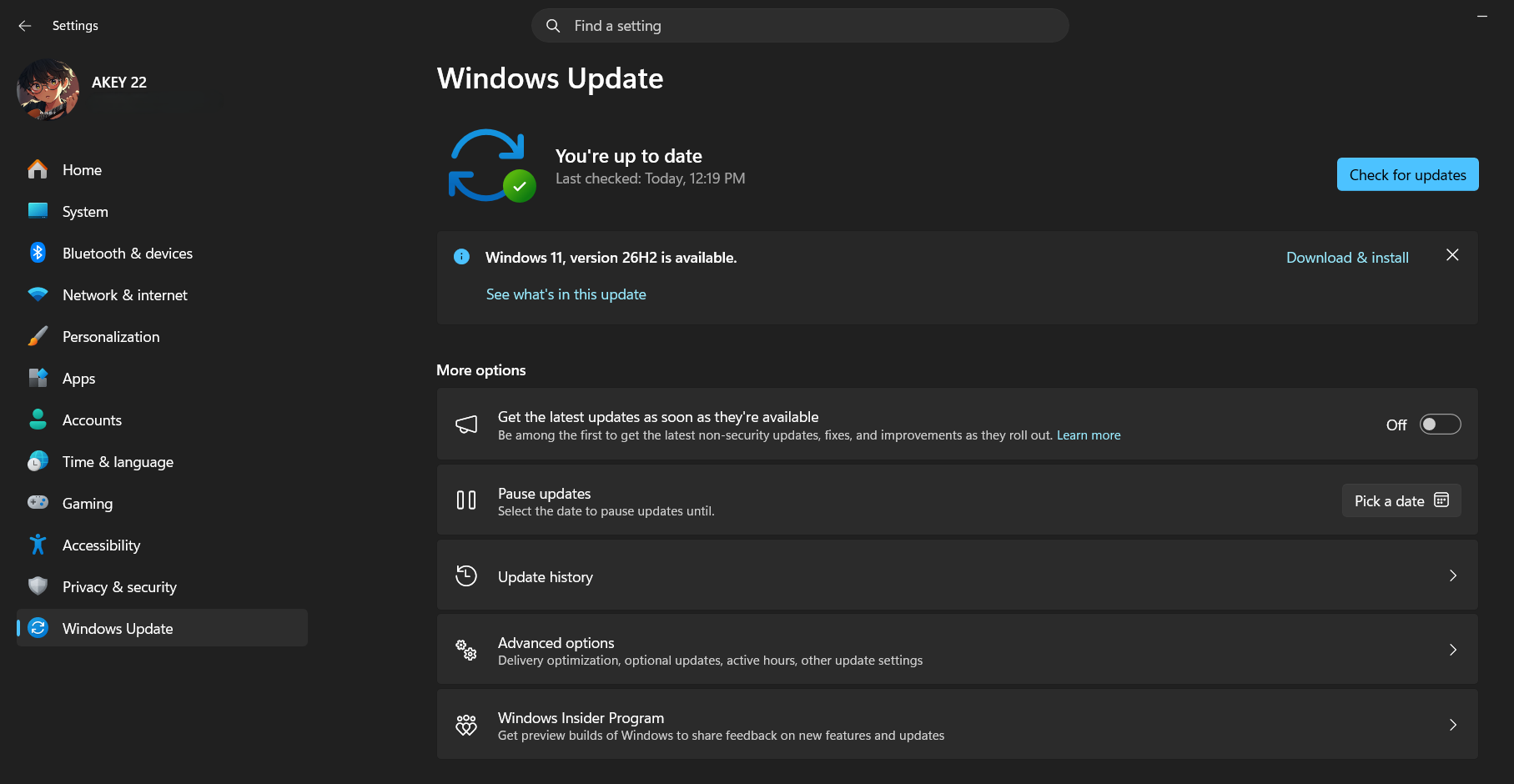
The image above shows exactly what you will notice once the update is available on your system. I happen to receive the update despite enabling the “Get the latest updates as soon as they’re available” option.

What’s new in Windows 11 2026 (version 26H2) update
Microsoft’s latest update brings several changes and improvements across productivity, accessibility, search, and customization. Here are some significant changes that are worth having a look at.
- Smarter File Explorer: The app received productivity-focused upgrades. Microsoft highlights AI actions for supported images, the ability to summarize documents kept in OneDrive and SharePoint, quick actions for work and school accounts, and support for additional archive formats.
- Improved Windows Search: The Search on Windows also got a number of improvements. The newer version brings improved experiences for previews, capability of handling typos and partial app names, clearer result types, and automatic indexing of mostly used folders.
- Expanded Accessibility Features: The 2026 update also expands accessibility features to assist users who use it. First, Magnifier has got more precise zoom controls and screen-tint options. Next, Narrator brings Braille Viewer, while Voice Access expanded its natural-language command capabilities on supported Copilot+ PCs.
- New Windows Customizations: The company has provided more options to tweak things up to the Start menu and taskbar. Now, users can change Start menu views and sizes accordingly, additional taskbar positioning options have arrived, and a smaller taskbar configuration is also there.
Windows 11 26H2 support lifecycle
With the newer version, Microsoft is beginning a new support lifecycle for supported Windows 11 editions.
| Windows 11 edition | Support period for version 26H2 |
|---|---|
| Home | 24 months |
| Pro | 24 months |
| Enterprise | 36 months |
| Education | 36 months |
For version 26H2, Microsoft notes September 29, 2026, as the official release date. Thus, the new version resets the servicing lifecycle for systems that move to version 26H2.
Should you install Windows 11 26H2?
Yes, eligible users may download and install Windows 11 26H2, because it is the latest annual Windows 11 feature update and packs the latest security, quality, and productivity improvements. However, the availability may differ for all users. Thereby, you are suggested to wait for the update to reach your system.
Keep up with the tech that actually matters.
Add us as a preferred source on Google Search for quicker access to our coverage.